


A professional SEO audit report should do far more than produce a long list of warnings. It should explain what is wrong, why it matters, which pages are affected, what should be fixed first, who should own each task, and how success will be measured after implementation.
Therefore, the best SEO audit reports combine technical SEO, content quality, internal linking, search visibility, backlinks, user experience and business impact into a clear action plan. A good report should help a developer understand technical priorities, help a content team identify optimization opportunities, and help decision-makers understand which fixes are most likely to improve organic growth.
This guide explains what every professional SEO audit report should include in 2026, how to prioritize findings, which metrics matter, and how to turn audit data into an implementation roadmap instead of another document that sits unread.
If you want to analyze a website before building a report, you can start with CBOOMARANK and connect website analysis, technical SEO findings, keyword research, authority metrics and competitor insights in one workflow.
What Is an SEO Audit Report?
An SEO audit report is a structured assessment of the factors that affect a website’s ability to be discovered, crawled, indexed, understood and ranked by search engines. However, the report should also examine whether organic traffic reaches useful pages and contributes to real business goals.
For example, an audit may discover hundreds of missing title tags. That information alone is not enough. A professional report should show whether those pages are indexable, whether they attract impressions, whether they target valuable queries, and whether fixing them deserves priority over a more serious crawling or canonicalization problem.
As a result, a strong audit report combines evidence with prioritization.
Why Every Professional SEO Audit Report Needs Priorities
SEO tools can identify thousands of issues. Nevertheless, businesses rarely have unlimited development, content or outreach resources.
Therefore, every finding should be classified according to impact, urgency and effort. A critical indexing problem affecting revenue pages should not appear at the same priority level as a minor metadata recommendation on a low-value archive page.
A useful priority model can include critical, high, medium and low severity. In addition, each issue can be scored by expected SEO impact, affected URLs, implementation complexity and business importance.
This approach turns the SEO audit report into a roadmap rather than a raw crawl export.
1. Executive Summary in the SEO Audit Report
The first section should explain the site’s current SEO condition in language that a non-technical stakeholder can understand.
For example, summarize the major risks, strongest opportunities and the three to five actions that deserve immediate attention. Moreover, include a short explanation of how those actions could affect visibility, traffic, conversions or operational efficiency.
The executive summary should normally include the overall audit date, website or property audited, approximate number of URLs assessed, major tools or data sources used, current SEO health, top critical issues and recommended next steps.
However, avoid reducing the whole audit to one health percentage. A score is useful for orientation, but the underlying problems and their business context matter more.
See the CBOOMARANK guide to understanding SEO scores for more context.
2. SEO Audit Report Scope and Methodology
A professional report should explain what was actually analyzed. Otherwise, readers may assume the audit covers areas that were never tested.
For example, specify whether the analysis included the complete site, a limited crawl sample, subdomains, JavaScript-rendered pages, international versions, ecommerce filters, staging URLs or only a selected folder.
In addition, document the main data sources. These may include crawler data, Google Search Console, analytics, server responses, backlink providers, keyword datasets and manual review.
Meanwhile, note any limitations. If log files were unavailable, say so. If conversion data could not be accessed, explain that the audit cannot fully quantify revenue impact.
3. Crawlability and Indexability
Crawlability and indexability belong near the top of every SEO audit report because pages cannot perform normally if search engines cannot reliably discover or index them.
First, review robots.txt directives, noindex directives, authentication barriers, response codes, redirect behavior, XML sitemaps and internal links.
Next, compare the site’s important canonical URLs with Google Search Console’s Page Indexing information. Google’s documentation explains that the Page Indexing report shows which known URLs are indexed and why other URLs may not be indexed. Importantly, not every non-indexed URL is a problem because duplicates, blocked pages and intentionally excluded URLs may legitimately remain outside the index.
Use the official Google Page Indexing documentation when interpreting those statuses.
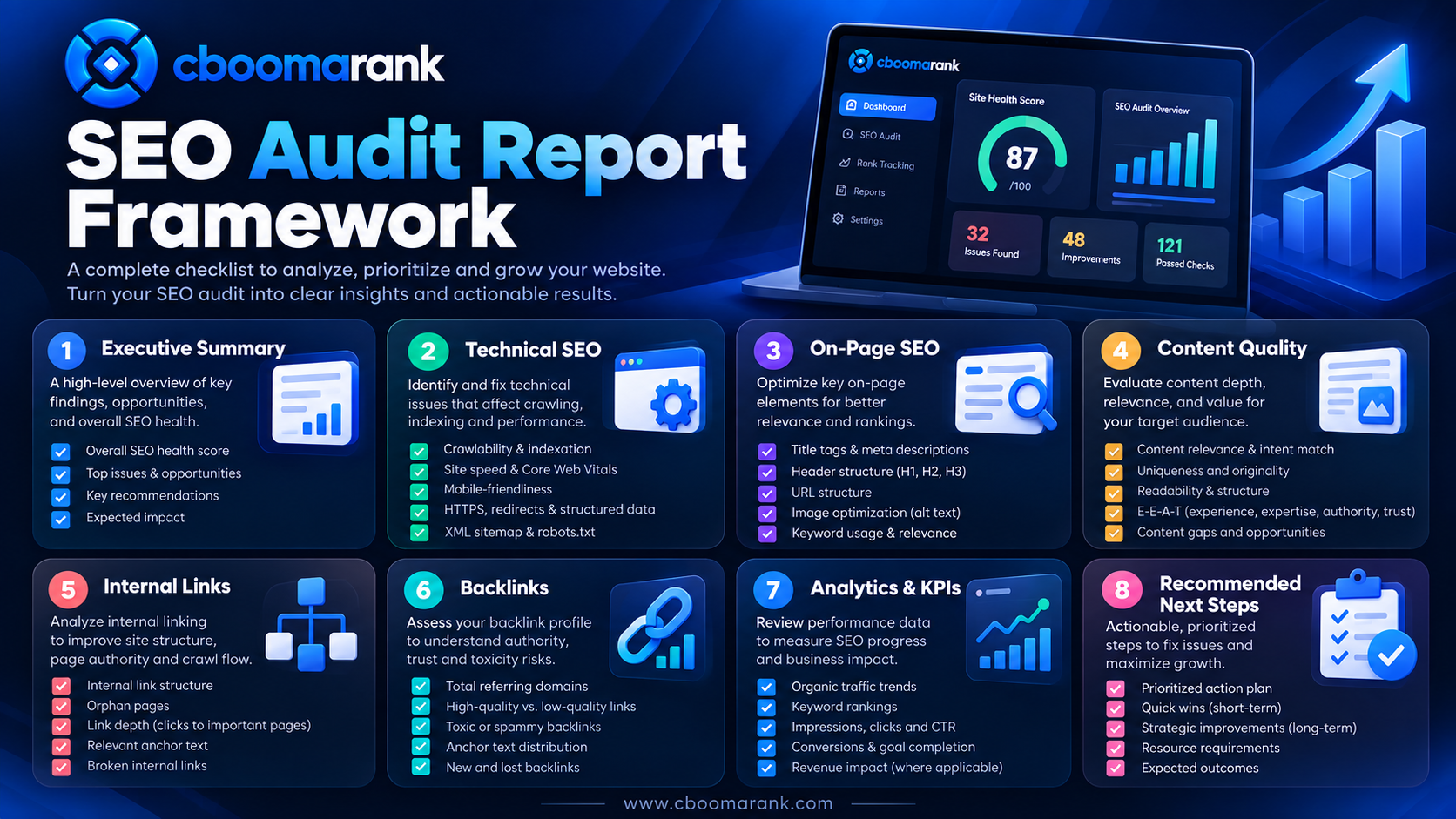
What the Crawl and Index Section Should Show
The report should identify important URLs blocked by robots.txt, unexpected noindex directives, indexable duplicates, soft 404s, server errors, redirect chains, canonical conflicts and sitemap inconsistencies.
Furthermore, separate legitimate exclusions from problems. An ecommerce filter that should not be indexed is fundamentally different from a product category accidentally excluded from Search.
4. URL Inspection Evidence
Site-level data is useful, but some problems require URL-level investigation.
Therefore, use Google’s URL Inspection workflow for important examples. It can show indexing status, Google’s selected canonical, crawl information and additional detected features for a specific URL.
The official URL Inspection documentation also explains common reasons a page may be missing, including discovery problems, robots restrictions, noindex directives and access requirements.
In the SEO audit report, include representative examples rather than screenshots for hundreds of URLs. Then provide a downloadable affected-URL list where appropriate.
5. HTTP Status Codes and Redirects
Next, report response-code problems that interfere with crawling, indexing or user navigation.
For example, identify internal links pointing to 404 pages, 5xx server errors, redirect loops, excessive redirect chains and outdated HTTP destinations.
However, do not label every 404 as an SEO emergency. Deleted URLs with no replacement can legitimately return 404 or 410 responses. The higher priority issue is often when important internal links or sitemap entries continue pointing to those URLs.
Recommended Report Fields
For each response-code issue, include the source URL, destination URL, HTTP status, number of internal links, sitemap presence, traffic or impressions if available, recommended fix and priority.
6. Canonicalization and Duplicate Content
Canonical problems can divide signals across multiple URL versions and make site architecture harder to understand.
Therefore, examine canonical tags, redirects, internal links and sitemap entries together. A report should identify missing canonicals, canonicals pointing to inappropriate pages, conflicting signals and duplicate URL families.
For example, if the sitemap lists one URL while internal links consistently use another version, the implementation deserves review.
In addition, evaluate parameter URLs, printer versions, HTTP/HTTPS duplicates, www/non-www variants and ecommerce facets where relevant.
7. XML Sitemap Health
An XML sitemap should primarily contain canonical URLs that the site wants search engines to discover and index.
Consequently, the SEO audit report should flag redirected URLs, 404s, noindexed pages, duplicate URLs or non-canonical URLs inside the sitemap.
Also check whether major sections are missing, whether timestamps are meaningful, and whether multiple sitemaps are logically organized on large websites.
For newly published or updated content, Google also recommends using sitemaps as one way to help Google discover URLs.
8. HTTPS and Security Checks
A professional audit should confirm that important URLs are served securely and consistently.
Google’s HTTPS report shows indexed HTTP versus HTTPS URLs and can identify reasons an HTTPS version could not be indexed. Therefore, check certificates, mixed protocols, HTTP links, HTTPS-to-HTTP redirects and sitemap inconsistencies.
Review the official Search Console HTTPS report guidance.
Moreover, the report should record whether Search Console shows manual actions or security issues. Those problems can require immediate attention before ordinary optimization work.
9. Site Architecture and Internal Linking
Internal links help users and crawlers discover important pages. They also communicate relationships between topics and sections of a site.
Therefore, an SEO audit should identify orphaned pages, excessively deep pages, broken internal links, weak navigation pathways and important URLs receiving too few contextual links.
For example, a high-value commercial page that can only be reached after five or six clicks may deserve a stronger position in the architecture.
The report should also evaluate anchor text. Natural descriptive anchors are generally more useful than repeatedly forcing one exact keyword.
For a deeper implementation approach, read the advanced SEO techniques guide.
10. Technical SEO Audit Report Findings
The technical section should consolidate problems that affect crawling, rendering, indexing, performance or search-engine interpretation.
For example, this may include canonicalization, pagination, JavaScript rendering, structured data, response headers, hreflang, redirects, duplicate templates, URL parameters and server performance.
However, technical findings should not simply repeat crawler labels. Every item needs an explanation of practical impact.
The CBOOMARANK technical SEO checklist can be used as a supporting reference when converting technical findings into implementation tasks.
11. Core Web Vitals and Page Experience
Performance analysis belongs in a modern SEO audit because slow or unstable pages can create a poor user experience.
Google’s current page-experience documentation recommends looking at Core Web Vitals together with secure delivery, mobile usability and other aspects of overall page experience. It also makes clear that site owners should not treat one metric as the entire ranking strategy.
Review Google’s page experience guidance when documenting this section.
In addition, distinguish field data from laboratory diagnostics. Real-user measurements and controlled tests answer different questions.
Include Template-Level Recommendations
If hundreds of pages share the same oversized hero image, blocking script or layout-shifting component, recommend a template-level fix. As a result, one engineering change can improve many URLs at once.
12. Mobile Experience
Mobile usability should be evaluated from the perspective of real visitors, not simply by checking whether the page technically shrinks to fit a screen.
For example, review tap targets, menus, intrusive overlays, font sizes, horizontal scrolling, interactive elements and mobile loading behavior.
Moreover, check whether mobile rendering hides important content or links that remain visible on desktop.
13. On-Page SEO Analysis
The on-page section of an SEO audit report should evaluate how effectively important pages communicate their topic and search intent.
Review title tags, meta descriptions, headings, primary content, image ALT attributes, internal links and content structure.
However, avoid treating every missing keyword occurrence as a defect. A page should read naturally and satisfy the searcher’s need.
Therefore, focus on clarity, intent alignment, uniqueness and usefulness rather than keyword repetition alone.
14. Content Quality and Search Intent
Content analysis should identify pages that are outdated, thin, duplicated, poorly targeted or competing with another page on the same site.
For example, an old article may still have backlinks and impressions but no longer satisfy current search intent. In that situation, updating the existing URL may be more valuable than publishing another page.
Similarly, several weak articles covering the same topic may need consolidation.
Use CBOOMARANK’s website SEO audit checklist when reviewing broad content and technical quality together.
15. Keyword Visibility in the SEO Audit Report
Technical health is only one side of SEO performance. Therefore, the report should also show how the site performs for strategically important queries.
Include keyword groups, current positions, ranking URLs, search intent, estimated opportunity, recent movement and competing domains where reliable data is available.
Furthermore, identify keywords where the site ranks just outside strong visibility positions. Pages ranking near the first page can sometimes represent faster opportunities than entirely new topics.
CBOOMARANK users can connect these findings with keyword and competitor workflows at app.cboomarank.com.
16. Cannibalization and Competing URLs
Keyword cannibalization occurs when multiple pages compete for substantially the same search intent and make it difficult to establish one clear destination.
Nevertheless, two pages mentioning the same keyword are not automatically cannibalizing each other.
Therefore, the SEO audit report should compare intent, ranking history, internal linking and content purpose before recommending a merge or redirect.
When true overlap exists, choose whether to consolidate, differentiate, canonicalize or redirect based on the value of each URL.
17. Structured Data and Search Appearance
Structured data can help Google understand page content and can support eligibility for certain search features. However, markup does not guarantee a rich result or a higher ranking.
Review Google’s current Search appearance and structured-data documentation before making recommendations.
The report should identify invalid markup, unsupported types, missing required properties and structured data that does not match visible page content.
In addition, use Google’s Rich Results Test or Search Console enhancement reports where relevant.
18. Image SEO
Images should be evaluated for relevance, file size, descriptive ALT text, accessibility and placement within useful surrounding content.
For example, screenshots in a technical tutorial should help demonstrate the process rather than act as decorative filler.
Moreover, oversized image files can affect page performance. Therefore, include compression, dimensions and modern delivery recommendations where applicable.
19. Backlink Profile and Authority
An SEO audit report should include an off-page assessment when backlink data is available.
Review referring domains, linked pages, anchor patterns, lost links, new links and competitor backlink gaps.
However, avoid reducing authority analysis to one third-party score. Different providers calculate authority metrics differently.
Instead, use those metrics alongside relevance, editorial quality, link context and the actual visibility of referring sites.
For deeper analysis, see the competitor backlink analysis guide.
20. Search Console Performance Data
Search Console should contribute performance evidence to the report, including clicks, impressions, click-through rate and average position.
Additionally, segment the data by query, page, country, device and search appearance when those dimensions help answer a specific question.
Google’s Search Console reports overview describes the available reports for performance, indexing, enhancements, links, security and manual actions.
As a result, a professional report can distinguish technical findings from actual search-performance changes.
21. Organic Traffic and Conversion Analysis
Traffic alone does not determine SEO success. Therefore, connect organic landing pages with meaningful outcomes such as leads, purchases, registrations, subscriptions or other conversions.
For example, a page may lose some traffic while gaining more qualified visitors. Conversely, another page may rank for a high-volume informational term but contribute little business value.
Thus, the SEO audit report should identify which organic pages produce measurable outcomes and which important pages underperform.
22. Competitor Benchmarking
Competitor analysis helps explain whether weak performance is caused by internal problems or by stronger competitors.
Compare content depth, keyword coverage, backlinks, internal architecture, SERP features and technical quality across relevant competing domains.
However, do not copy competitor strategies mechanically. Instead, look for patterns that reveal opportunities or weaknesses.
You can use CBOOMARANK competitor research to connect competitor findings with your website and keyword datasets.
23. Issue Severity and Business Impact
Every issue should have a severity level. More importantly, it should explain why that severity was assigned.
For example, a canonical error affecting thousands of product pages may receive a critical rating. Meanwhile, a missing meta description on three low-traffic archive pages may be classified as low priority.
In addition, include the business area affected: traffic, revenue, lead generation, publishing efficiency, crawl efficiency or brand visibility.
24. Effort Versus Impact Matrix
A practical audit should help teams decide what to implement first.
Therefore, classify recommendations by expected impact and implementation effort. High-impact, low-effort improvements are usually strong early candidates.
Meanwhile, high-impact, high-effort projects should be placed into a planned development roadmap rather than ignored because they are difficult.
This framework also makes the SEO audit report more useful to managers allocating budget and engineering time.
25. Recommended Action Plan
The action plan is one of the most important parts of the entire report.
Each recommendation should specify the problem, affected area, evidence, recommended action, priority, owner and target completion date.
For example, instead of writing “fix internal links,” write that 47 high-value pages contain internal links to redirected URLs and recommend updating those links directly to their final destinations.
Specific recommendations are easier to implement and easier to verify later.

26. Owners and Accountability
SEO recommendations often fail because nobody owns implementation.
Therefore, assign each action to an appropriate role such as developer, content editor, SEO specialist, designer, product manager or server administrator.
In addition, distinguish tasks that require collaboration. A Core Web Vitals problem may involve both development and design, while a content consolidation project may require SEO and editorial approval.
27. Baseline Metrics Before Changes
Before major fixes are implemented, record the baseline.
This can include organic clicks, impressions, indexed-page counts, rankings, conversion rate, referring domains, crawl errors and performance metrics.
As a result, later reports can evaluate whether the work produced measurable improvement.
28. Evidence and Examples
A good report should include enough evidence to reproduce the finding.
For example, include representative URLs, screenshots, crawler exports, Search Console examples or code snippets where they help explain the issue.
However, avoid turning the main report into thousands of pages. Put large affected-URL lists into supporting exports and keep the primary document focused on decisions.
29. SEO Audit Report Checklist
- Executive summary and overall audit scope
- Crawlability and indexability assessment
- URL Inspection examples for critical pages
- HTTP response codes and redirect analysis
- Canonicalization and duplicate-content review
- XML sitemap quality
- HTTPS and security status
- Site architecture and internal linking
- Core Web Vitals and page experience
- Mobile usability
- On-page SEO
- Content quality and search intent
- Keyword rankings and visibility
- Cannibalization review
- Structured data and search appearance
- Image SEO
- Backlinks and authority
- Search Console performance
- Organic traffic and conversions
- Competitor benchmarking
- Issue severity and business impact
- Effort-versus-impact prioritization
- Owners and deadlines
- Baseline KPIs and follow-up measurement
30. Common SEO Audit Report Mistakes
Listing Problems Without Explaining Impact
A raw list of errors forces the client or implementation team to interpret the findings themselves. Therefore, explain why each issue matters.
Treating Every Warning as Critical
Not every crawler warning deserves immediate action. Consequently, priority should reflect actual SEO and business impact.
Ignoring Search Performance Data
A technical crawl cannot show the entire picture. Therefore, combine crawl findings with Search Console, rankings, analytics and conversion evidence.
Making Recommendations Without Examples
Generic recommendations are difficult to implement. Instead, provide real URLs and clear before-and-after guidance.
Creating a Report Without a Follow-Up Process
An audit has little value if no one verifies implementation. Therefore, define a follow-up date and recheck critical items after changes are deployed.
How CBOOMARANK Can Support an SEO Audit Report
CBOOMARANK is being built to connect website analysis, SEO crawling, keyword research, competitor research, authority metrics, backlink intelligence, outreach and reporting.
As a result, the audit process can move from problem discovery to implementation planning without keeping every dataset in a separate workflow.
Start with CBOOMARANK to analyze website and research data. Then use related insights to prioritize technical fixes, content opportunities and authority work.
If you are comparing professional platform options, review the SEO software pricing guide and the enterprise SEO platform guide.
You can also compare current CBOOMARANK plans at CBOOMARANK Pricing.
SEO Audit Report Template for Stakeholders
A concise stakeholder-facing structure can begin with the executive summary, followed by critical findings, opportunity areas, technical findings, content findings, authority findings, performance evidence and the implementation roadmap.
Then place detailed crawl exports and large URL lists in appendices or CSV files.
This format helps executives understand priorities while developers and SEO specialists still receive the technical detail they need.
How Often Should You Run an SEO Audit?
There is no universal schedule. However, many active websites benefit from recurring reviews because content, templates, links, competitors and search behavior change over time.
For example, a large ecommerce site may require frequent automated monitoring, while a smaller corporate site may need a comprehensive audit after major redesigns or several times per year.
In addition, run focused audits after migrations, CMS changes, major traffic drops, large content expansions or significant technical releases.
Frequently Asked Questions About SEO Audit Reports
What should an SEO audit report include?
A professional report should include crawlability, indexing, technical SEO, on-page optimization, content quality, internal linking, structured data, performance, mobile experience, backlinks, keyword visibility, traffic, conversions, competitor context and a prioritized action plan.
How long should an SEO audit report be?
Length depends on the website and scope. However, clarity matters more than page count. A small site may need a concise report, while a large ecommerce or enterprise website may require extensive appendices and URL exports.
What is the most important part of an SEO audit report?
The prioritized implementation roadmap is often the most valuable section because it converts findings into action. Nevertheless, the roadmap must be supported by accurate technical and performance evidence.
Should an audit include every crawler warning?
No. Report meaningful problems and provide full exports separately when useful. Otherwise, minor warnings can obscure critical issues.
Should an SEO audit report include backlinks?
Yes, when off-page data is available and relevant to the project’s goals. Backlink analysis can identify lost links, authority gaps, risky patterns and competitor opportunities.
Can an SEO audit guarantee higher rankings?
No. An audit identifies problems and opportunities, but rankings also depend on competition, relevance, authority, search demand, implementation quality and many other factors.
What happens after the audit?
Prioritized issues should be assigned to owners, implemented, tested and measured. Therefore, the audit should lead directly into an execution and monitoring process.
Final Thoughts: Turn the SEO Audit Report Into an Action Plan
A professional SEO audit report is valuable because it turns complex website data into decisions.
First, identify whether search engines can crawl and index the right pages. Next, examine technical health, content quality, search intent, internal links, structured data, authority and performance. Then prioritize the findings according to impact and implementation effort.
Finally, assign owners, record baseline metrics and measure the results after fixes are deployed.
If you want to connect SEO analysis with keyword research, competitor research, backlink intelligence and reporting, explore CBOOMARANK. For plan options, see CBOOMARANK Pricing, and use the platform to turn audit findings into an ongoing SEO workflow rather than a one-time document.
For teams evaluating broader platform requirements, you can also review current CBOOMARANK plans before choosing the workflow that fits your business.
SEO Site Audit Report: A Practical Client-Ready Reporting Worksheet
A professional SEO audit report should make it possible for a client, marketer, developer and content owner to agree on what happens next. The most useful deliverable is not a collection of screenshots; it is an evidence-based decision record. The following worksheet adds a repeatable reporting layer to the technical, content and backlink checks covered above.
Start with an audit evidence register
Create one row per issue family, not one disconnected paragraph per affected URL. Each row should capture the finding, supporting evidence, affected page set, business risk, recommended fix, accountable owner, estimated effort, deadline and verification method. Store the full affected-URL export separately and link it from the register. This makes an SEO audit report readable to leadership while remaining actionable for the implementation team.
| Evidence field | Example entry | Why it matters |
|---|---|---|
| Observation | Important category URLs return unintended noindex directives | Names the actual fault instead of a vague crawler warning |
| Evidence | Rendered meta robots; crawl sample; Search Console URL Inspection | Allows another reviewer to reproduce the finding |
| Scope | List of verified affected category URLs | Separates a template-level issue from a single-page exception |
| Business impact | Relevant pages may not be eligible for Search indexing | Connects technical work to discoverability; does not promise traffic gains |
| Fix owner | Web developer, with SEO approval | Prevents an unassigned recommendation from stalling |
| Acceptance test | Re-crawl sample; inspect rendered directives; request validation if appropriate | Establishes proof that implementation happened |
Illustrative example only: never publish hypothetical issue counts as real findings for a client. Record actual URLs, dates, data sources and access limitations from the engagement.
Separate observed facts from hypotheses
When an organic landing page loses clicks, an audit may reveal a title change, new competition, indexing restrictions or lower search demand. Those are different explanations. Mark each claim as observed, plausible or not yet tested. Then list the next check needed. Google’s traffic-drop troubleshooting guidance recommends comparing affected pages, queries and patterns before assuming a single cause.
For performance reporting, keep Google Search Console clicks and impressions separate from analytics sessions and conversions. These products answer different questions and their totals do not have to agree. The official Search Console and Analytics guidance explains why. A professional SEO audit report should document both the source and metric definition.
Use a decision-based priority score
Prioritize important affected URLs before cosmetic changes. A useful team rubric scores each confirmed issue from one to five for impact, breadth, urgency, confidence and implementation effort. Discuss scores together rather than treating the formula as a universal algorithm. For example, a broken canonical across revenue-producing category pages may outrank missing meta descriptions on nonessential archives.
| Priority | Typical trigger | Recommended handling |
|---|---|---|
| Critical | Confirmed indexability or access failure on important pages | Assign owner immediately and retest after deployment |
| High | Major internal linking, template or content problem with meaningful exposure | Schedule in the current sprint |
| Medium | Contained issue on pages with realistic demand | Batch fixes and monitor effect |
| Low | Cosmetic item with limited demonstrable impact | Track rather than displace higher-value work |
What executives should see on page one
Keep the opening summary to a decision-ready page. State the audit scope, the date and data sources, the three to five highest-priority findings, the estimated implementation effort and the agreed recheck date. Also note missing access, crawl limitations and areas not evaluated. A single SEO health score cannot replace that context.
Turn findings into a 30-day action plan
Days 1–7: validate critical findings, assign owners, preserve a performance baseline and fix accidental blocking or broken high-value journeys. Days 8–14: deploy the highest-impact template and internal-link corrections, then re-crawl affected URL samples. Days 15–21: improve content and search-intent gaps backed by query and landing-page evidence. Days 22–30: confirm fixes, update the issue register and compare early signals without claiming that rankings must change immediately.
For every recommended action, capture the date deployed and a measurable acceptance criterion. Search systems may take time to recrawl and reassess pages, so distinguish implementation complete from outcome confirmed.
Recommended SEO audit report handoff checklist
- Specify property, crawl date, data freshness, coverage and exclusions.
- Include an executive summary that names the most material findings.
- Link evidence exports and representative URLs to each recommendation.
- List an accountable owner, effort estimate and acceptance test for every priority action.
- Separate Search Console visibility from on-site session and conversion metrics.
- Preserve a baseline and recheck the site after releases or migrations.
- Use the CBOOMARANK website-audit diagnostics guide when a traffic decline requires a focused investigation.
To move from a one-time professional SEO audit report to recurring research and monitoring, explore CBOOMARANK and the available CBOOMARANK plans.
