A free website SEO audit should answer a practical question: what is stopping this website from earning more qualified organic traffic, and what should be fixed first? A useful audit is not just a software score. It combines crawling, indexing, on-page SEO, technical performance, internal linking, content quality and measurement into one prioritized view of the site.
This 50-point checklist is designed for business owners, publishers, marketers and SEO teams that want a repeatable way to diagnose problems without turning the audit into a 200-page report nobody acts on. If you are comparing platforms first, see our best SEO audit software and our guide to best SEO audit tools for small businesses.
How to use this checklist:
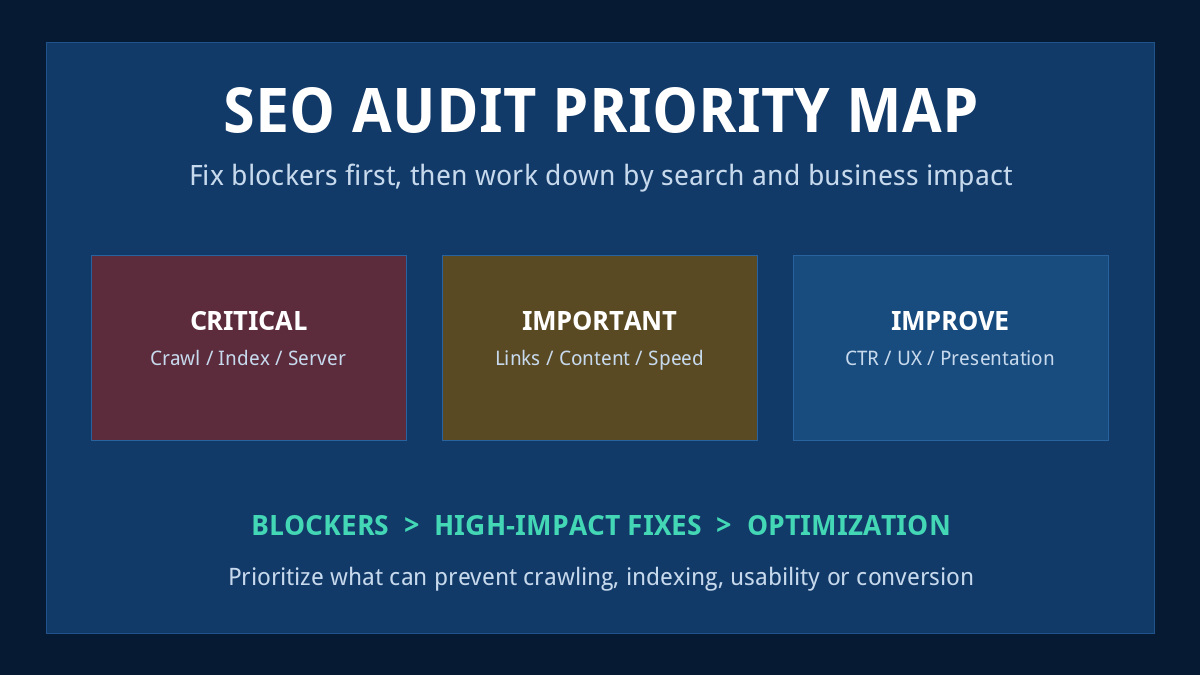
do not treat all 50 checks as equally urgent. Fix crawl, indexing, server and mobile problems first. Then improve content, internal linking, performance and conversions. Record what changed so the next audit can measure progress instead of starting from zero.
Prioritize blockers first, then address important optimization gaps and lower-risk improvements.
What Should a Free Website SEO Audit Cover?
A strong audit examines the entire path between discovery and conversion. Search engines first need to crawl useful URLs, understand which versions are canonical and decide which pages should be indexed. Those pages then need relevant content, a usable information architecture, descriptive internal links and a fast experience across devices.
Google documentation continues to emphasize proper canonicalization and deliberate crawling controls. Canonicals help indicate the representative version of duplicate or near-duplicate URLs, while robots.txt governs crawler access and should not accidentally prevent important resources from being fetched. See Google Search Central on canonicalization and Google’s robots.txt implementation.
SEO Audit Priority Matrix
Priority
Typical Issues
Action
Critical
Blocked pages, accidental noindex, broken templates, server errors, mobile layout failures
Fix before lower-impact optimization
Important
Cannibalization, weak internal linking, poor Core Web Vitals, outdated content
Prioritize by affected traffic and business value
Improve
Meta copy, readability, anchor refinement, presentation and UX polishing
Improve after technical foundations are stable
1. Crawling, Indexing and Site Accessibility
The first group of checks determines whether search engines can reliably access the pages you actually want them to evaluate. A beautifully optimized page cannot perform normally if it is blocked, unavailable, duplicated incorrectly or disconnected from the rest of the site.
Checks 1–15: Crawlability, Indexing and Canonicalization
01
Confirm HTTPS works sitewide
Critical
Load important URLs over HTTPS and check that HTTP versions redirect cleanly to the preferred secure URL. Mixed-content warnings, certificate errors and unnecessary protocol variants should be resolved before deeper optimization.
02
Choose one preferred hostname
Critical
Make sure www and non-www versions do not compete. Redirect alternate hostnames to the preferred version and keep canonical tags, internal links and sitemap URLs consistent with that choice.
03
Review robots.txt
Critical
Open robots.txt directly and confirm that important pages, CSS, JavaScript and other resources needed for rendering are not accidentally blocked. Rules should be deliberate rather than inherited from staging or development.
04
Confirm the XML sitemap loads
Critical
Your sitemap or sitemap index should return a successful response and list the URLs you actually want search engines to discover. Submit the relevant sitemap through Google Search Console.
05
Keep only canonical indexable URLs in sitemaps
Important
Remove redirected, duplicate, noindex, parameter-driven and error URLs from XML sitemaps. A clean sitemap makes it easier to compare submitted URLs with the pages search engines actually index.
06
Check important URLs return HTTP 200
Critical
Priority landing pages, articles, product pages and category pages should return 200 responses. Unexpected 3xx, 4xx or 5xx responses can waste crawl attention and interrupt user journeys.
07
Find broken and soft-404 pages
Critical
Identify true 404 errors and pages that technically return 200 while showing thin not-found content. Repair internal links, restore useful pages or redirect only when a genuinely relevant replacement exists.
08
Remove unnecessary redirect chains
Important
Important internal links should point directly to final destinations. Multiple hops slow users and crawlers and make site migrations or future URL changes harder to manage.
09
Find accidental noindex directives
Critical
Check meta robots and HTTP headers on important pages. A noindex left over from staging, redesign work or temporary maintenance can quietly remove valuable URLs from search.
10
Discover orphan pages
Important
Compare crawler results, XML sitemaps, analytics, Search Console and the CMS inventory. Valuable pages that exist but have no internal path should be linked contextually or intentionally consolidated.
11
Inspect canonical tags
Critical
Each important page should identify the correct representative URL. Self-referencing canonicals are useful on unique pages, while duplicate variants should consistently signal the preferred version.
12
Check URL parameter duplicates
Important
Filtering, sorting, campaign parameters and faceted navigation can generate many near-duplicate URLs. Decide which versions deserve indexing and keep internal linking and canonical signals consistent.
13
Review duplicate page variants
Important
Look for printer pages, HTTP and HTTPS duplicates, alternative hostnames, trailing-slash variants and CMS-generated duplicates. Consolidate signals so search engines do not have to guess which version matters.
14
Protect staging and development environments
Critical
Development copies should not compete with production. Confirm that staging sites are properly restricted and that production pages are not carrying temporary noindex instructions.
15
Check server stability
Critical
Review recurring 5xx errors, timeouts and unusually slow responses. Search visibility cannot compensate for a server that intermittently fails users or crawlers.
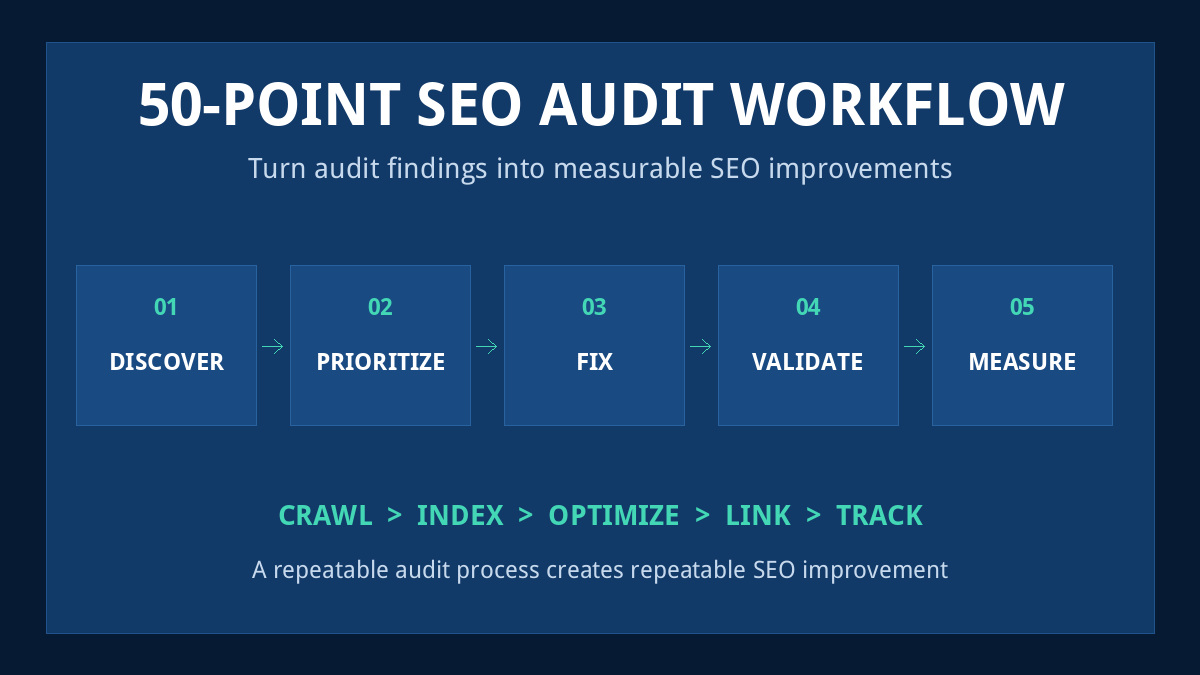
A useful SEO audit moves from discovery to prioritization, implementation, validation and ongoing measurement.
Checks 16–25: On-Page SEO and Content Quality
Once crawling and indexing are stable, review whether each page actually deserves to rank for its intended query. Titles, headings and meta descriptions matter, but deeper problems such as thin content, outdated comparisons and overlapping search intent usually deserve more attention than cosmetic keyword placement.
16
Write unique title tags
Important
Every important indexable page should have a specific title that reflects its main purpose. Duplicate or boilerplate titles make large sites harder to understand and weaken click-through differentiation.
17
Match titles to search intent
Important
A title should promise what the page actually delivers. Commercial pages, tutorials, comparisons and definitions should use language that matches what a searcher expects after clicking.
18
Improve meta descriptions
Improve
Write concise descriptions that summarize the value of the page and encourage qualified clicks. Treat them as SERP copy rather than a place to repeat keywords mechanically.
19
Use one clear descriptive H1
Important
The primary heading should clearly communicate the page topic. Avoid vague headings that require visitors or search systems to infer what the page is actually about.
20
Check heading hierarchy
Improve
Use H2 and H3 headings to organize real sections rather than styling text. Logical headings improve scanning, accessibility and the clarity of long-form content.
21
Strengthen the opening paragraph
Important
Confirm that the introduction answers the searcher quickly, defines the scope of the page and makes the next section worth reading. Remove generic filler before the useful information begins.
22
Cover related terminology naturally
Improve
Use the language readers and the industry actually use. Helpful topical coverage is more useful than forcing the exact same phrase into every heading or paragraph.
23
Find genuinely thin pages
Important
Thinness is about usefulness, not a fixed word count. Pages that fail to answer their intent, provide evidence or help a user take the next step should be improved, merged or removed.
24
Find keyword cannibalization
Important
Review pages competing for the same intent. When two URLs serve nearly identical purposes, decide whether one should become the primary page and whether the other should be differentiated or consolidated.
25
Refresh outdated content
Important
Update prices, screenshots, product features, statistics, dates and broken references. Commercial comparison content should be reviewed more frequently than evergreen explanatory material.
Do not create new articles just because an audit finds a keyword gap
Check whether an existing URL already serves the intent. CBOOMARANK has been applying this principle to its own content clusters so strong URLs are upgraded instead of publishing multiple near-identical pages that compete with one another.
Checks 26–33: Images, Internal Links and Link Equity
Describe meaningful images in a way that helps users who cannot see them. Decorative imagery should not be overloaded with keyword-heavy alternative text.
27
Compress oversized images
Important
Serve images at sensible dimensions and file sizes. Large hero graphics and unoptimized screenshots can become major contributors to slow loading and poor mobile experience.
28
Add contextual internal links
Important
Link relevant concepts inside the body of the page rather than depending only on menus or related-post boxes. Descriptive internal links help users discover the next useful resource.
29
Repair broken internal links
Critical
Crawl internal anchors and identify destinations returning errors or unnecessary redirects. Fix the source link instead of allowing broken navigation to accumulate across older content.
30
Improve internal anchor text
Improve
Use descriptive language that explains what the destination contains. Avoid repeating the exact same aggressively optimized anchor across every article.
31
Strengthen links to priority pages
Important
Important commercial and pillar pages should receive relevant links from supporting content. Pages buried deep in the architecture often need better contextual pathways rather than more menu clutter.
32
Check external references
Improve
Verify that outbound sources still work and still support the claim being made. Replace outdated references with current primary sources where possible.
33
Recover valuable backlinks pointing to broken URLs
Important
When external links point to deleted or redirected content, determine whether restoring, consolidating or directly redirecting that URL can preserve useful referral and authority signals.
Checks 34–41: Core Web Vitals, Performance and Mobile UX
Performance auditing should focus on real user experience rather than chasing a perfect synthetic score. Review large content elements, interaction responsiveness, layout stability and the amount of front-end code required before a page becomes genuinely usable.
Google’s current documentation continues to treat page rendering and mobile accessibility as part of a technically sound search experience. Use field data where available and then reproduce specific problems with lab tools before changing production code.
34
Review Largest Contentful Paint
Important
Identify the dominant above-the-fold element and determine whether large images, slow server response, render-blocking resources or delayed loading are hurting the user experience.
35
Review Interaction to Next Paint
Important
Look for slow interactions caused by heavy JavaScript, long tasks or expensive event handlers. A page that appears loaded but responds slowly can still frustrate users.
36
Review Cumulative Layout Shift
Important
Unexpected movement often comes from images without dimensions, injected ads, web fonts or late-loading components. Reserve appropriate space so content stays visually stable.
37
Verify responsive layouts
Critical
Check representative templates at real phone widths. Text, forms, tables, media, CTAs and navigation should fit without horizontal scrolling or compressed unreadable columns.
38
Check typography and readability
Improve
Body copy should use a comfortable font size, line height and contrast. Dense paragraphs and extremely wide lines can make otherwise strong content difficult to consume.
39
Check tap targets
Improve
Buttons and navigation items should be easy to activate without accidentally hitting nearby controls. This is particularly important for mobile menus, cookie notices and conversion forms.
40
Audit heavy JavaScript and CSS
Important
Remove or defer scripts and styles that provide little user value. Plugins, tracking tags and visual builders can gradually add significant front-end cost.
41
Review critical resource loading
Improve
Prioritize resources needed to display the initial page. Avoid making users wait for unnecessary third-party scripts before meaningful content becomes usable.
Checks 42–50: Structured Data, Search Console and Measurement
The final group turns an audit from a technical exercise into an operating system. Structured data should accurately describe visible content, Search Console should be reviewed for indexing and security issues, and analytics should reveal whether organic visitors reach meaningful next actions.
42
Validate structured data
Important
Use schema only when it accurately represents visible page content. Test important templates and fix syntax or required-property errors rather than adding markup purely for appearance.
43
Review breadcrumbs
Improve
Breadcrumbs can help visitors understand where a page sits within a larger site. Confirm that breadcrumb links are accurate and follow the real information architecture.
44
Check page experience around ads and overlays
Important
Advertising, popups and consent notices should not make the main content difficult to access. Review especially on smaller screens where overlays consume a larger portion of the viewport.
45
Review Search Console indexing reports
Critical
Investigate unexpected exclusions, crawling problems and indexed pages you did not intend to expose. Use URL Inspection for important individual URLs when deeper diagnosis is needed.
46
Check manual actions and security reports
Critical
Confirm that Search Console does not report a manual action or security problem. These issues require direct remediation before ordinary optimization work can have its expected effect.
47
Validate analytics and Search Console tracking
Important
Ensure important pages, campaigns and conversions are measurable. Bad tracking can make successful pages look weak and weak pages look successful.
48
Review organic landing-page performance
Important
Compare impressions, clicks, click-through rate and average position with engagement and conversion data. Prioritize pages where visibility exists but the result does not match business value.
49
Audit conversion paths
Important
SEO traffic should have a useful next step. Test forms, account-registration links, product CTAs, phone links and lead magnets so rankings can translate into measurable outcomes.
50
Schedule the next audit
Improve
A website audit is not a one-time event. Repeat focused checks after migrations, redesigns, major plugin changes and large content updates, with a broader recurring review at a sensible interval.
What to Do After Your SEO Audit
Do not send all 50 findings into one undifferentiated task list. Group problems by template, cause and business impact. One template-level fix can sometimes repair hundreds of URLs, while a high-value landing page may deserve individual attention even if only one URL is affected.
1. Fix blockers. Resolve crawling, indexing, canonical, server and broken-template problems.
2. Repair architecture. Improve orphan pages, broken links and weak pathways to priority content.
3. Improve valuable pages. Update pages that already have impressions, backlinks or business potential.
4. Validate. Re-crawl changed areas, inspect representative URLs and confirm that errors actually disappeared.
5. Measure. Track impressions, clicks, rankings, engagement and conversions rather than judging success by an audit score alone.
How Often Should You Audit a Website?
There is no universal schedule. A small stable business site can often use a lighter recurring review with deeper audits after major releases. Ecommerce sites, publishers and SaaS platforms may need more frequent monitoring because new URLs, templates, JavaScript, plugins and content are introduced continuously.
Trigger a focused audit after a domain migration, major redesign, CMS change, large internal-linking project, navigation change or unexpected organic-traffic decline. Commercial comparison pages should also be reviewed periodically because products, pricing and features change.
Free SEO Audit vs Paid SEO Audit
A checklist like this can uncover many important problems without paying an agency simply to export crawler warnings. The difference between a basic audit and professional SEO work is usually not the existence of the data—it is diagnosis, prioritization, implementation and the ability to connect technical findings with search demand and business outcomes.
If your site is small, use this checklist to establish a clean baseline. If the site is large, multilingual, JavaScript-heavy or suffering from a major ranking loss, deeper log analysis, template testing, backlink analysis and expert investigation may be justified.
Final SEO Audit Checklist Summary
A complete website SEO audit should answer five questions:
Can search engines access the right URLs?
Are those URLs technically indexable and canonical?
Does each important page satisfy a clear search intent?
Can users and crawlers move naturally through the site?
Can the business measure whether SEO traffic creates value?
If those answers are clear, the audit has done more than generate a score—it has produced a prioritized improvement plan.