


Google Keyword Planner for SEO: Why It Still Matters in 2026
Google Keyword Planner remains one of the most useful starting points for keyword research because it connects marketers directly with Google Ads keyword data. It was built primarily to help advertisers plan Search campaigns, but the same keyword ideas, demand patterns, location filters, historical metrics and bid signals can support organic SEO when they are interpreted correctly.
The key is to use Keyword Planner for the job it actually does well. It can help you discover phrases people search for, compare relative demand, explore seasonal patterns, identify commercially valuable themes and generate ideas from a seed keyword or website. It is not a complete organic SEO suite, and its Competition column is not an organic keyword-difficulty score.
This 2026 rewrite expands CBOOMARANK’s original practical guide into a step-by-step workflow: how to access Keyword Planner, how to find ideas, how to understand every important metric, how to turn PPC-oriented data into SEO decisions, how to build content clusters, and how to combine the tool with Search Console, Google Trends and specialist SEO platforms.
What Is Google Keyword Planner?
Google Keyword Planner is a planning tool inside Google Ads. Google describes it as a tool for researching keywords for Search campaigns. It can generate keyword ideas from words, phrases, products, services or a website, show estimates of monthly searches, provide advertiser-competition and bid data, organize ideas, and build forecasts for paid campaigns.
There is no separate Keyword Planner subscription. However, Google currently states that you must complete Google Ads account setup, including billing information, to access basic Keyword Planner features such as discovering new keyword ideas.
For SEO, that means Keyword Planner is best viewed as a demand-discovery and commercial-intent tool. Use it to generate and validate ideas, then combine those ideas with organic SERP analysis, Search Console performance, content quality and competitor research before deciding what to publish.
What Keyword Planner Can Help You Do for SEO
- Discover new keyword ideas from seed terms, products, services or a website.
- Estimate broad search demand across a chosen location and Search Network setting.
- Find related long-tail phrases and content themes.
- Use location filters to research national, regional or local demand.
- Compare bid ranges as a directional signal of commercial value.
- Review historical search trends and seasonality.
- Upload an existing keyword list to get search volume and forecasts.
- Group ideas into content clusters before writing new pages.
How to Access Google Keyword Planner in 2026
1. Sign in to Google Ads
Use an existing Google Ads account or create one. Complete the account setup Google requires, including billing information.
2. Open Keyword Planner
In Google Ads, open Tools and choose Keyword Planner from the Planning area.
3. Choose your workflow
Use Discover new keywords when you need ideas, or Get search volume and forecasts when you already have a keyword list.
4. Set targeting carefully
Choose the country, region, language and Search Network settings that match the audience you actually want to reach.
Discover New Keywords: Start With Keywords or a Website
The Discover new keywords workflow gives you two useful starting options. Start with keywords lets you enter terms related to your product, service or topic. Start with a website lets Google analyze a page or domain and return keyword ideas related to that content.
Google also notes that combining a keyword with a URL can produce a larger set of ideas than using only a URL. For SEO teams, this can be useful when you want to expand an existing topic rather than brainstorm from scratch.
A strong seed keyword is broad enough to reveal adjacent opportunities but specific enough to stay relevant. Instead of entering only “marketing,” try phrases such as “SEO software,” “keyword research tools,” “technical SEO audit,” or “rank tracking software.”
Understanding the Key Keyword Planner Metrics
| Metric | How an SEO Team Should Interpret It |
| Average monthly searches | Google defines this as the average number of searches for a keyword and close variants based on the selected month range, location and Search Network settings. By default, demand is averaged over 12 months. |
| Competition | This reflects advertiser competition in Google Ads: how many advertisers showed on a keyword relative to other keywords. Low, Medium or High does not mean the keyword is easy or hard to rank for organically. |
| Top of page bid – low range | A historical lower-range estimate of what advertisers have paid for top-of-page ad placement. It can be used as a directional commercial-intent signal, not an SEO ranking metric. |
| Top of page bid – high range | A higher historical bid range. Strong bids may indicate commercially valuable searches, but they do not prove that a keyword will convert for your specific business. |
| Three-month change / trend views | Useful for spotting recent changes in demand. Compare with Google Trends before treating a short-term spike as a durable evergreen opportunity. |
| Forecasts | Google’s forecasts estimate potential paid performance based on factors such as spend, bid, budget, seasonality and historical ad quality. They are not organic SEO traffic forecasts. |
Important distinction: Keyword Planner’s Competition metric measures advertising competition, not organic SEO difficulty. To estimate organic ranking difficulty, inspect the actual SERP and use backlink, authority, content-quality and competitor data from dedicated SEO tools.
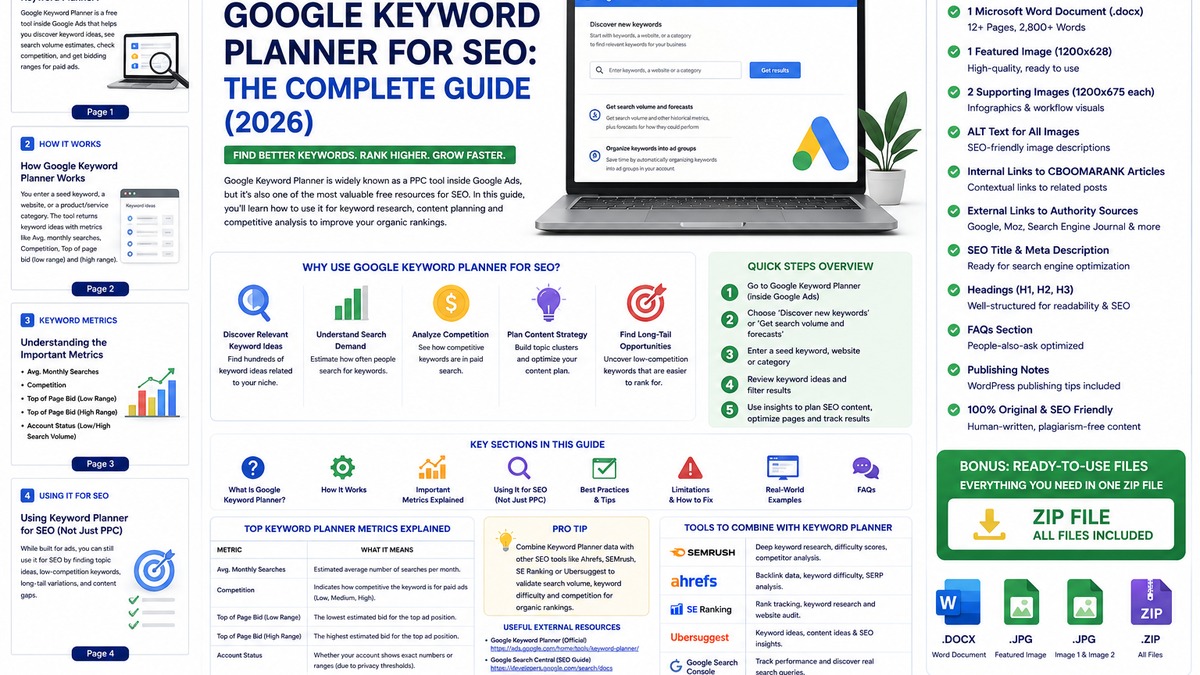
How to Use Google Keyword Planner for SEO: Step by Step
Step 1: Define the business goal
Decide what you want the page to accomplish: educate, generate leads, support a product, compare solutions, capture local demand or answer a recurring customer question.
Step 2: Enter seed keywords
Use a few closely related seed terms. Avoid dumping unrelated topics into one research session because broad inputs produce noisy lists.
Step 3: Add your website when useful
Use your domain to help Google exclude ideas unrelated to what you actually offer, or analyze a competitor or relevant page to uncover adjacent vocabulary.
Step 4: Set the right location and language
Search demand changes dramatically by market. Research Nigeria, the United States, the United Kingdom or another target region separately when the audience and commercial value differ.
Step 5: Refine with filters
Filter by keyword text, average monthly searches and bid ranges. Remove irrelevant brands or product categories and narrow the list to phrases that genuinely fit your site.
Step 6: Group by search intent
Separate informational, commercial-investigation, navigational and transactional terms. A keyword’s intent should determine the page type you create.
Step 7: Validate the SERP
Search the keyword manually. Identify the result types Google is rewarding, the authority of ranking sites, the depth of content, and whether the query deserves a guide, product page, comparison, category or local landing page.
Step 8: Build a content cluster
Choose one primary intent and group related phrases into a single comprehensive page. Create supporting pages only when the intent is materially different.
Step 9: Publish and measure
After publishing, use Google Search Console to see the real queries your page earns impressions for. Those first-party queries are often more valuable than continuing to guess from keyword tools.
How to Find Long-Tail Keywords With Keyword Planner
Long-tail keywords are usually more specific than broad head terms. They often reveal clearer intent and can be easier to match with a useful page. Keyword Planner can surface long-tail ideas when you use specific seed phrases, a relevant website, filters and category refinement.
Do not assume every long-tail phrase has low organic competition. Some commercially valuable long-tail terms are dominated by highly authoritative sites. The advantage of long-tail research is precision: you can create a page that matches a narrower problem more closely.
Look for modifiers such as best, for beginners, near me, pricing, review, comparison, how to, software, tools, guide, template, examples, for small business, or a specific year when the freshness is genuinely important.
Use Bid Data to Understand Commercial Intent
Top-of-page bid data is one of Keyword Planner’s most useful SEO-adjacent signals. It shows what advertisers have historically been willing to bid for premium ad visibility. Higher bids can indicate that a query is commercially valuable, but the signal must be interpreted in context.
For example, a high bid for “enterprise SEO software pricing” makes intuitive sense because the searcher may be close to evaluating a paid solution. A high bid for a broad informational term can reflect a competitive advertising market without meaning the organic visitor will convert on your site.
Use bid data to prioritize commercial topics, affiliate comparisons, lead-generation pages and service landing pages—but validate those opportunities against your own business model.
Keyword Planner for Content Strategy and Topic Clusters
The best use of Keyword Planner is not exporting thousands of rows. It is turning a messy keyword list into a clear publishing plan.
Start by identifying a core topic. Group phrases that share the same intent into one page, then identify subtopics that deserve their own supporting pages. This reduces keyword cannibalization and creates a stronger internal-link structure.
For example, a broad cluster around keyword research could include a pillar guide to keyword research, a Google Keyword Planner tutorial, a guide to trending keywords, a comparison of keyword tools and a page about keyword difficulty. Each page should have a distinct job and link naturally to the others.
Useful CBOOMARANK reading: How to Find Trending Keywords for SEO in 2026 • SEO Optimization Guide 2026 • Best Free SEO Tools for Beginners
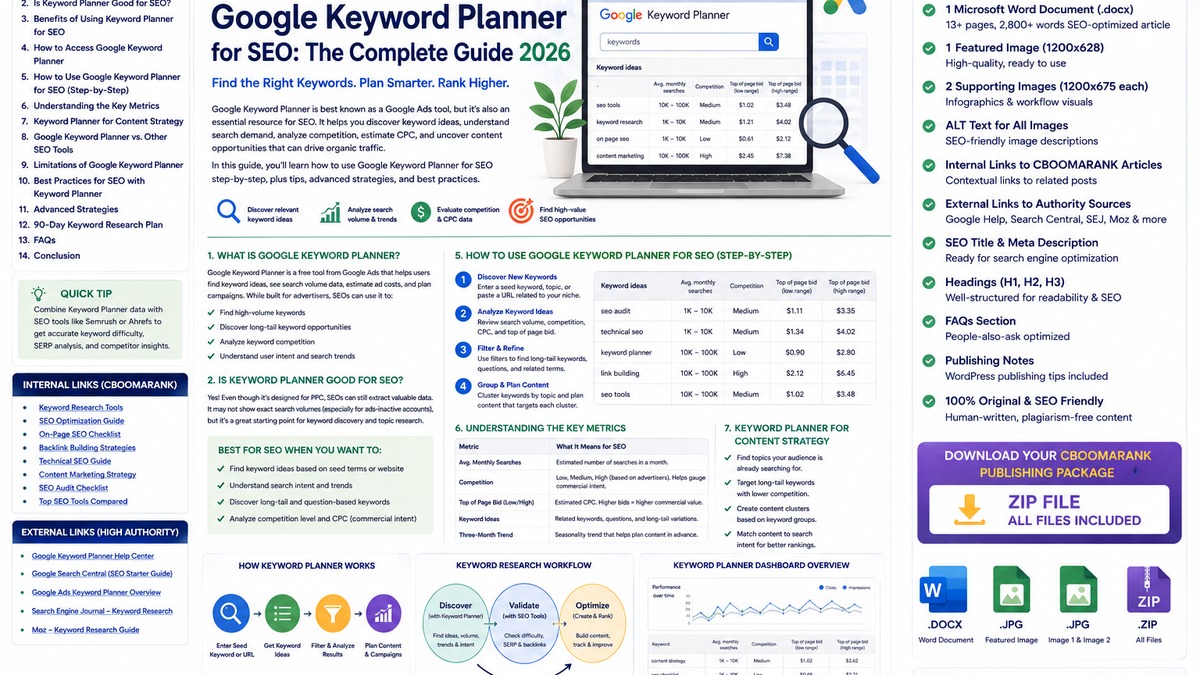
Keyword Planner vs Dedicated SEO Keyword Tools
| Tool | Best Use | Main Limitation |
| Google Keyword Planner | Keyword ideas, search-demand estimates, advertiser competition, bid data and forecasts | No organic keyword-difficulty score; built for Google Ads |
| Google Search Console | Real queries, clicks, impressions, CTR and average position for your own site | Does not discover the full market before your site earns visibility |
| Google Trends | Relative trend direction, seasonality and regional interest | Does not provide conventional absolute search-volume estimates |
| Paid SEO suites | Organic difficulty, competitor rankings, backlinks, SERP analysis, content gaps and rank tracking | Paid subscriptions and vendor-specific estimates |
A Better Keyword Research Stack for 2026
- Keyword Planner for seed ideas, demand direction and commercial-intent signals.
- Google Trends for seasonality, breakout topics and regional interest.
- Google Search Console for the real queries already generating impressions for your site.
- A dedicated SEO platform when you need competitor rankings, organic difficulty, backlink analysis or large-scale research.
- Manual SERP review to understand search intent and what type of page Google is currently rewarding.
Common Google Keyword Planner Mistakes to Avoid
Treating Ads competition as SEO difficulty
Competition describes advertiser activity. It does not measure backlink strength, domain authority or organic SERP difficulty.
Choosing keywords only by search volume
Volume is demand, not value. Relevance, intent, conversion potential and your ability to create a better result matter more.
Researching the wrong country
A global total can hide the actual demand in the market you serve. Use the right location and language settings.
Ignoring seasonality
Average monthly searches can smooth peaks and troughs. Review historical patterns and Google Trends.
Publishing one page per keyword
Closely related keywords often belong on one comprehensive page when they share the same intent.
Using forecasts as organic traffic predictions
Keyword Planner forecasts are paid-campaign forecasts and account for factors such as budget and bids.
Never revisiting Search Console after publishing
Your real Search Console queries show how Google actually connects your content with users. Use that data to improve the page.
Advanced Keyword Planner Strategies
Analyze competitor pages for vocabulary
Use the website option on strong competitor or industry pages to discover phrases and categories you may have missed. Treat the output as research inspiration, not a blueprint to copy.
Build local keyword maps
Run separate research for cities, regions or countries and compare demand. Local service language can vary considerably between markets.
Prioritize pages with commercial signals
Combine bid ranges, business relevance and search intent to identify pages that could generate leads or affiliate revenue.
Use low-volume terms to complete a topic
A keyword does not need large volume to deserve coverage when it answers an important customer question or strengthens a high-value page.
Refresh research before major content updates
Search behavior changes. Re-run the keyword set before rewriting a pillar article or launching a new product category.
A 30-Day Keyword Research Workflow
Week 1: Discover
Create seed lists for your highest-value products, services and content topics. Run Keyword Planner by target location and export the most relevant ideas.
Week 2: Validate
Group by intent, check Google Trends, inspect SERPs and compare opportunities with existing CBOOMARANK content.
Week 3: Build
Choose one primary topic cluster, create or upgrade the main page, add supporting internal links and make the call to action match the searcher’s intent.
Week 4: Measure
Track indexing, impressions, clicks and queries in Search Console. Record pages gaining traction and add newly discovered queries to your next optimization cycle.
Google Keyword Planner SEO Checklist
- Google Ads account setup completed and Keyword Planner accessible.
- Target country, location and language selected correctly.
- Seed keywords closely matched to the business goal.
- Website/domain input used when it improves relevance.
- Irrelevant categories and brands filtered out.
- Average monthly searches treated as estimates, not guarantees.
- Competition interpreted as advertiser competition.
- Bid ranges used only as directional commercial-intent signals.
- Search intent validated manually in Google.
- Related keywords grouped into topic clusters.
- Existing CBOOMARANK pages checked before creating a new URL.
- Internal-link plan defined before publication.
- Search Console configured to measure real post-publication queries.
Frequently Asked Questions
Is Google Keyword Planner free?
There is no separate subscription charge for Keyword Planner, but Google currently states that account setup including billing information is required to access its basic features.
Is Google Keyword Planner good for SEO?
Yes, as a starting research tool. It is useful for keyword ideas, search-demand estimates, location targeting and commercial-intent signals. It should be combined with organic SERP analysis and Search Console.
Does Keyword Planner show organic keyword difficulty?
No. The Competition column refers to advertisers, not organic ranking difficulty.
Are Google Keyword Planner search volumes exact?
Google describes them as historical averages and notes that search-volume statistics are rounded and affected by settings and changing demand.
What do top-of-page bids mean for SEO?
They are Google Ads bid estimates. SEOs can use them as a directional clue that advertisers value the query, but they are not an organic ranking factor.
How often are Keyword Planner forecasts updated?
Google says forecasts are refreshed daily and use recent data adjusted for seasonality.
Should I use Keyword Planner or Search Console?
Use both. Keyword Planner helps before and during topic research; Search Console shows the real queries, impressions and clicks your published pages earn.
Final Verdict
Google Keyword Planner remains a valuable SEO research tool in 2026 when you understand what its data represents. It is strongest for discovering ideas, estimating broad demand, researching markets, spotting commercial themes and organizing a content plan.
Its biggest weakness is also easy to solve: Keyword Planner was built for advertisers, so it does not tell you how difficult a keyword is to rank for organically. Use it to discover and prioritize ideas, then validate them with the SERP, Search Console, Google Trends and dedicated SEO tools.
The most effective keyword strategy does not chase the biggest number. It chooses the right query, matches the right intent, creates the right page and measures whether that page attracts qualified searchers who take meaningful action.
Recommended CBOOMARANK Internal Links
- SEO Optimization Guide 2026
- How to Find Trending Keywords for SEO in 2026
- Best Free SEO Tools for Beginners in 2026
- Best SEO Audit Software Reviewed in 2026
- Google Ads Beginner’s Guide for 2026
- SEO Best Practices for 2026
Authoritative External Sources
- Google Ads Help – Use Keyword Planner
- Google Ads Help – About Keyword Planner Forecasts
- Google Ads Help – Refine New Keywords
- Google Ads Help – Best Practices for Finding New Keywords
- Google Search Central – SEO Starter Guide
Editorial note: This is a rewritten and expanded version of CBOOMARANK’s August 23, 2026 Google Keyword Planner guide. Keyword Planner is a Google Ads product, so interface details, access rules and metrics can change. Re-check Google Ads Help when performing future major updates.
