

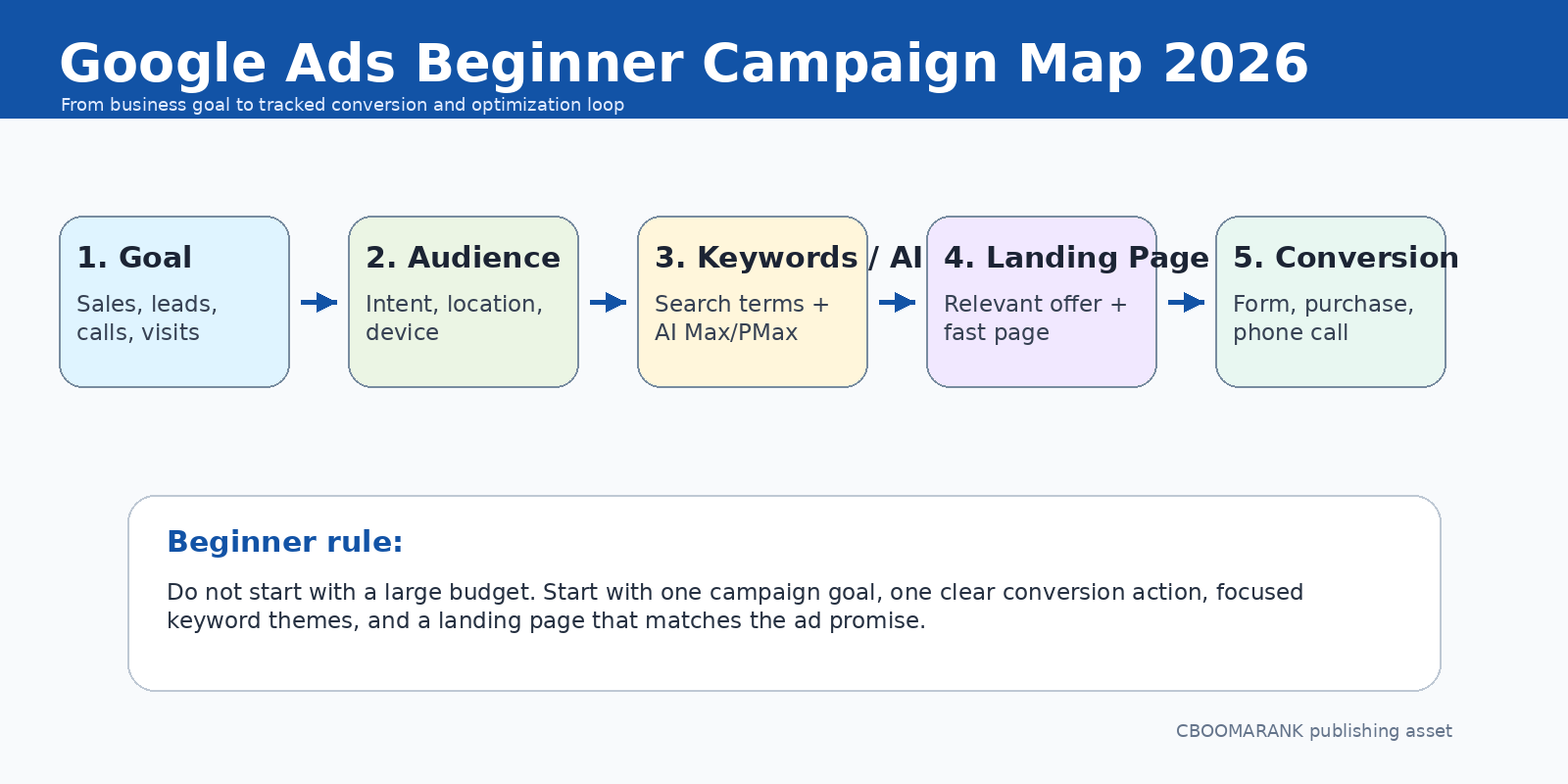
Google Ads can be one of the fastest ways to put your business in front of people who are already searching, comparing, watching, browsing, or ready to buy. For beginners, however, the platform can feel intimidating: campaign types, keywords, bids, Quality Score, tracking, landing pages, budgets, AI automation, policies, and reporting all compete for attention.
This guide simplifies the process. Instead of trying to master every feature on day one, you will learn the core Google Ads workflow: define the goal, choose the right campaign type, research keywords or audience signals, build a relevant landing page, set a sensible budget, track conversions, and optimize based on business results.
The most important beginner lesson is this: Google Ads is not just about getting clicks. A successful PPC campaign connects a searcher or viewer with a relevant offer, measures the action that matters, and improves over time. If you launch without conversion tracking, you may spend money without knowing which ads actually produce leads, sales, phone calls, bookings, downloads, or store visits.
Google says Google Ads can help businesses reach people across Google Search, YouTube, Maps, Gmail, Discover, Google Play, and the Display Network depending on campaign type. For beginners, this makes campaign selection important: start with the channel that best matches your goal, not the campaign type that sounds most advanced. Source: Google Ads overview.
In this article, you will learn:
- What Google Ads is and how PPC works
- The main Google Ads campaign types beginners should understand
- How to plan keywords, budget, bids, and landing pages
- How to set up conversion tracking before scaling spend
- How AI features like Performance Max and AI Max fit into beginner campaigns
- Common mistakes to avoid and a practical 30-day optimization plan
What Is Google Ads?
Google Ads is Google’s online advertising platform. It allows advertisers to show ads when people search on Google, watch videos on YouTube, browse websites and apps in the Display Network, use Gmail, explore Discover, look for locations on Maps, or shop across Google surfaces.
In most campaigns, advertisers pay when someone clicks the ad, watches a video, views an impression, or completes another billable action depending on the campaign type and bidding model. This is why Google Ads is commonly called PPC, or pay-per-click advertising, even though modern campaigns can optimize for conversions, conversion value, views, app installs, or reach.
For a beginner, the practical definition is simple: Google Ads helps you buy targeted visibility. SEO builds organic visibility over time. Google Ads gives you faster exposure, but only works profitably when your targeting, message, landing page, and conversion tracking are aligned.
| SEO vs Google Ads | SEO | Google Ads |
| Speed | Usually slower; builds over months | Can launch traffic quickly |
| Cost model | Content, technical work, links, tools, time | Pay for clicks, views, impressions, or conversions |
| Control | Ranking depends on search algorithms and competition | More control over budget, targeting, ad copy, and timing |
| Best use | Long-term organic traffic and authority | Fast testing, lead generation, sales, remarketing, and launch campaigns |
| Weakness | Takes time and may be uncertain | Traffic stops when budget stops |
Main Google Ads Campaign Types for Beginners
Google Ads offers several campaign types. Beginners should not use all of them immediately. Start with the campaign type that matches your business goal and the customer journey.
| Campaign Type | Best For | Beginner Notes |
| Search campaigns | Leads, calls, bookings, high-intent sales | Best starting point when people actively search for your product or service. |
| Performance Max | Sales, leads, ecommerce, multi-channel reach | Goal-based campaign that can access Google inventory from one campaign. |
| Shopping campaigns | Ecommerce product discovery and purchases | Requires product feed and Merchant Center setup. |
| Display campaigns | Awareness, remarketing, visual reach | Useful for retargeting, but cold Display traffic can be broad. |
| YouTube campaigns | Brand awareness, product education, video conversions | Requires strong video creatives and clear calls to action. |
| Demand Gen campaigns | Visual discovery and demand creation | Good when you have strong visual assets and want to influence consideration. |
| App campaigns | App installs and engagement | Best for mobile app marketers. |
Google describes Performance Max as a goal-based campaign type that lets performance advertisers access Google Ads inventory from a single campaign and complement keyword-based Search campaigns. Source: Google Ads Help – Performance Max.
Best Beginner Starting Point: Search Campaigns
For many small businesses, service providers, agencies, coaches, local companies, SaaS products, and B2B websites, a Search campaign is the cleanest starting point. Search ads appear when users search for keywords related to your offer. This means intent is already present.
For example, someone searching “emergency plumber near me” or “best payroll software for small business” is much closer to action than someone passively scrolling through a website. Search campaigns allow beginners to learn keyword intent, ad copy, budget control, and conversion tracking before moving into more automated campaign types.
- Use Search campaigns when customers already know what problem they want solved.
- Use tightly themed ad groups rather than dumping every keyword into one group.
- Send users to a landing page that matches the exact service or offer in the ad.
- Start with exact and phrase match keywords before expanding too broadly.
- Add negative keywords early to reduce irrelevant traffic.
Step 1: Research Keywords With Google Keyword Planner
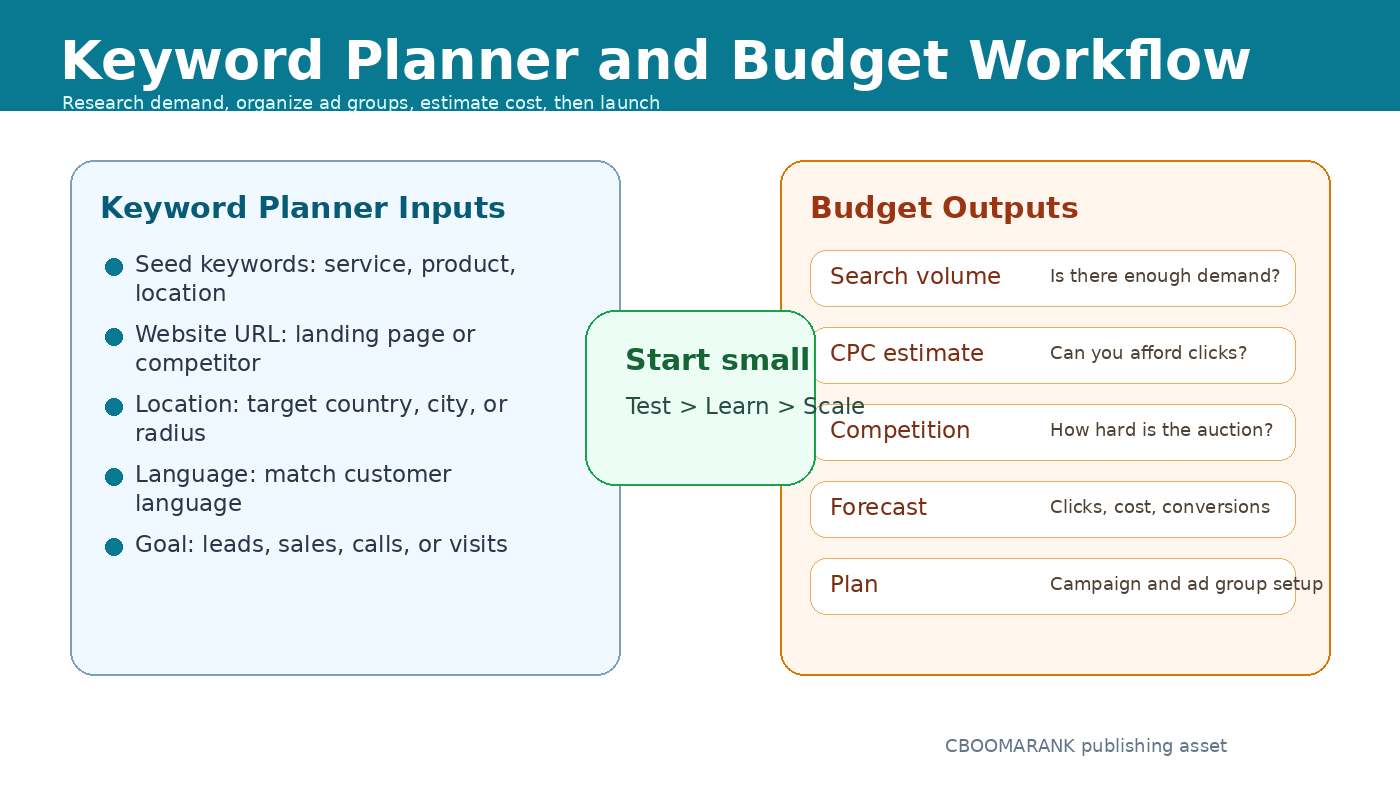
Supporting Image: Keyword Planner and budget workflow for beginners. ALT: Google Ads Keyword Planner and budget workflow showing seed keywords, location targeting, CPC estimates, competition, and campaign forecast
Keyword research is the foundation of a beginner Search campaign. The goal is not to find the most popular keywords. The goal is to find terms that match the customer’s buying intent and fit your budget.
Google Keyword Planner helps advertisers find keyword ideas, review search demand, understand how searches change over time, and get bid estimates for budgeting. Source: Google Keyword Planner.
When using Keyword Planner, start with seed terms related to your product, service, location, or category. Then organize keywords by intent.
| Keyword Intent | Example | How to Use It |
| Informational | how does Google Ads work | Good for blog content, not usually your first paid Search ad target. |
| Commercial investigation | best PPC agency for small business | Useful when you have comparison content, demos, or consultation offers. |
| Transactional | hire Google Ads manager | Strong for lead generation and service pages. |
| Local intent | Google Ads agency in Lagos | Excellent for local agencies and location-based services. |
| Brand intent | CBOOMARANK PPC services | Use brand campaigns carefully to protect branded demand. |
- Group keywords by theme, not only by volume.
- Review estimated CPC before setting your budget.
- Check whether the keyword suggests buying intent.
- Avoid broad, expensive terms until you have enough conversion data.
- Create negative keyword lists for irrelevant searches such as jobs, free, template, PDF, and training when they do not match your offer.
Step 2: Set a Realistic Beginner Budget
A beginner Google Ads budget should be large enough to collect data but small enough to protect you from expensive mistakes. There is no universal budget because CPC varies by industry, country, competition, and keyword intent.
A practical starting formula is: daily budget = target cost per lead multiplied by the number of leads you want to test per day, adjusted for expected conversion rate. If you do not know your conversion rate, start conservatively and optimize before scaling.
| Budget Level | Recommended Use | What to Watch |
| $10-$30/day | Small local tests, brand campaigns, narrow keyword groups | Enough for learning, but data may be slow. |
| $30-$100/day | Most small business lead generation tests | Good for testing keywords, ads, and landing pages. |
| $100-$300/day | Competitive local services, SaaS trials, ecommerce testing | Requires tracking, negatives, and close monitoring. |
| $300+/day | Aggressive growth, ecommerce scaling, multiple campaigns | Needs strong conversion data and optimization discipline. |
Do not scale a campaign just because it gets clicks. Scale when conversion tracking shows that the traffic is producing valuable actions at an acceptable cost.
Step 3: Choose the Right Bidding Strategy
Google Ads offers manual and automated bidding options. Beginners often want full control, but automated bidding can work well when conversion tracking is accurate and enough data is available.
| Bidding Strategy | Best For | Beginner Caution |
| Manual CPC | Learning keyword-level control | Requires close monitoring and bid adjustments. |
| Maximize Clicks | Driving traffic to gather early data | Can chase cheap clicks that do not convert. |
| Maximize Conversions | Lead generation or sales after tracking is set | Needs reliable conversion actions. |
| Target CPA | Scaling leads at a target cost | Works best after conversion history exists. |
| Target ROAS | Ecommerce and revenue optimization | Needs accurate conversion values. |
| Maximize Conversion Value | Revenue-focused campaigns | Requires value tracking and clean data. |
A safe beginner path is to start with a controlled bidding strategy, verify search terms and conversion tracking, then move toward automated bidding once your account has useful data.
Step 4: Build Landing Pages That Match the Ad
Google Ads performance depends heavily on landing page relevance. A landing page should continue the same promise made in the ad. If the ad promotes “affordable SEO audit,” the landing page should clearly explain the audit, who it is for, what is included, and how to request it.
- Use one clear headline that matches the ad promise.
- Place the main call to action above the fold.
- Show benefits, proof, testimonials, or trust signals.
- Make forms short and easy to complete.
- Ensure pages load quickly on mobile.
- Use tracking on forms, calls, purchases, and other valuable actions.
- Avoid sending every ad to the homepage unless the homepage is the best match for intent.
For organic landing page and SEO improvements, internally link this post to CBOOMARANK’s Best Free SEO Tools for Beginners and SEO Pricing Guide articles.
Step 5: Set Up Conversion Tracking Before You Spend Heavily
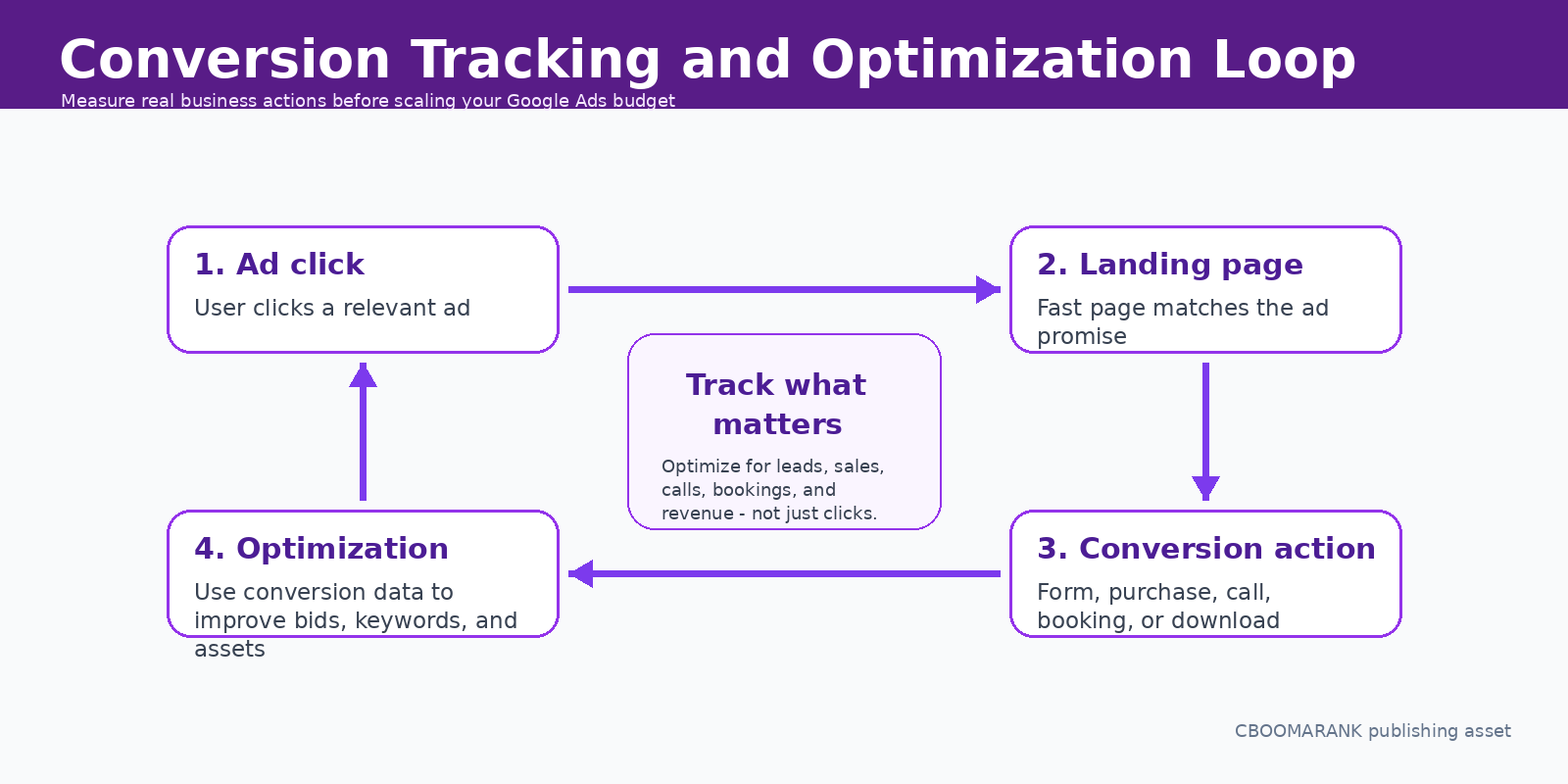
Supporting Image: Conversion tracking and optimization loop. ALT: Google Ads conversion tracking and optimization loop showing ad click, landing page, conversion action, and campaign optimization
Conversion tracking is the difference between guessing and optimizing. A click only tells you someone visited. A conversion tells you that the visitor completed an action that matters to your business.
Google Ads conversion measurement analyzes specific actions users take on your website after interacting with your ads, such as activities that matter to campaign performance. Source: Google Ads Help – Set up web conversions.
| Conversion Type | Example | Why It Matters |
| Lead form | Contact form submission | Measures inquiries and service demand. |
| Phone call | Call from ad or website | Important for local service businesses. |
| Purchase | Online sale | Essential for ecommerce ROAS. |
| Booking | Appointment or demo scheduled | Useful for consultants, SaaS, and clinics. |
| Download | PDF, app, or resource download | Useful for lead magnets and funnels. |
| Qualified lead | CRM status change | More accurate than counting every form submission as equal. |
Beginners should avoid tracking too many weak actions as primary conversions. If every page view or button click is counted as a conversion, automated bidding may optimize toward low-value behavior instead of real business outcomes.
Step 6: Write Ads That Match Search Intent
Good ad copy does not need to be clever. It needs to be relevant, specific, and aligned with the searcher’s problem. Use the keyword theme, benefit, proof, and call to action clearly.
| Ad Element | Beginner Example | Tip |
| Headline | Google Ads Management for Small Businesses | Match the search intent and offer. |
| Benefit | Launch campaigns that track leads and sales | Explain the outcome, not only the service. |
| Trust signal | Transparent reporting and monthly strategy | Reduce risk for the buyer. |
| Call to action | Request a free PPC audit | Tell users what to do next. |
| Path text | /google-ads/audit | Make the URL path look relevant. |
Create multiple headlines and descriptions, but avoid mixing unrelated offers in one ad. The closer your ad matches the keyword and landing page, the easier it is for the user to understand why they should click.
Google Ads AI Features Beginners Should Understand in 2026
Google Ads has become increasingly AI-powered. Beginners should understand automation without handing over strategy blindly. AI can help find opportunities, expand reach, adjust bids, test assets, and optimize placements, but the advertiser still controls goals, conversion quality, budget, offers, landing pages, and policy compliance.
Google describes AI Max for Search campaigns as a suite of targeting and creative enhancements, including search term matching, text customization, and final URL expansion. Source: Google Ads Help – AI Max.
| AI Feature | What It Helps With | Beginner Guardrail |
| Performance Max | Multi-channel reach and automated optimization | Use after tracking and assets are ready. |
| AI Max for Search | Search expansion, text customization, landing page relevance | Monitor search terms, assets, and landing pages. |
| Automated bidding | Bid adjustments based on signals | Only trust it with clean conversion data. |
| Asset generation/support | Creative testing and ad variations | Review claims, brand voice, and policy fit. |
| Recommendations | Optimization suggestions | Apply only when the recommendation supports your strategy. |
The beginner mistake is assuming automation removes the need for strategy. In reality, AI works best when it receives accurate conversion data, strong creative assets, clear landing pages, and sensible budget constraints.
Step 7: Follow Google Ads Policies
Before launching, review Google Ads policies for your industry. Advertising rules are especially important in finance, healthcare, employment, housing, legal services, supplements, gambling, crypto, alcohol, adult content, and other sensitive categories.
Google says its advertising policies are designed to support a trustworthy and transparent advertising ecosystem and prohibit content harmful to users or the broader ad ecosystem. Source: Google Ads Policies Help.
- Do not make misleading claims in ads or landing pages.
- Avoid unrealistic promises such as guaranteed income, instant results, or deceptive before/after claims.
- Use clear pricing, terms, disclosures, and privacy information where relevant.
- Make sure your landing page works, loads, and accurately represents the ad.
- Check industry-specific policies before launching sensitive campaigns.
A Simple 30-Day Google Ads Plan for Beginners
| Week | Main Focus | Actions |
| Week 1 | Foundation | Define goal, choose campaign type, research keywords, prepare landing page, set conversion tracking. |
| Week 2 | Launch and monitor | Launch with modest budget, check disapprovals, review search terms, confirm conversions fire correctly. |
| Week 3 | Optimize relevance | Add negative keywords, pause weak keywords, improve ads, adjust landing page messaging. |
| Week 4 | Scale or refine | Evaluate cost per conversion, lead quality, ROAS, and budget. Scale only profitable segments. |
The first 30 days are not only about making sales. They are about learning what people search, which messages get clicks, which landing pages convert, and which keywords waste money.
Google Ads Metrics Beginners Should Track
| Metric | What It Means | Beginner Interpretation |
| Impressions | How often ads are shown | Shows reach, not success by itself. |
| Clicks | How often users click | Useful only when traffic is relevant. |
| CTR | Click-through rate | Can indicate ad relevance, but high CTR without conversions is not enough. |
| CPC | Cost per click | Helps manage budget and keyword competitiveness. |
| Conversions | Valuable actions completed | The most important action metric. |
| Cost per conversion | Spend divided by conversions | Core lead generation efficiency metric. |
| Conversion rate | Percent of clicks that convert | Shows ad and landing page alignment. |
| ROAS | Revenue divided by ad spend | Essential for ecommerce and value-based campaigns. |
| Search terms | Actual queries that triggered ads | Use to add negatives and discover winners. |
Common Google Ads Mistakes Beginners Should Avoid
- Launching campaigns without conversion tracking.
- Using broad match keywords without negatives or budget control.
- Sending all traffic to the homepage instead of a relevant landing page.
- Judging success only by clicks instead of leads, sales, or revenue.
- Changing settings every few hours before data has time to collect.
- Ignoring mobile page speed and form usability.
- Using one campaign for too many unrelated products or services.
- Accepting every automated recommendation without checking the strategy.
- Not reviewing search terms regularly.
- Scaling budget before proving conversion quality.
Beginner Best Practices for Google Ads in 2026
| Best Practice | Why It Works |
| Start with one clear campaign goal | Prevents confusing bidding, budgets, and conversion signals. |
| Separate themes into focused ad groups | Improves relevance between keywords, ads, and landing pages. |
| Use conversion tracking early | Allows optimization around real business value. |
| Write ads around intent, not only keywords | Makes ads more useful and persuasive. |
| Review search terms weekly | Finds wasted spend and new opportunities. |
| Use negative keywords | Reduces irrelevant clicks. |
| Test landing pages | Often improves performance more than bid changes. |
| Use AI carefully | Automation works better with accurate goals and clean data. |
| Measure lead quality | Prevents campaigns from optimizing for low-quality inquiries. |
| Document changes | Helps you understand what caused performance shifts. |
Example Beginner Campaign Setup
Here is a simple example for a digital marketing agency offering Google Ads management services.
| Setup Item | Example |
| Campaign goal | Lead generation |
| Campaign type | Search campaign |
| Location | Nigeria, United Kingdom, or selected target cities |
| Ad group 1 | Google Ads management |
| Ad group 2 | PPC agency |
| Ad group 3 | Google Ads audit |
| Primary conversion | Consultation request form |
| Secondary conversion | Phone call click |
| Daily budget | $30-$100 for testing, adjusted by market CPC |
| Landing page | Dedicated Google Ads management service page |
| Optimization cadence | Review search terms, cost per lead, and lead quality weekly |
Recommended Internal Links for CBOOMARANK
Add these internal links naturally in the WordPress version:
- Best Free SEO Tools for Beginners
- SEO Pricing Guide
- Semrush vs Ahrefs
- Ubersuggest vs Semrush
- Submit URL to Search Engines
- CBOOMARANK Blog
External Authoritative References
- Google Ads overview
- Google Keyword Planner
- Use Keyword Planner – Google Ads Help
- Set up web conversions – Google Ads Help
- About Performance Max campaigns – Google Ads Help
- About AI Max for Search campaigns – Google Ads Help
- Google Ads Policies Help
FAQ: Google Ads for Beginners
Is Google Ads good for beginners?
Yes, but beginners should start with one goal, one campaign type, a modest budget, and proper conversion tracking. Search campaigns are often the easiest starting point for high-intent leads.
How much should a beginner spend on Google Ads?
Start with a test budget you can afford to learn from. Many small businesses begin around $10-$100 per day depending on industry CPC, location, and conversion goals.
Should I use Search or Performance Max first?
Use Search first if people actively search for your service and you want more control. Use Performance Max when you have strong tracking, creative assets, and a clear conversion goal across multiple Google channels.
What is the most important Google Ads setup step?
Conversion tracking is the most important step because it tells you which campaigns, keywords, ads, and landing pages produce valuable business actions.
Can AI run my Google Ads automatically?
AI can help optimize targeting, bidding, and assets, but it still needs accurate conversion data, good landing pages, clear goals, and human oversight.
What is a good click-through rate?
A good CTR varies by industry and campaign type. Instead of chasing CTR alone, evaluate conversion rate, cost per conversion, and lead or sales quality.
How long before Google Ads works?
Some campaigns can generate results quickly, but most beginners need at least a few weeks to test keywords, ads, budgets, and landing pages before making confident decisions.
Do I need a landing page for Google Ads?
Yes. A relevant landing page usually performs better than sending traffic to a generic homepage because it matches the user intent and makes the next action clear.
Final Verdict
Google Ads is powerful for beginners when it is treated as a measured marketing system, not a traffic shortcut. Start small, choose the right campaign type, research your keywords, create a relevant landing page, set up conversion tracking, and optimize based on business results.
In 2026, AI features can help advertisers expand reach and improve performance, but they do not replace strategy. The best beginner campaigns still depend on clear goals, strong offers, accurate tracking, helpful landing pages, and disciplined optimization.
For CBOOMARANK readers, the best next step is to connect this guide with SEO, analytics, conversion tracking, and landing page optimization content so users can understand the full digital marketing funnel: attract traffic, measure behavior, convert users, and scale what works.
