

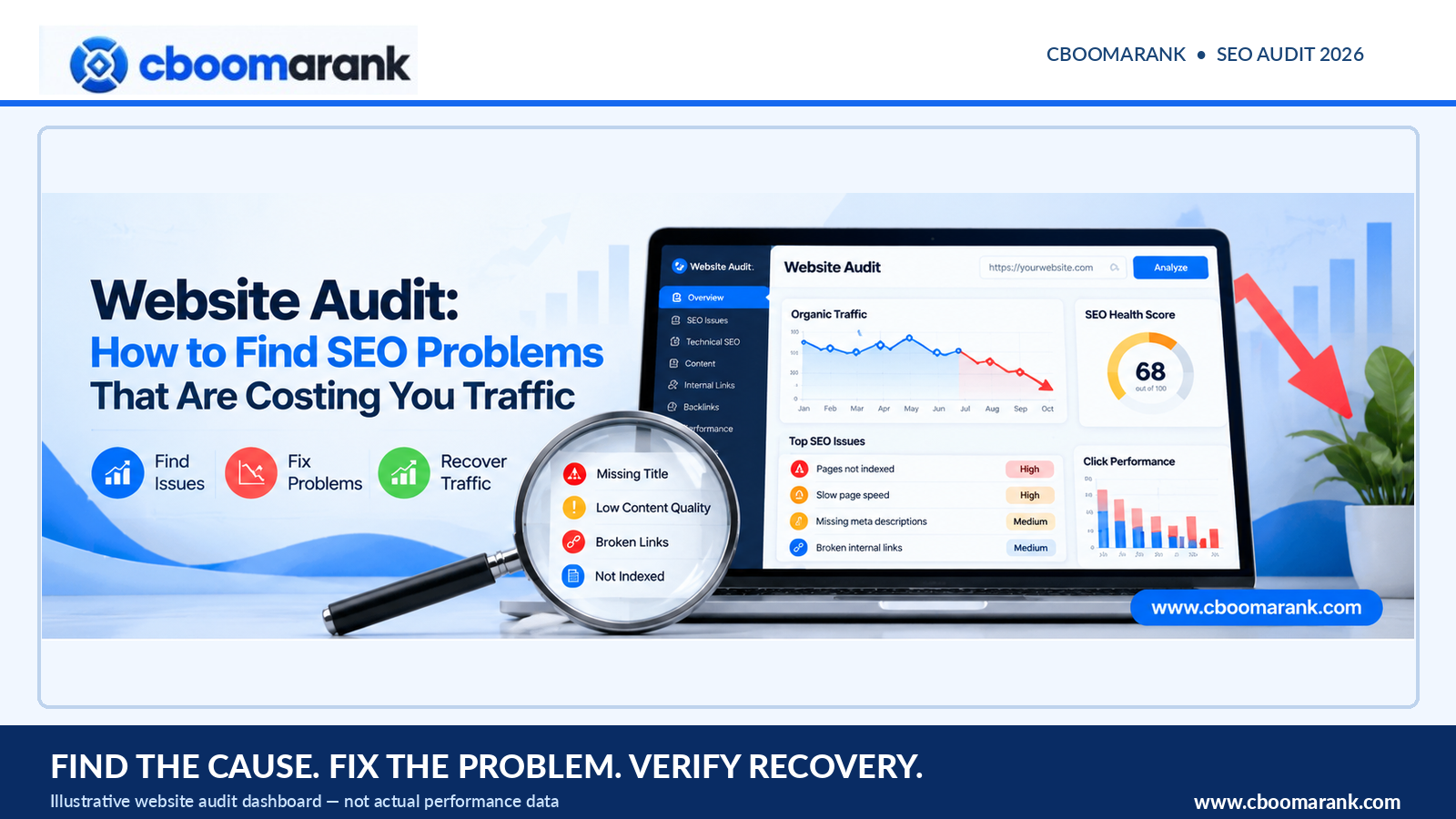
A website audit should tell you why valuable organic traffic is being lost, which pages are affected, and what to fix first. It should not stop at a health-score percentage or a list of missing meta descriptions. The useful outcome is a verified diagnosis backed by Search Console, analytics, page inspection and an action plan.
Imagine an online business whose organic clicks fall after a WordPress redesign. The homepage works, but several product categories lost their canonical links. Or imagine a publisher whose impressions remain steady while clicks drop because search snippets are no longer competitive. Therefore, these situations demand different fixes. This guide shows how to distinguish them and avoid changes that make the problem worse.
Quick answer: Begin the website audit by confirming when and where traffic changed. Segment Google Search Console results by page, query, device and country. Check indexing, canonical signals, response codes and content changes on affected URLs. Prioritize verified blockers, implement focused fixes, then monitor both search visibility and business outcomes. Google Search Central’s traffic-drop guide provides the primary investigation framework.
Website audit versus a checklist: what is different?
A comprehensive checklist asks whether a site follows many technical and editorial practices. A traffic-loss investigation asks which of those issues actually contributed to a decline. Both are useful; however, they should not be confused. Start with a known symptom and gather corroborating evidence before changing canonical rules, deleting pages or rewriting entire content sections.
Readers who want an exhaustive inventory can use our 50-point website SEO audit checklist. By contrast, this article is the companion playbook for diagnosing traffic loss, making priority decisions and validating recovery.
Fast website audit triage: match the symptom to the evidence
Before opening a crawl report, separate the traffic patterns. A sitewide collapse, a mobile-only decline and a loss of leads with stable organic sessions suggest different causes. For this reason, the matrix below is a starting hypothesis—not proof of causation.
| Observed symptom | First evidence to check | Likely investigation path |
|---|---|---|
| Clicks and impressions fall across many URLs | GSC Pages + Page indexing + deployment log | Indexation, availability, algorithms or demand |
| Clicks fall while impressions look stable | Queries, CTR, snippets and search appearance | SERP presentation, intent and competitors |
| Only mobile visibility declines | Device filter + mobile rendering + Core Web Vitals | Template, usability or regional/device differences |
| One site section disappears | Template URL Inspection, canonicals, response codes | Noindex, canonicalization, crawl paths |
| Organic visits steady, leads down | GA4 key events, form tests and landing-page mix | Conversion or measurement fault |
| Decline repeats each season | Year-over-year comparisons and Google Trends | Demand/seasonality rather than a technical error |
Start the website audit by confirming the traffic loss
Start with evidence. Confirm the dates and the affected audience before touching SEO settings. As a result, the team avoids spending a week fixing details that did not cause the change.
Website audit check 1: Find whether the decline is real
Evidence to inspect: Compare organic search clicks and engaged sessions for the same dates. Use a like-for-like period, matching days of the week and controlling for unusually short windows. Look for a corresponding change in impressions before assuming rankings are the cause.
Fix based on evidence: Confirm analytics and Search Console collection continued throughout the period. Investigate outages, consent changes or removed tracking tags when one platform declines while the other remains stable.
How to verify: Record the affected dates, metrics, device mix and source of each figure. For example, keep a screenshot or export so the diagnosis can be retested later.
2. Separate brand demand from non-brand visibility
Evidence to inspect: Segment queries into brand and non-brand groups. A decline in brand searches may reflect a change in advertising, awareness or seasonality rather than a website malfunction. A non-brand decline affecting high-value pages warrants closer ranking and content investigation.
Fix based on evidence: Compare trends in impressions, clicks and country mix for both groups. In addition, use Google Trends cautiously as an external demand signal rather than a direct measure of your website performance.
How to verify: Write separate hypotheses for demand loss and SEO visibility loss; do not combine them into a single unexplained percentage.
Website audit check 3: Locate the page templates losing traffic
Evidence to inspect: Export Search Console pages ordered by the largest click losses. Group them by blog posts, product pages, categories, locations and important landing-page templates. Sitewide templates can reveal systemic errors hidden by the site-level graph.
Fix based on evidence: Inspect representative high-loss pages, not only the overall average. For example, one broken template can affect hundreds of URLs; one old article may only need a focused content update.
How to verify: Define the impacted URL set and preserve it for post-fix monitoring.
4. Test traffic changes by device and country
Evidence to inspect: Filter performance by mobile versus desktop and by top countries. A mobile-only decline can point to layout, rendering or speed regressions; a country-only drop may reflect language, availability, local competitors or seasonal demand.
Fix based on evidence: Open the affected page on a real phone and test key content, navigation, overlays and conversion paths. In addition, check localization and hreflang only where the site actually has alternate-language or regional pages.
How to verify: Document exactly which segments changed before touching production settings.
Website audit check 5: Distinguish ranking losses from click-through losses
Evidence to inspect: If impressions and average positions look broadly stable while clicks fall, study the query and page mix, snippets and search appearance. If impressions and ranking visibility drop together, prioritize indexing, relevance or competition.
Fix based on evidence: However, average position is an aggregate and can shift with query mix. Evaluate the same representative queries and URLs across comparable periods instead of treating a single sitewide average as proof.
How to verify: Select a small set of stable, commercially relevant queries to monitor in the next two weeks.
6. Check for reporting anomalies and seasonal demand
Evidence to inspect: Before calling a decline an SEO penalty, review Google Search status information, Search Console data anomalies, campaign calendars and previous-year patterns. Holidays, new search features, product seasonality and shifts in user interest all affect demand.
Fix based on evidence: Compare year-over-year periods when available and distinguish the normal demand baseline from a new abnormal movement. Therefore, do not promise to recover traffic that disappeared because fewer people searched for the topic.
How to verify: Label each finding as confirmed, likely or unverified; uncertainty should remain visible in the audit report.
Website audit checks for crawl and indexing failures
After confirming the drop, test whether important URLs are accessible, correctly indexed and internally discoverable. For this reason, crawl and indexing barriers deserve attention before content polish.
Website audit check 7: Catch accidental noindex directives
Evidence to inspect: Check priority pages for meta robots noindex tags and X-Robots-Tag headers. A staging flag, CMS setting or deployment can accidentally instruct search engines not to show pages even while they load normally for visitors.
Fix based on evidence: Cross-check the live response, saved page source and URL Inspection report. Then remove an unintended directive only from the affected canonical pages; leave deliberate noindex policies for login, internal-search and other low-value URLs intact.
How to verify: After deployment, inspect representative URLs and monitor the Page indexing report rather than expecting instant recovery.
8. Audit robots.txt and rendering-resource access
Evidence to inspect: Inspect robots.txt rules for newly blocked page paths and supporting CSS or JavaScript needed for rendering. A broad Disallow can prevent crawling of a section or make rendered content difficult to interpret.
Fix based on evidence: Match the actual URL path to the appropriate user-agent rules and test the effect on known affected pages. Importantly, robots.txt is a crawler-control file, not a secure way to hide private information or a substitute for noindex.
How to verify: Use a controlled change log, then recrawl the affected URL group and verify the block is gone.
Website audit check 9: Check canonical signals and unintended duplicates
Evidence to inspect: Review the live canonical tag, internal links, sitemap entry and Google-selected canonical for valuable pages. Canonicals pointing to a parent, homepage, language variant or old URL can divert indexing signals away from the intended destination.
Fix based on evidence: Search for parameters, trailing-slash conflicts, content duplication and conflicting canonical hints. Therefore, do not rewrite canonical rules sitewide because one page looks unusual; reproduce a pattern across representative affected pages first.
How to verify: Validate preferred URLs after any corrections and check that the rendered page still serves the intended content.
10. Inspect redirects, response codes and soft 404s
Evidence to inspect: Crawl high-value URLs and follow redirects to their final destinations. Flag unexpected 404, 410, 5xx and soft-404 responses, as well as chains that route a relevant page to an unrelated homepage.
Fix based on evidence: Restore an accidentally removed valuable page when practical. Alternatively, redirect permanently moved content only to the most relevant alternative; unrelated redirects do not replace the missing answer users expected.
How to verify: Recheck HTTP status codes and update internal links to point directly to final canonical pages.
Website audit check 11: Find orphan pages and broken internal crawl paths
Evidence to inspect: Compare your crawler inventory with sitemaps, CMS exports and high-value Search Console landing pages. A useful page with no internal links may be discovered less consistently and becomes harder for visitors to reach.
Fix based on evidence: Add relevant contextual links from pages that already serve related user needs. Repair broken breadcrumbs, category links and navigation paths without flooding every article with the same anchor.
How to verify: Repeat a crawl and confirm the target pages are reachable through ordinary internal navigation.
12. Validate XML sitemap accuracy
Evidence to inspect: A clean sitemap should favor indexable canonical pages that return appropriate success responses. Redirected, blocked, duplicate or intentionally noindex URLs can make submitted-versus-indexed comparisons noisy.
Fix based on evidence: Review whether new content appears in the sitemap and whether recently deleted or redirected pages have been removed. However, sitemap inclusion does not guarantee indexing, and exclusion alone does not prove a page cannot be crawled.
How to verify: Track the submitted URL set alongside Search Console indexing reports after important changes.
Website audit check 13: Review JavaScript rendering and client-side links
Evidence to inspect: A page can return HTTP 200 while rendering thin or empty main content to automated clients. Check server HTML, browser-rendered DOM and the output Google reports for a representative JavaScript-heavy URL.
Fix based on evidence: Ensure important content and navigation are accessible through standard crawlable links. Compare successful and failing templates, including lazy-loaded content and mobile menu paths.
How to verify: Confirm the critical content and hyperlinks appear in a repeatable rendered test after the fix.
More technical depth: Our technical SEO checklist covers additional crawler, mobile, sitemap and structured-data checks.
Content and search-intent website audit
If technical access is sound, test the match between searcher intent and what the page delivers. Therefore, audit page groups rather than responding to isolated keyword fluctuations.
14. Detect outdated content that no longer answers intent
Evidence to inspect: Sort declining pages by lost relevant queries. Compare each page with current searcher needs: are tools discontinued, screenshots obsolete, definitions stale, or comparisons missing major decision criteria?
Fix based on evidence: Refresh the existing strong URL where possible. Furthermore, update evidence and publication-context labels honestly rather than changing the year without changing the substance. Preserve useful historical comments and relationships during in-place upgrades.
How to verify: Monitor page-level clicks, conversions and query coverage after the editorial update.
Website audit check 15: Find search-intent mismatch and weak introductions
Evidence to inspect: A technically sound article can still disappoint a visitor if the title promises a diagnosis and the body delivers a generic glossary. Compare the query, title, first screen, main headings and the final answer.
Fix based on evidence: Rewrite openings to answer the user’s actual question quickly, then support that answer with evidence and deeper guidance. For commercial pages, provide real evaluation criteria rather than padding the page with repeated keywords.
How to verify: Check engagement and conversions alongside impressions; a traffic increase without better fit may not be useful.
16. Investigate overlapping posts and keyword cannibalization
Evidence to inspect: Find queries where multiple pages change positions or attract impressions for the same intent. However, overlap is not automatically harmful: glossary, tutorial and buying-guide pages can naturally use similar vocabulary.
Fix based on evidence: When two pages genuinely compete for the same purpose, choose a primary URL, consolidate or differentiate content, update internal links and redirect only if a redundant page has a genuinely equivalent destination.
How to verify: Compare the combined query performance of the cluster before and after the change, not only one URL.
Website audit check 17: Improve weak titles without misleading readers
Evidence to inspect: Titles influence how readers interpret a search result. Investigate declining click-through rates for pages with stable visibility, paying attention to vague promises, repeated boilerplate, truncated words and titles that no longer reflect the answer.
Fix based on evidence: Write a descriptive title matching the page’s scope and distinguish it from neighboring results. Moreover, avoid changing dozens of titles in one release without a measurement plan or rewriting strong titles solely to satisfy a plugin score.
How to verify: Record the old and new titles and monitor the relevant query groups after recrawling.
18. Identify thin or unhelpful template pages
Evidence to inspect: Faceted pages, empty categories, templated locations and auto-generated listings can create large numbers of URLs without distinct value. Examine whether these pages provide real answers, products, local details or navigation choices.
Fix based on evidence: Improve genuinely useful pages and define a deliberate crawl/indexation approach for weak variants. Therefore, do not apply noindex across important categories just because a few empty archives were found.
How to verify: Sample the page templates again after release and verify valuable landing pages remain accessible.
Website audit check 19: Strengthen topic-cluster navigation and contextual links
Evidence to inspect: Searchers arriving on one article often need a related comparison, checklist or troubleshooting guide. Thin contextual linking can leave them stranded and make important topic relationships difficult to follow.
Fix based on evidence: Add selective, descriptive links from relevant pages to the best next answer. Instead, favor a clear hierarchy over an automatic block that inserts the same anchors sitewide, which may reduce editorial relevance.
How to verify: Validate internal link targets and measure assisted page journeys instead of relying on raw link counts.
Prevent cannibalization: Before adding another article on the same intent, use the keyword cannibalization guide to decide whether to update an existing URL instead.
Website audit of authority, speed and experience
Site experience, backlinks and link architecture can influence outcomes, but they require contextual evidence. Avoid treating a synthetic score or link-count graph as proof by itself.
20. Review backlink losses with relevance context
Evidence to inspect: A decline in referring domains may reflect changed editorial citations, deleted resources or normal link turnover. Review genuinely important lost links, linking-page relevance and whether the target page still exists.
Fix based on evidence: Restore useful missing resources where appropriate and earn replacement references by publishing credible material. In particular, avoid buying ranking-passing links, mass spam outreach or treating an arbitrary authority score as a Google metric.
How to verify: Monitor relevant referring pages and referral traffic alongside organic performance.
Website audit check 21: Check site speed and Core Web Vitals
Evidence to inspect: Review LCP, INP and CLS using field data for affected page groups. Google recommends good experiences across loading, responsiveness and visual stability; a single lab score is not the full picture.
Fix based on evidence: Find the cause at template level: oversized hero images, blocking scripts, expensive interaction handlers and layout shifts. Then compare before/after measurements on the same device class and traffic segments.
How to verify: Recheck actual user metrics after deployment, accounting for reporting delays and sample size.
22. Test mobile usability and intrusive overlays
Evidence to inspect: An audit should verify that content can be read and forms completed on common phones. Menus, sticky banners, consent panels and fixed headers can obscure important buttons or make the page difficult to navigate.
Fix based on evidence: Test touch targets, font scaling, keyboard accessibility and layout widths. Reproduce the failure in a mobile browser before changing the theme, and preserve functioning desktop templates.
How to verify: Confirm the improved flow with a real mobile interaction, not just a screenshot.
Website audit check 23: Validate structured data and search presentation
Evidence to inspect: Missing or incorrect structured data can affect eligibility for certain presentation features, but markup is not an automatic ranking boost. Check whether the schema matches the visible page and supported type requirements.
Fix based on evidence: Repair syntax, missing required properties and fake/inconsistent values. Similarly, avoid adding made-up ratings, FAQs or product information solely to obtain a rich-result test pass.
How to verify: Validate representative pages and record whether appearance or clicks actually changed.
24. Audit server errors and security warnings
Evidence to inspect: Intermittent 5xx responses, TLS failures, malware warnings or unexpected redirects can cause real availability and trust problems. Compare server logs and monitoring alerts with the dates when search visibility changed.
Fix based on evidence: Prioritize recovery of site availability and remove compromised code through a controlled security process. In addition, preserve logs and backups before large changes, and rotate affected credentials when security professionals advise it.
How to verify: Confirm clean responses over repeated checks and review Search Console security or manual-action reports.
Website audit check 25: Compare competitors without assuming causation
Evidence to inspect: A drop can happen because other pages improved, the result layout changed or demand shifted. Compare representative competing pages for freshness, coverage, original evidence, user utility and the terms they satisfy.
Fix based on evidence: Do not copy another publisher’s outline mechanically or equate more words with higher quality. Instead, identify the one or two meaningful reader needs your page currently misses and improve those parts first.
How to verify: Measure recovery for a fixed set of queries and pages rather than a single screenshot position.
Prioritize website audit fixes and measure recovery
The last phase turns findings into accountable work. Tie each proposed fix to supporting evidence, realistic testing and the pages or conversions it is meant to help.
26. Trace lost conversions back to affected landing pages
Evidence to inspect: Not every traffic problem is a ranking problem. For example, organic sessions may be stable while sign-ups or sales fall because a form broke, a checkout changed or lower-intent visitors increased.
Fix based on evidence: Inspect analytics key events, form errors, CTA destinations and segmentation by landing page. Also verify that measurement is configured correctly before treating a reporting gap as lost revenue.
How to verify: Retest the conversion path and compare qualified leads or sales after the fix.
Website audit check 27: Link each issue to a clear root-cause hypothesis
Evidence to inspect: For each finding, write the symptom, affected URLs, evidence, likely cause, confidence level and alternative explanation. In other words, a credible audit distinguishes confirmed facts from plausible theories.
Fix based on evidence: Example: “Mobile product pages lost impressions after deployment; affected HTML contains noindex; live URL Inspection confirms exclusion.” This is actionable. “SEO score fell by 12 points” without supporting detail is not.
How to verify: Only implement high-risk production changes after verifying the root cause on a representative sample.
28. Score fixes by impact, urgency and effort
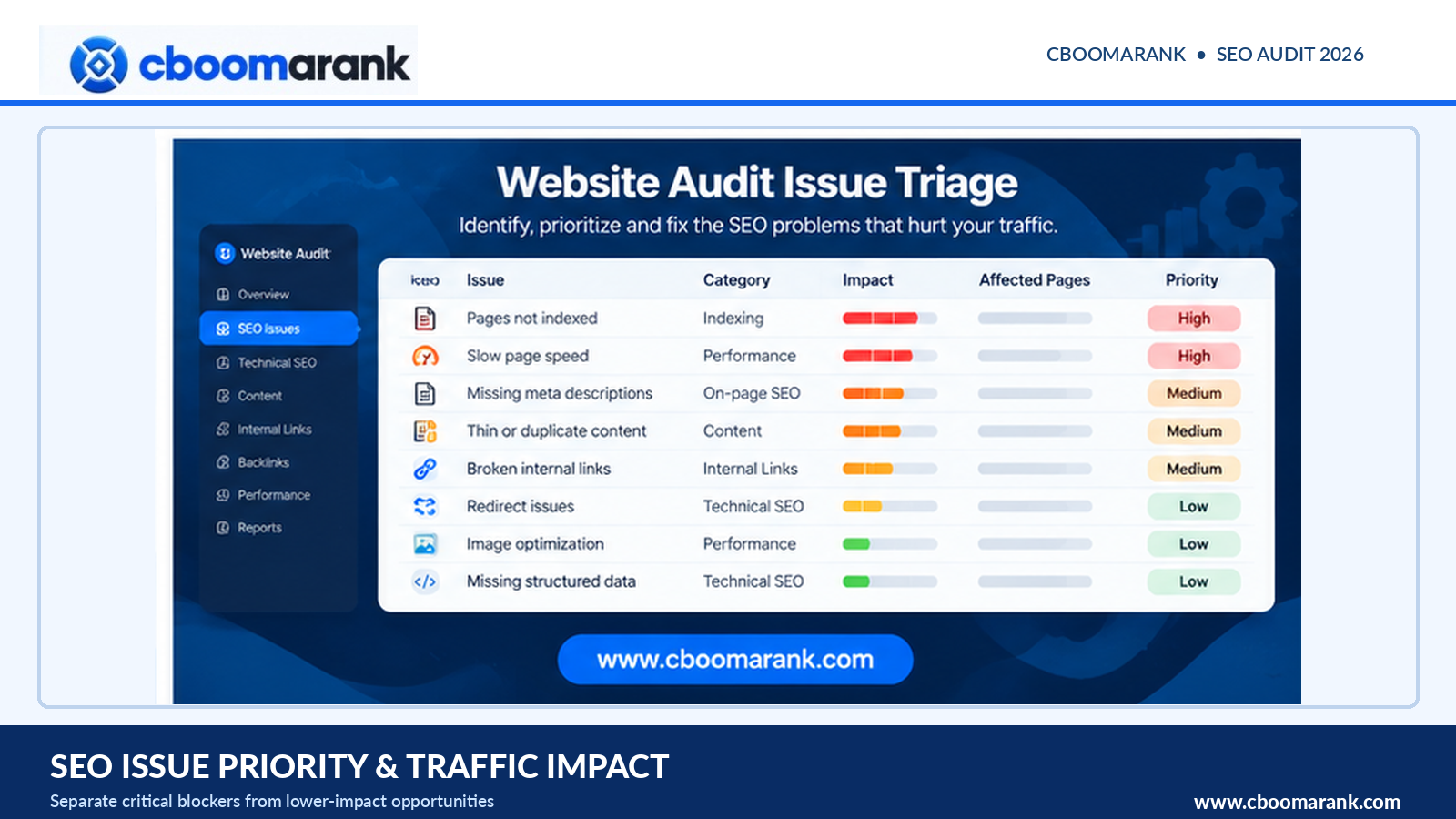
Evidence to inspect: Rank critical indexation blockers and revenue-page outages above minor cosmetic warnings. Estimate the affected URL count, organic opportunity, business importance, confidence, effort and reversibility.
Fix based on evidence: Start with one issue that affects many valuable pages or one business-critical landing page. A low-risk template fix may unlock more value than dozens of standalone metadata edits.
How to verify: Record an owner, change date and expected validation signal for every approved fix.
Website audit check 29: Roll out changes safely and avoid simultaneous redesigns
Evidence to inspect: Large batches make it difficult to know which intervention helped. Back up the relevant CMS records and configuration, record before-state checksums where possible and stage high-risk changes before production.
Fix based on evidence: Apply one logical group of related fixes at a time. Keep post IDs, canonical slugs, links and original publication metadata when improving an established page in place.
How to verify: Run smoke tests immediately after release, then check the Search Console evidence on a realistic timetable.
30. Verify recovery without promising a deadline
Evidence to inspect: Technical changes may validate quickly while search traffic patterns need more time to settle. Compare similar periods, watch indexation signals and check the specific pages and queries tied to each intervention.
Fix based on evidence: However, an improved audit score proves only that checks passed; it does not guarantee ranking, clicks or sales. Keep a measurement journal that shows what changed, which metrics improved and what remains uncertain.
How to verify: Schedule a 14-day technical review and an additional 30–90-day outcome review appropriate to the site.
Website audit priority score: choose fixes by business impact
Use a transparent priority model that can be challenged by editors and developers. For example, one practical version scores severity, number of valuable affected pages, commercial importance and confidence on a 1–5 scale, then considers implementation effort and reversibility. Do not mistake a model score for proof that rankings will improve.
| Finding | Evidence | Priority | Owner | Post-fix test |
|---|---|---|---|---|
| Accidental noindex on pricing pages | Live HTML + URL Inspection | Critical | Developer | Removed noindex, inspected URLs |
| Broken internal link to key guide | Crawl + navigation test | High | Content/engineering | Link destination returns 200 |
| Outdated paragraph on a low-traffic post | Editorial review + query history | Medium | Editor | Updated facts and context |
| Missing meta description on an archive | CMS scan + page intent | Low | SEO editor | Relevant snippet copy visible |
Decision rule: Prioritize confirmed blockers on important URLs before optional improvements. For a detailed impact-versus-effort framework, see the CBOOMARANK SEO issue prioritization guide.
A 14-day website audit and SEO recovery plan
- Baseline (Days 1–2): Export GSC and analytics baselines, identify high-loss URLs, compare devices and countries, note site changes and seasonal context.
- Indexing diagnosis (Days 3–4): Inspect representative URLs for indexability, status codes, canonicals, mobile rendering and internal crawl paths; reproduce issues.
- Content and conversion review (Days 5–6): Check search intent, content freshness, template duplication, internal links and commercially important conversion journeys.
- Decision checkpoint (Day 7): Approve a short prioritized backlog with evidence, owners, risks, backups, and specific validation tests.
- Fix implementation (Days 8–10): Implement a controlled batch of high-confidence fixes, beginning with blockers; avoid unrelated redesigns during the measurement window.
- Validation (Days 11–12): Recrawl fixed URL groups, inspect representative pages, test mobile functionality, and confirm conversion forms and CTAs.
- Follow-up (Days 13–14): Review early indexing and tracking signals; set 30/60/90-day checkpoints for impressions, clicks, conversions and business outcomes.
Do not assume an organic visibility trend will reverse in 14 days. Some technical checks can be validated immediately; search systems may take longer to recrawl, reprocess and reflect changes in reports. Keep the original baseline intact.
Website audit report template: what to hand your team
A useful website audit report is an operating document, not a pile of screenshots. For every issue, record the affected URLs, observed symptom, supporting evidence, confidence level, change owner, rollback approach and validation result. Also include the starting clicks, impressions, relevant conversion metric and date range so the next report can distinguish real progress from seasonal fluctuations.
For more detailed report examples, read what a professional SEO audit report should include. To grow beyond recovery work, use the 50 proven strategies to increase website traffic as a separate growth program.
Frequently asked questions about website audits
What is a website audit?
A website audit is a structured inspection of crawlability, indexing, content quality, internal links, user experience and measurement. In a traffic-loss investigation, its purpose is to identify and verify issues that may be connected to lost organic traffic or conversions.
Can a website audit explain why Google traffic dropped?
Sometimes. Indexing errors, server failures or template changes can be confirmed directly. Other causes involve competition, algorithmic changes or demand shifts, so conclusions need multiple signals and may remain uncertain.
How long does a website audit take?
A focused diagnosis can take hours for a small site, while an enterprise site needs more sampling and coordination. Fixes and ranking recovery have different timelines; the 14-day plan in this guide is an investigation and implementation framework, not a recovery guarantee.
Which metrics matter most?
Compare Search Console impressions and clicks, representative query/page positions, indexability, crawl errors and actual business conversions. Use Core Web Vitals and backlinks to understand specific issues, not as standalone success metrics.
Should I delete pages that have no traffic?
No. A low-traffic page may serve users, carry conversions or be seasonally important. Check its purpose, intent, indexing and usefulness; merge or remove only when a well-supported editorial decision justifies it.
What if my site audit shows 100% health but traffic is down?
An audit score measures selected checks, not search demand, competition or the value of your content. Return to query-level and page-level evidence and test tracking, search appearance and user intent.
Authoritative website audit references
Google Search Central: Debugging drops in Search traffic
Search Console: Inspect and troubleshoot a single page
Google Search Central: Core Web Vitals
Google Search Central: SEO Starter Guide
Google Search Central: Consolidate duplicate URLs
Final website audit checklist: diagnose, fix, prove
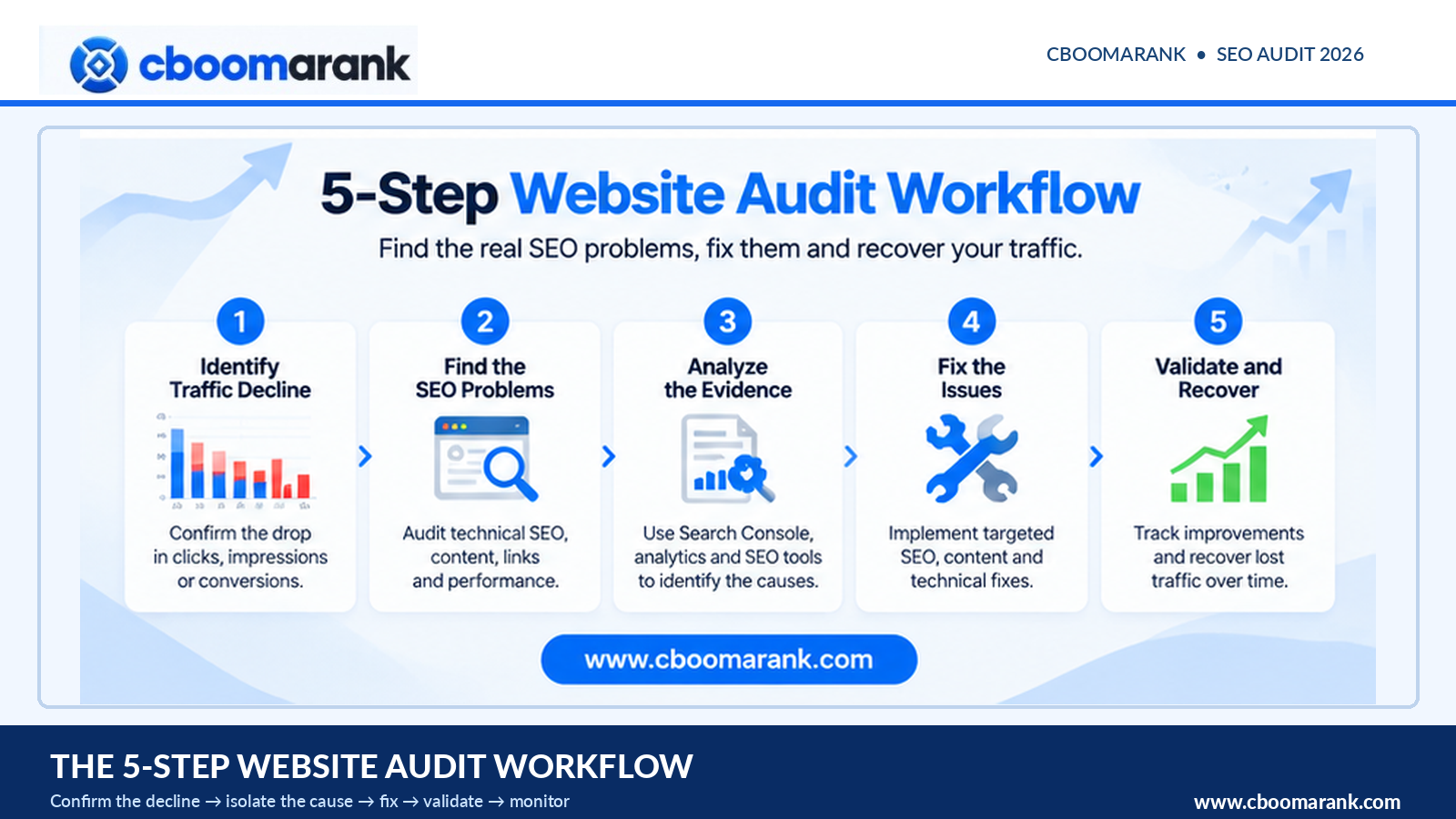
The strongest website audit is repeatable: identify which traffic changed, inspect evidence on the affected pages, test the most plausible cause, implement a narrowly scoped change and verify results. Fixing a problem that blocks important users or search engines is valuable even if traffic does not immediately rebound. Improving useful content and conversions may create value over a longer period.
Visit www.cboomarank.com to explore CBOOMARANK SEO research and website analysis tools. Build your audit around evidence, not cosmetic scores or guaranteed traffic claims.
