

Introduction
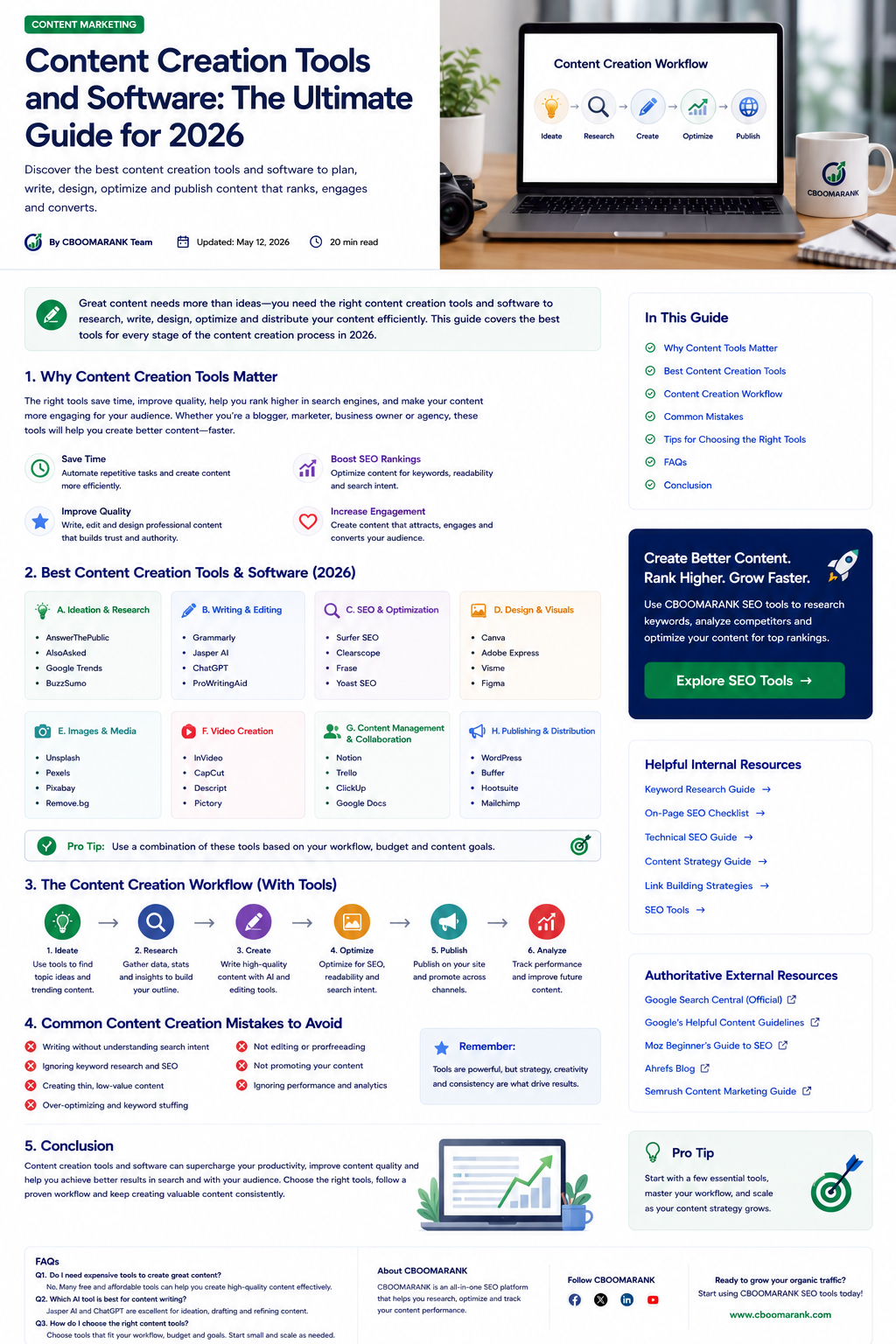
Content creation has changed dramatically. A modern creator or marketing team may need to research a topic, analyze search demand, draft an article, design original graphics, record video, repurpose the work for social channels, publish it, and measure performance—often within the same week.
The best content creation tools do not replace strategy, expertise, or human judgment. They reduce repetitive work, improve consistency, and help teams move from a rough idea to a polished, useful asset more efficiently. The most effective stack is usually a small group of tools that work well together rather than dozens of disconnected subscriptions.
This guide compares current tools for every stage of the workflow, including AI-assisted writing, SEO research, visual design, video and audio production, collaboration, distribution, and analytics. It also explains how to choose a stack that fits your budget and content goals.
What Are Content Creation Tools?
Content creation tools are applications that help individuals and teams plan, produce, edit, optimize, distribute, and evaluate content. They can support blog posts, landing pages, newsletters, social posts, infographics, podcasts, videos, presentations, ebooks, and other marketing assets.
A useful tool should solve a specific bottleneck. For example, a research platform may reveal topics your audience cares about, an AI assistant may help organize notes into a clear draft, a design platform may turn that draft into visual content, and an analytics platform may show whether the final asset generates traffic or leads.
Why Content Creation Software Matters in 2026
- Faster production without skipping editorial review.
- Consistent brand voice, visual identity, and formatting across channels.
- Better collaboration among writers, designers, editors, and subject-matter experts.
- More effective repurposing from one core asset into video, email, social, and visual formats.
- Stronger SEO decisions based on search intent, first-party data, and performance measurement.
- More time for original research, expert insights, interviews, and creative differentiation.
25 Best Content Creation Tools and Software
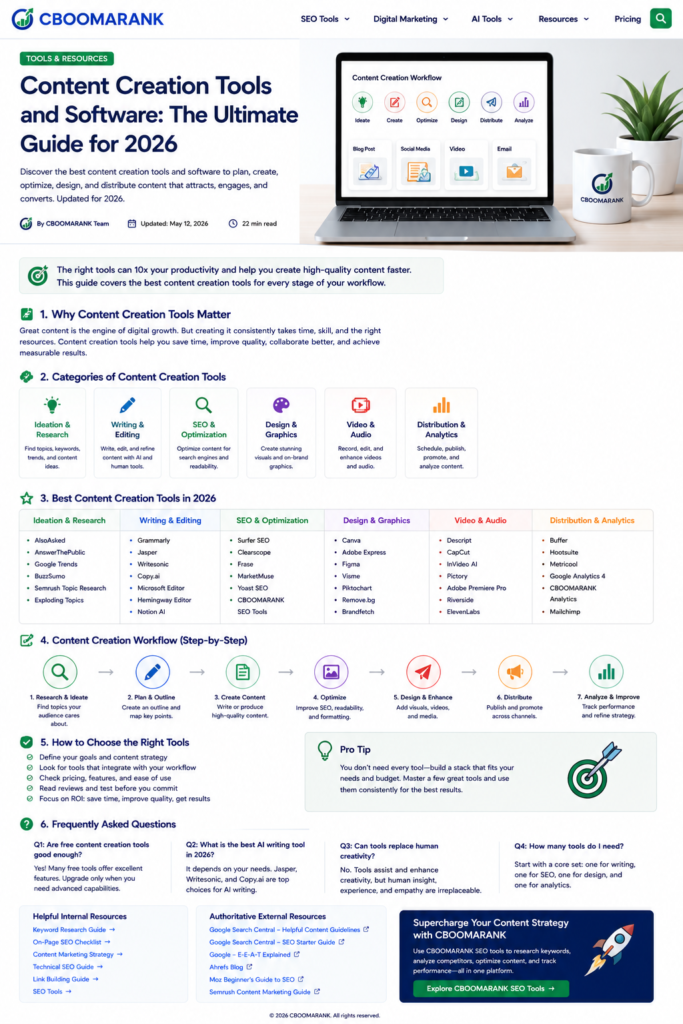
| Tool | Category | Best For | Key Strength |
| ChatGPT | Research, drafting and editing | Turning notes into outlines, drafts and revisions | Supports drafting, refinement, analysis and reusable project instructions. |
| Google Trends | Trend research | Seasonality and rising demand | Shows relative search interest across time and regions. |
| Google Search Console | First-party SEO data | Finding real queries and improving existing pages | Shows impressions, clicks, CTR, position and page-level search performance. |
| Semrush | SEO and competitive research | Topic, keyword and competitor analysis | Combines keyword, content and competitive research workflows. |
| Ahrefs | SEO and link research | Content gaps, keywords and backlinks | Strong organic-search and backlink datasets. |
| Surfer | Content optimization | SEO briefs and on-page guidance | Helps compare topic coverage against competing pages. |
| Frase | Research and briefs | SERP research and structured outlines | Speeds up brief creation and question discovery. |
| Grammarly | Editing | Clarity, grammar and tone checks | Provides writing feedback across common work surfaces. |
| Hemingway Editor | Editing | Simplifying dense prose | Highlights difficult sentences and readability issues. |
| Canva | Design and visual content | Social graphics, presentations and brand templates | Combines templates, brand controls and AI-assisted design. |
| Adobe Express | Design, video and social | On-brand marketing assets | Creates and edits images, video, social posts and other assets in one app. |
| Adobe Firefly | Generative media | Images, video, audio and creative variations | Supports generative creation and editing across several media types. |
| Figma | Collaborative design | Web visuals, interfaces and reusable systems | Real-time collaboration and component-based design. |
| Descript | Video and podcast editing | Text-based editing and repurposing | Edits audio and video through transcripts; supports captions and cleanup. |
| CapCut | Short-form video | Reels, Shorts and TikTok-style edits | Accessible editing, captions and social formats. |
| Riverside | Remote recording | Podcasts, interviews and webinars | Records remote participants and supports production workflows. |
| Loom | Screen recording | Tutorials, product demos and internal explanations | Fast recording and sharing for educational content. |
| Notion | Planning and knowledge management | Editorial calendars, briefs and content databases | Flexible documents, databases and team knowledge. |
| Airtable | Content operations | Structured calendars and production pipelines | Combines spreadsheet familiarity with workflow automation. |
| Google Docs | Writing and collaboration | Drafting, comments and approvals | Simple real-time editing and review. |
| WordPress | Publishing | Blogs, landing pages and content hubs | Flexible publishing, plugins and ownership of website content. |
| Buffer | Social distribution | Scheduling and publishing social content | Simple multi-channel scheduling and performance review. |
| Mailchimp | Email marketing | Newsletters and audience nurturing | Combines campaign creation, automation and audience tools. |
| Google Analytics 4 | Measurement | Content engagement and conversions | Connects traffic behavior to business outcomes. |
| CBOOMARANK | SEO analysis and reporting | Keyword, competitor and website performance workflows | Supports research, optimization, reporting and growth decisions. |
Best Tools for Ideas and Research
ChatGPT can help transform raw notes, interview transcripts, and research into structured questions and content angles, but factual claims should still be checked against reliable sources.
Google Trends is useful for identifying seasonality and comparing interest across locations. Search Console is even more valuable for established sites because it reveals the real queries already producing impressions.
Semrush and Ahrefs help marketers study competitors, keyword gaps, backlinks, and content opportunities. Use estimated metrics directionally rather than treating them as exact traffic numbers.
Best Writing and Editing Tools
ChatGPT can assist with outlining, drafting, restructuring, summarizing source material, and testing different explanations. It works best when the writer provides clear goals, source material, audience context, and editorial standards.
Grammarly and Hemingway are useful final-stage tools. They can surface grammar, tone, and readability issues, but editors should avoid accepting every suggestion automatically.
Best Design and Image Tools
Canva is a practical all-in-one choice for templates, presentations, social media graphics, brand assets, and collaborative design. Canva’s current AI suite supports design, writing, brand, and media workflows.
Adobe Express combines design, image, video, social, and publishing workflows, while Firefly supports generative image, video, audio, and design creation. Always review licensing terms and verify that you have rights to uploaded source media.
Best Video and Audio Tools
Descript is especially useful for creators who prefer editing video and podcasts through text. It can transcribe recordings, remove filler words, create captions, improve audio, and produce social-ready clips.
CapCut is suited to short-form social video, Riverside to remote interviews and podcasts, and Loom to tutorials and screen-based explanations.
Best Content Management and Publishing Tools
Notion, Airtable, and Google Docs help teams manage briefs, approvals, deadlines, and source material. WordPress remains a flexible publishing platform for organizations that want control over their website and content library.
Buffer and Mailchimp support distribution through social and email. Publishing is not the final step: creators should review engagement, leads, conversions, and organic-search performance.
A Practical Content Creation Workflow
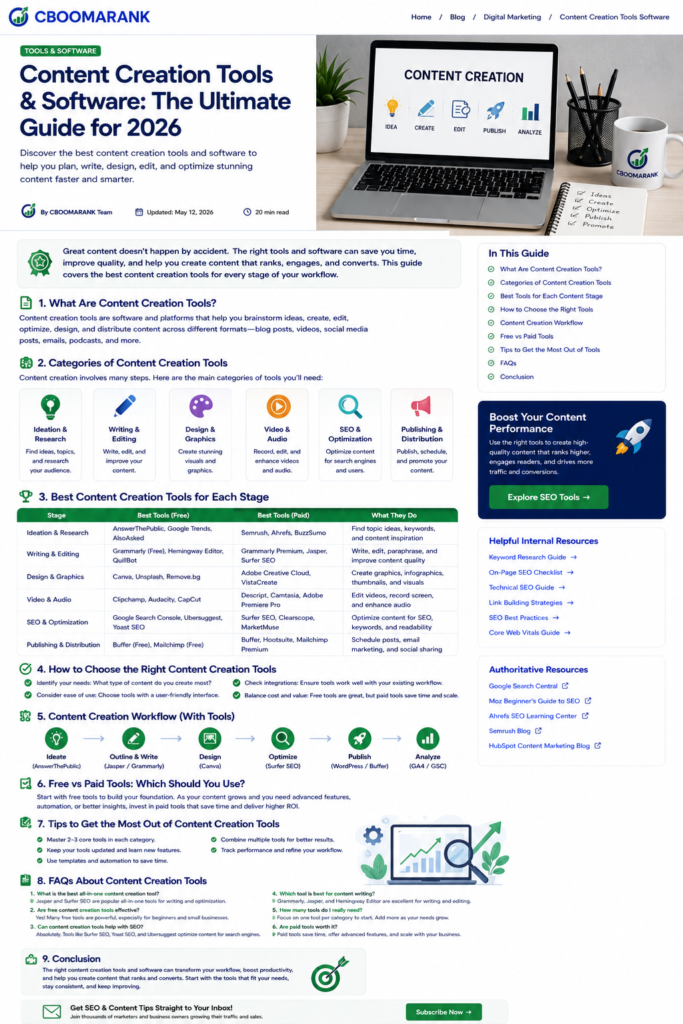
1. Define the goal
Decide whether the asset should attract traffic, generate leads, educate customers, earn links, or support a sale.
2. Research the audience
Use customer questions, Search Console, interviews, sales conversations, and keyword research to understand demand.
3. Create the brief
Document the target reader, primary intent, evidence requirements, format, internal links, CTA, and review owner.
4. Draft with evidence
Use AI tools to accelerate organization and iteration, not to invent facts or replace expert input.
5. Edit and verify
Check every important claim, improve clarity, remove repetition, and confirm that the content offers original value.
6. Design and publish
Create accessible visuals, add descriptive ALT text, format the page for mobile readers, and publish through a controlled workflow.
7. Distribute and improve
Promote through relevant channels, track performance, and update the asset using real audience and search data.
How to Choose the Right Content Creation Stack
- Start with your recurring bottleneck, not the longest feature list.
- Choose tools that integrate with the systems your team already uses.
- Test collaboration, export, brand-control, accessibility, privacy, and approval features.
- Calculate total cost across users, storage, AI credits, and required add-ons.
- Keep human review for accuracy, originality, legal risk, and brand judgment.
- Review the stack quarterly and remove overlapping subscriptions.
AI Content Creation: Best Practices and Risks
- Use AI to assist research, organization, variation, editing, and repurposing.
- Provide approved sources and require citations or source notes for factual work.
- Do not publish unverified claims, fabricated quotes, or unsupported statistics.
- Add first-hand experience, original examples, screenshots, testing, and expert commentary.
- Protect confidential information and follow your organization’s data policies.
- Disclose material AI use when required by policy, law, client agreement, or platform rules.
Common Mistakes to Avoid
- Buying too many tools before defining a workflow.
- Publishing generic AI drafts without fact-checking or original contribution.
- Optimizing for keyword density instead of reader intent.
- Using stock or generated visuals without checking rights, accuracy, and accessibility.
- Creating content without distribution or measurement plans.
- Failing to update tool comparisons when features and pricing change.
Recommended CBOOMARANK Internal Links
- Best Keyword Research Tools
- AI SEO Tools
- SEO Best Practices
- Technical SEO Guide
- Trending Keywords for SEO
- Link Building Tools
- CBOOMARANK Pricing
Authoritative External References
- OpenAI: Writing with ChatGPT
- OpenAI: ChatGPT Overview
- Canva: Content Creation Tools
- Canva: Magic Design
- Adobe Express: Create with AI
- Adobe Firefly
- Descript Video Editor
- Google: Helpful, Reliable, People-First Content
Frequently Asked Questions
What is the best all-in-one content creation tool?
There is no universal winner. Canva is strong for visual production, ChatGPT for drafting and refinement, and WordPress for publishing. Many teams need a small connected stack.
Can AI tools create an entire article?
They can generate drafts, but publication-ready work still needs source verification, expert judgment, editing, originality, and audience-specific examples.
Which tools are best for SEO content?
Search Console, Google Trends, Semrush, Ahrefs, Surfer, Frase, and CBOOMARANK address different parts of research, optimization, competitive analysis, and measurement.
Are free tools enough for a small business?
Often yes at the beginning. Start with free or entry-level tools and upgrade only when a paid feature saves meaningful time or supports measurable growth.
How many content tools should a team use?
Use the smallest stack that covers research, production, design, publishing, and measurement. Too many overlapping tools increase cost and complexity.
How often should this tool list be reviewed?
Review it at least quarterly because AI features, product availability, pricing, and integrations change frequently.
Conclusion
Content creation software can make a small team faster, but the workflow matters more than the number of subscriptions. Start with the audience and business goal, choose a few tools that solve real bottlenecks, and build human review into every important stage.
For CBOOMARANK, the strongest opportunity is to connect content research, SEO analysis, publishing, and performance measurement. Use this guide to build a practical stack, create more original and useful work, and improve every asset using real search and audience data.
