


SEO reporting software should do more than export rankings into a PDF. The best SEO reporting tools in 2026 help agencies, marketing teams and businesses connect rankings, traffic, backlinks, site health, competitors and increasingly AI-search visibility into reports that lead to better decisions.
The challenge is that different reporting platforms are built for different users. Some are strongest for client-facing agency reports. Others excel at deep SEO analysis, dashboards, competitor research or custom business intelligence.
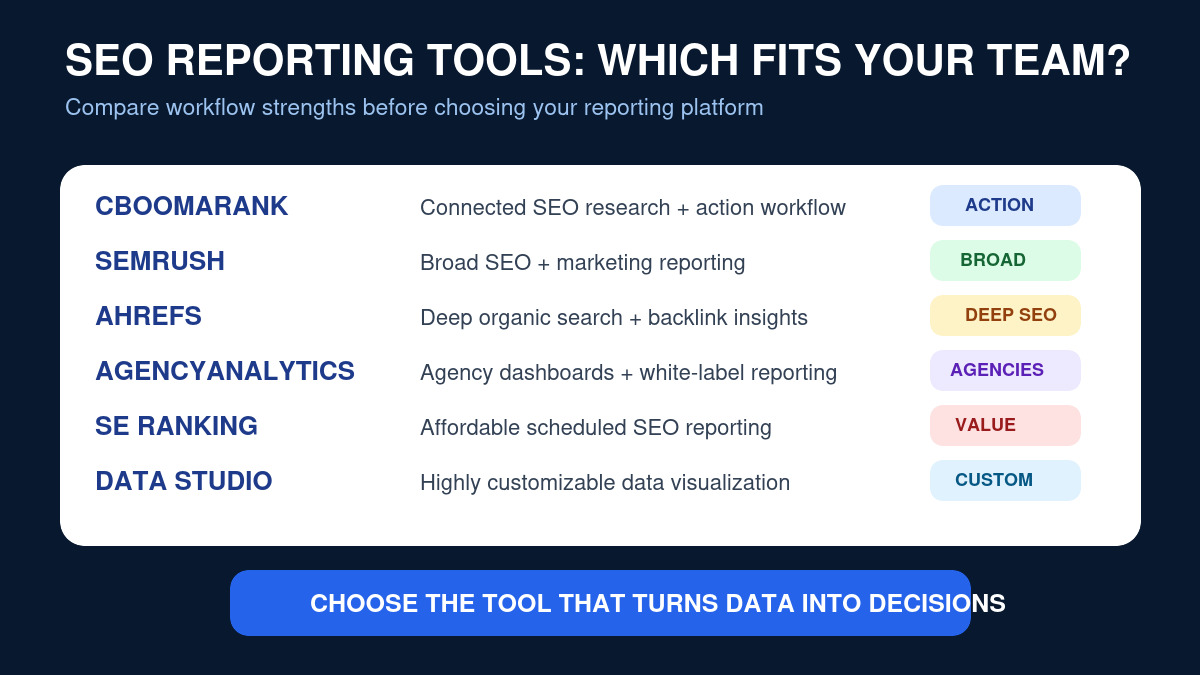
This guide compares leading SEO reporting platforms for 2026, including CBOOMARANK, Semrush, Ahrefs, AgencyAnalytics, SE Ranking and Google Looker Studio.
We evaluate each platform based on reporting usefulness, SEO depth, automation, dashboards, competitor insights, team and client workflows, AI-search relevance and how easily the data can lead to action.
Want to move from SEO reports to actual optimization? Create your CBOOMARANK account to analyze your website, research keywords, study competitors and identify the SEO opportunities behind your reporting data.
Best SEO Reporting Tools in 2026: Quick Comparison
| Tool | Best For | Key Reporting Strength |
|---|---|---|
| CBOOMARANK | Businesses and SEO teams wanting reporting connected to action | Website analysis, SEO research, competitor insights and AI-search workflow |
| Semrush | Agencies and multi-channel marketing teams | Branded automated reports using Semrush and external marketing data |
| Ahrefs | SEO specialists and teams | Deep SEO metrics, dashboards, Rank Tracker and Site Explorer reporting |
| AgencyAnalytics | Marketing agencies managing many clients | Automated white-label reporting and broad marketing integrations |
| SE Ranking | Agencies and SMB SEO teams | Customizable scheduled SEO reports |
| Looker Studio | Teams needing custom dashboards | Flexible visualization across many connected data sources |
What Makes a Good SEO Reporting Tool?
A polished dashboard is useful, but appearance alone does not make a reporting platform valuable.
The strongest tools help answer questions such as:
- Are our important keyword rankings improving?
- Which landing pages are gaining or losing organic traffic?
- Are technical SEO problems affecting performance?
- Which competitors are gaining visibility?
- Are backlinks increasing or disappearing?
- Which SEO activities are contributing to leads or sales?
- Where are new content opportunities appearing?
- How visible is the brand across AI-powered search experiences?
Reporting should reduce uncertainty. A useful report tells a team what changed, why it may matter and what action should come next.
How We Evaluated the Best SEO Reporting Software
For this comparison, we focused on seven practical areas.
1. SEO Data Depth
Reporting becomes more useful when rankings, backlinks, site health, keyword data and competitors can be analyzed without constantly moving between unrelated systems.
2. Dashboard Quality
Teams need reports that can communicate performance quickly. Good dashboards make trends, wins and problems understandable without forcing stakeholders to interpret raw spreadsheets.
3. Automation
For agencies especially, manually rebuilding the same monthly report is expensive. Scheduling, reusable templates and automated delivery can save substantial time.
4. Client and Team Reporting
Agencies may need white labeling, client portals, permissions and scheduled reports. Internal teams may care more about collaboration and executive summaries.
5. Competitor Intelligence
Reporting only your own performance can hide important market changes. Strong reporting should help teams understand whether competitors are gaining rankings, visibility, backlinks or content opportunities.
6. AI Search Visibility
SEO reporting is expanding beyond ten blue links. Businesses increasingly want to understand visibility across Google AI experiences, ChatGPT, Claude, Perplexity, Gemini and Microsoft Copilot.
For background, read the CBOOMARANK guides to Google AI Overviews, Claude visibility and Generative Engine Optimization.
7. Ability to Turn Reports Into Action
This is the most important criterion.
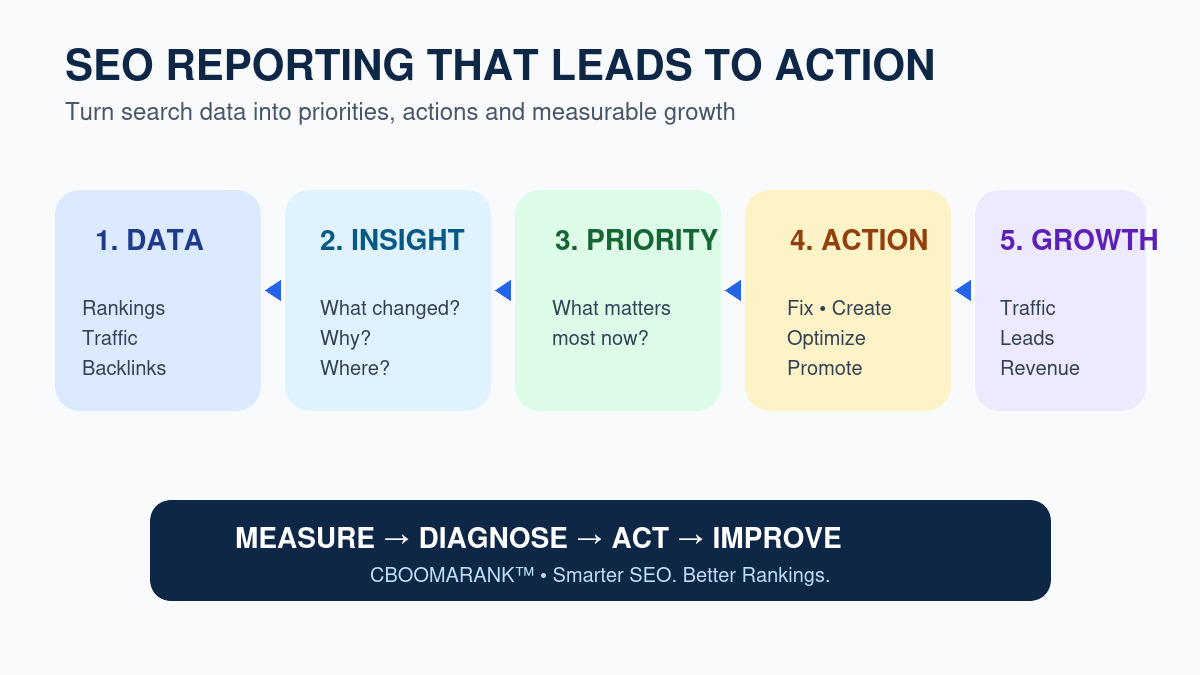
A reporting platform should help a user move from:
data → insight → priority → action → measurable result.
That is where reporting becomes part of an SEO growth system rather than an administrative task.
1. CBOOMARANK — Best for Connected SEO Reporting and Action
Best for: Businesses, publishers and SEO teams that want reporting connected directly to website analysis, keyword research, competitor research and optimization workflows.
Editorial disclosure: CBOOMARANK is our own platform. This section describes first-party product capabilities and positioning rather than an independent third-party review.
CBOOMARANK is being built around a connected SEO workflow rather than treating reports as an isolated final step.
The platform brings together areas such as:
- website analysis;
- SEO audits;
- keyword research;
- competitor research;
- authority and website metrics;
- SEO reporting;
- AI-assisted SEO workflows;
- publisher content workflows.
The advantage of this approach is context.
If a report shows that organic visibility is weak, the user should be able to move toward keyword opportunities, competitor gaps, site issues or content actions instead of simply downloading another report.
CBOOMARANK is also being developed with the changing search environment in mind. Traditional Google rankings remain important, but businesses increasingly need reporting that can accommodate SEO, content performance and AI-search visibility as part of the same growth strategy.
This makes CBOOMARANK particularly relevant for businesses that do not merely want to report what happened. They want help deciding what to do next.
Where CBOOMARANK Stands Out
- Connected SEO workflow rather than reporting in isolation.
- Keyword and competitor research tied to website context.
- Website analysis and SEO auditing.
- Growing support for AI-oriented SEO and content workflows.
- Designed around actionable recommendations and business growth.
Who Should Choose CBOOMARANK?
Consider CBOOMARANK if you are a business owner, publisher, SEO professional or marketing team that wants to connect reporting with research and optimization rather than maintaining several disconnected workflows.
See What Your SEO Data Is Telling You
Analyze your website, research keywords, inspect competitors and turn SEO reporting into a practical growth plan.
Create your CBOOMARANK account and start your website analysis →
2. Semrush — Best for Broad Marketing and SEO Reporting
Best for: Agencies and marketing teams that want SEO reporting alongside broader digital-marketing data.
Semrush’s reporting system is built around customizable reports and dashboards that combine data from its own SEO platform with external marketing sources.
According to Semrush’s current reporting documentation, My Reports can pull live data from Semrush and more than 20 marketing tools, including platforms such as Google Analytics 4 and Google Ads.
Reports can be customized, branded and scheduled for automatic delivery.
That makes Semrush particularly useful for teams that need to report SEO together with PPC, traffic, competitor performance and other marketing activity.
Semrush Reporting Strengths
- Custom marketing dashboards.
- Scheduled reporting.
- White-label reporting options.
- SEO and competitor data.
- Multiple external marketing integrations.
- Useful for multi-channel reporting.
Official reference: Semrush Reporting Features.
Where Semrush Fits Best
Semrush is a strong choice when reporting needs extend beyond SEO into broader marketing performance and the organization is already using the Semrush ecosystem.
The trade-off is complexity. Teams that only need a focused reporting workflow may find that a large all-in-one suite provides more functionality than they actually use.
3. Ahrefs — Best for Deep SEO Performance Reporting
Best for: SEO specialists, content teams and businesses that rely heavily on backlink, ranking and organic-competitor analysis.
Ahrefs has expanded its reporting capabilities around its core SEO datasets.
Its current reporting offering includes a central dashboard, portfolios, a report builder, alerts and connectors for enhanced reporting workflows.
The Report Builder can use widgets from tools such as Site Explorer and Rank Tracker, allowing teams to create SEO-focused performance reports and share them with stakeholders.
Ahrefs Reporting Strengths
- Strong backlink and organic-search datasets.
- Site Explorer reporting.
- Rank Tracker reporting.
- SEO project dashboards.
- Portfolio monitoring.
- Google Search Console integration.
- Automated alerts for important SEO changes.
Official reference: Ahrefs Reporting.
Where Ahrefs Fits Best
Ahrefs is particularly useful when the reporting conversation is deeply SEO-focused: backlinks, organic competitors, rankings, content performance and search visibility.
Agencies that require heavy white-label, cross-channel client reporting may prefer a platform designed specifically around agency reporting workflows, while SEO teams that value deep search data may find Ahrefs particularly strong.
4. AgencyAnalytics — Best for SEO Agencies Managing Many Clients
Best for: Digital agencies that need scalable client dashboards, scheduled reports and white-label presentation.
AgencyAnalytics is built specifically around agency reporting.
Its current SEO reporting platform combines keyword rankings, backlinks, traffic, site-health information and integrations with other SEO and marketing platforms.
AgencyAnalytics says it currently connects with more than 85 data sources and supports automated reports, customizable dashboards, white labeling and client-facing reporting workflows.
That agency-first design is its biggest advantage.
AgencyAnalytics Reporting Strengths
- Automated daily, weekly or monthly reporting.
- White-label reports and dashboards.
- Client portals and permissions.
- Keyword ranking reports.
- Backlink reporting.
- Google Analytics and Search Console integration.
- Broad cross-channel marketing integrations.
Official reference: AgencyAnalytics SEO Reporting.
For agencies whose biggest reporting problem is producing consistent reports across many clients, AgencyAnalytics is one of the most purpose-built options in this comparison.
Reporting Is More Valuable When It Leads to Action
If your report identifies declining rankings, competitor gains or content gaps, the next step should be optimization—not another spreadsheet.
Use CBOOMARANK to analyze your site and uncover your next SEO opportunities →
5. SE Ranking — Best for Affordable Agency SEO Reporting
Best for: Agencies, consultants and growing SEO teams that want rankings, audits, competitor data and customizable reporting in one platform.
SE Ranking combines its SEO toolkit with a dedicated Report Builder. Teams can create reports manually or schedule them for automatic delivery.
Current SE Ranking documentation confirms that scheduled reports can be delivered daily, weekly or monthly, with configurable timing and recipients. Reports can also be branded with a company name and logo where the applicable white-label features are available.
The Report Builder can include project data from rankings, competitors, website audits and Google-connected sources such as Google Analytics, Google Search Console and Google Ads.
SE Ranking Reporting Strengths
- Customizable SEO reports.
- Daily, weekly and monthly scheduled delivery.
- Rank-tracking reports.
- Website Audit data.
- Competitor reporting.
- Google Search Console and Analytics data.
- White-label options for agency workflows.
- PDF, HTML and spreadsheet-oriented exports.
Official reference: SE Ranking SEO Reporting documentation.
SE Ranking is especially attractive to agencies that want an SEO platform with reporting capabilities without necessarily adopting a much larger enterprise marketing stack.
6. Google Data Studio — Best for Flexible Custom Dashboards
Best for: Analysts and marketing teams that want highly customizable dashboards built from multiple data sources.
Google’s reporting product formerly known as Looker Studio returned to the Data Studio name in April 2026.
Data Studio remains a no-cost dashboard and visualization platform. It can connect to many different data sources and turn that information into interactive reports containing charts, tables, filters and branded visual elements.
Google currently describes Data Studio as suitable for self-service analytics, interactive dashboards, ad-hoc reports, embedded reporting and connections to more than 1,000 data sources.
Data Studio Reporting Strengths
- Highly customizable dashboards.
- Interactive filters and date controls.
- Google Analytics and Search Console reporting.
- Many third-party connector options.
- Shareable reports.
- Collaborative editing.
- Report embedding.
- No-cost core version.
Official reference: Google Data Studio documentation.
The Main Limitation of Data Studio
Data Studio is primarily a visualization layer rather than a complete SEO research platform.
It can present SEO data beautifully, but users still need reliable underlying data sources for rankings, backlinks, competitors, technical SEO and other specialist metrics.
This makes Data Studio excellent for custom executive dashboards but less suitable as the only SEO platform used by a team.
Best SEO Reporting Tools: Detailed Comparison
| Platform | SEO Research | Automated Reports | Agency Focus | Competitor Data | Custom Dashboards |
|---|---|---|---|---|---|
| CBOOMARANK | Strong connected workflow | Growing reporting capabilities | Businesses, publishers and SEO teams | Yes | Yes |
| Semrush | Extensive | Yes | Strong | Extensive | Yes |
| Ahrefs | Extensive | Yes | Moderate | Extensive | Yes |
| AgencyAnalytics | Integration-oriented | Strong | Excellent | Via integrations and SEO features | Strong |
| SE Ranking | Strong | Yes | Strong | Yes | Yes |
| Data Studio | Depends on connected sources | Reporting distribution available | General reporting | Depends on source | Excellent flexibility |
Which SEO Reporting Tool Is Best for Agencies?
Agency reporting has special requirements because the report is often part of the client relationship.
Agencies usually need:
- multiple client accounts;
- scheduled reporting;
- white-label branding;
- client dashboards;
- easy-to-understand summaries;
- rank tracking;
- traffic and conversion reporting;
- competitor insights;
- proof of work and progress.
AgencyAnalytics is particularly focused on this workflow.
Semrush is attractive when the agency also wants extensive SEO and marketing research.
SE Ranking provides a useful balance between SEO functionality and agency reporting.
CBOOMARANK is relevant to agencies and SEO professionals that want reports connected more directly to analysis, keyword research, competitor discovery and future AI-search workflows.
Which SEO Reporting Tool Is Best for Small Businesses?
Small businesses usually do not need dozens of reports.
They need clarity.
A useful small-business reporting system should answer:
- Is my website becoming more visible?
- Which keywords matter?
- Which competitors are ahead of me?
- What SEO problems should I fix first?
- Which content should I create next?
- Are SEO efforts producing enquiries, registrations or revenue?
This is where a connected workflow can be more useful than an elaborate reporting stack.
CBOOMARANK’s direction is designed around helping users move from website analysis to keyword and competitor research and then toward prioritized action.
Don’t Just Read Your SEO Report — Improve It
Find the keywords, competitors, technical problems and content opportunities behind your performance data.
Which SEO Reporting Tool Is Best for In-House Marketing Teams?
In-house marketing teams often need to combine SEO reporting with broader business reporting.
The best choice depends on the team’s workflow.
- Semrush: useful when SEO sits inside a broader digital-marketing program.
- Ahrefs: useful for teams heavily focused on organic search, content and backlinks.
- Data Studio: useful when executives need custom dashboards combining several business data sources.
- CBOOMARANK: useful when the team wants SEO reporting tied closely to site analysis, research and actionable opportunities.
What SEO Metrics Should You Include in a Report?
A report becomes less useful when it contains every metric simply because the software can display it.
Choose metrics that help explain performance and guide decisions.
Organic Visibility Metrics
- Search impressions.
- Organic clicks.
- Keyword rankings.
- Average ranking position.
- Share of tracked keywords in top positions.
- Organic landing-page performance.
Website Health Metrics
- Crawl errors.
- Indexability problems.
- Broken internal links.
- Duplicate or canonical issues.
- Core technical SEO problems.
- Page-experience issues.
Authority and Backlink Metrics
- Referring domains.
- New backlinks.
- Lost backlinks.
- Link quality indicators.
- Competitor link growth.
Content Metrics
- Top organic pages.
- Pages losing visibility.
- Keyword opportunities.
- Content gaps.
- New pages gaining rankings.
- Engagement and conversions.
Commercial Metrics
- Lead submissions.
- Account registrations.
- Trial starts.
- Revenue attributed to organic landing pages.
- Conversion rate.
- Cost per acquired customer where measurable.
SEO Reporting Is Expanding Into AI Search Visibility
Traditional keyword rankings are still essential, but search visibility is becoming more fragmented.
A prospect may now discover a company through:
- Google organic results;
- Google AI Overviews;
- Google AI Mode;
- ChatGPT Search;
- Claude;
- Perplexity;
- Gemini;
- Microsoft Copilot.
This makes future SEO reporting broader than conventional position tracking.
Teams increasingly need to understand:
- whether AI systems mention their brand;
- whether their pages receive citations;
- which competitors receive more AI visibility;
- which topics generate AI citations;
- whether AI referrals produce qualified traffic;
- how AI visibility connects to organic search performance.
For deeper guidance, see our Perplexity SEO guide, Gemini SEO guide, Microsoft Copilot guide and Claude visibility guide.
How to Build an SEO Reporting Workflow That Drives Growth
Step 1: Define the Business Goal
Start with the outcome you want SEO to influence: leads, ecommerce sales, subscriptions, qualified traffic, brand demand or another measurable objective.
Step 2: Select Decision-Making Metrics
Choose metrics that help explain progress toward that goal. Avoid adding data simply because it is available.
Step 3: Add Competitive Context
Compare your performance with the search competitors that matter. A five-position ranking improvement can look excellent until you discover that three competitors improved even faster.
Step 4: Identify the Cause
When visibility changes, investigate why.
Look at:
- technical issues;
- content quality;
- search intent;
- competitor improvements;
- backlink changes;
- algorithm and SERP changes;
- seasonality.
Step 5: Assign an Action
Every important issue should eventually become an action.
Examples:
- update an outdated article;
- fix an indexing problem;
- create a missing content page;
- strengthen internal links;
- research competing keywords;
- improve a conversion page;
- earn relevant backlinks.
Step 6: Measure the Result
Use the next reporting cycle to determine whether the action produced an improvement.
This creates a continuous loop:
measure → diagnose → prioritize → act → measure again.
Build an SEO Workflow Around Action, Not PDFs
CBOOMARANK connects website analysis, keyword research and competitor insights so your reporting can lead directly into optimization decisions.
Create your account and start analyzing your SEO opportunities →
Common SEO Reporting Mistakes
Reporting Too Many Metrics
A 70-page report can contain more data and provide less understanding than a focused five-page executive summary.
Reporting Rankings Without Search Intent
Ranking number one for an irrelevant keyword may produce little business value.
Ignoring Competitors
Your own numbers need market context.
Reporting Traffic Without Conversions
Growing organic sessions is useful only when the traffic supports business objectives.
Automating Reports Without Adding Insight
Automation saves time, but automatically emailing charts is not the same as providing analysis.
Teams should explain meaningful changes and recommend next steps.
Using Reporting as the End of the SEO Process
The report should begin the next round of optimization.
Frequently Asked Questions
What is SEO reporting software?
SEO reporting software collects and presents search-performance data such as rankings, traffic, backlinks, technical SEO health, competitors and conversions so teams can monitor progress and make decisions.
What is the best SEO reporting tool for agencies?
AgencyAnalytics is highly specialized for client reporting. Semrush and SE Ranking also provide strong agency workflows. The best choice depends on whether the agency prioritizes client presentation, deep SEO research, multi-channel reporting or connected optimization.
What is the best SEO reporting tool for small businesses?
Small businesses should prioritize clarity and action over reporting complexity. CBOOMARANK is designed to connect reporting-oriented insights with website analysis, keyword research and competitor research, while platforms such as SE Ranking and Semrush provide established reporting suites.
Can I use Google Data Studio for SEO reports?
Yes. Data Studio, formerly called Looker Studio, can create highly customizable SEO dashboards when connected to sources such as Google Analytics, Search Console or third-party SEO data providers.
Is Data Studio free?
Google provides a no-cost Data Studio product. A Data Studio Pro offering adds additional enterprise-oriented capabilities.
Should SEO reports include competitors?
Yes. Competitor context helps explain whether your visibility is improving relative to the market and can reveal new keywords, content gaps and backlink opportunities.
How often should SEO reports be generated?
Monthly reporting is common for strategic reviews, while weekly dashboards can be useful for active campaigns. Daily reporting is usually more appropriate for operational monitoring than executive decision-making.
Should SEO reports include AI visibility?
Increasingly, yes. Businesses that depend on organic discovery should monitor emerging AI-search channels alongside conventional rankings, especially where AI citations and referrals influence customer discovery.
Final Verdict: Which SEO Reporting Tool Should You Choose?
There is no single best reporting platform for every organization.
- Choose CBOOMARANK if you want SEO reporting connected to website analysis, keyword research, competitor intelligence and an expanding AI-search workflow.
- Choose Semrush if you want broad SEO and multi-channel marketing reporting.
- Choose Ahrefs if deep SEO, backlink and competitor research are central to your workflow.
- Choose AgencyAnalytics if scalable white-label client reporting is the primary requirement.
- Choose SE Ranking if you want an SEO suite with customizable scheduled reporting and agency-oriented capabilities.
- Choose Data Studio if maximum dashboard flexibility and custom data visualization matter most.
The bigger lesson is that reporting should never be disconnected from action.
The most valuable SEO report is the one that helps your team identify the next opportunity, make a better decision and improve measurable business performance.
Turn Your SEO Data Into Growth
Analyze your website, discover keyword opportunities, research competitors and build a clearer SEO action plan with CBOOMARANK.
Register for CBOOMARANK and start analyzing your website today →
