

SEO audit software helps you find technical, content, crawlability, indexability, performance, and user-experience problems that can limit organic growth. The right tool turns a website crawl into a clear action plan: what is broken, which pages are affected, how serious the issue is, and what should be fixed first.
In 2026, the best SEO audit software does more than list missing title tags. Modern audit platforms now evaluate Core Web Vitals, JavaScript rendering, internal links, canonicals, structured data, AI crawler accessibility, ecommerce templates, international SEO, and reporting workflows for agencies and in-house teams.
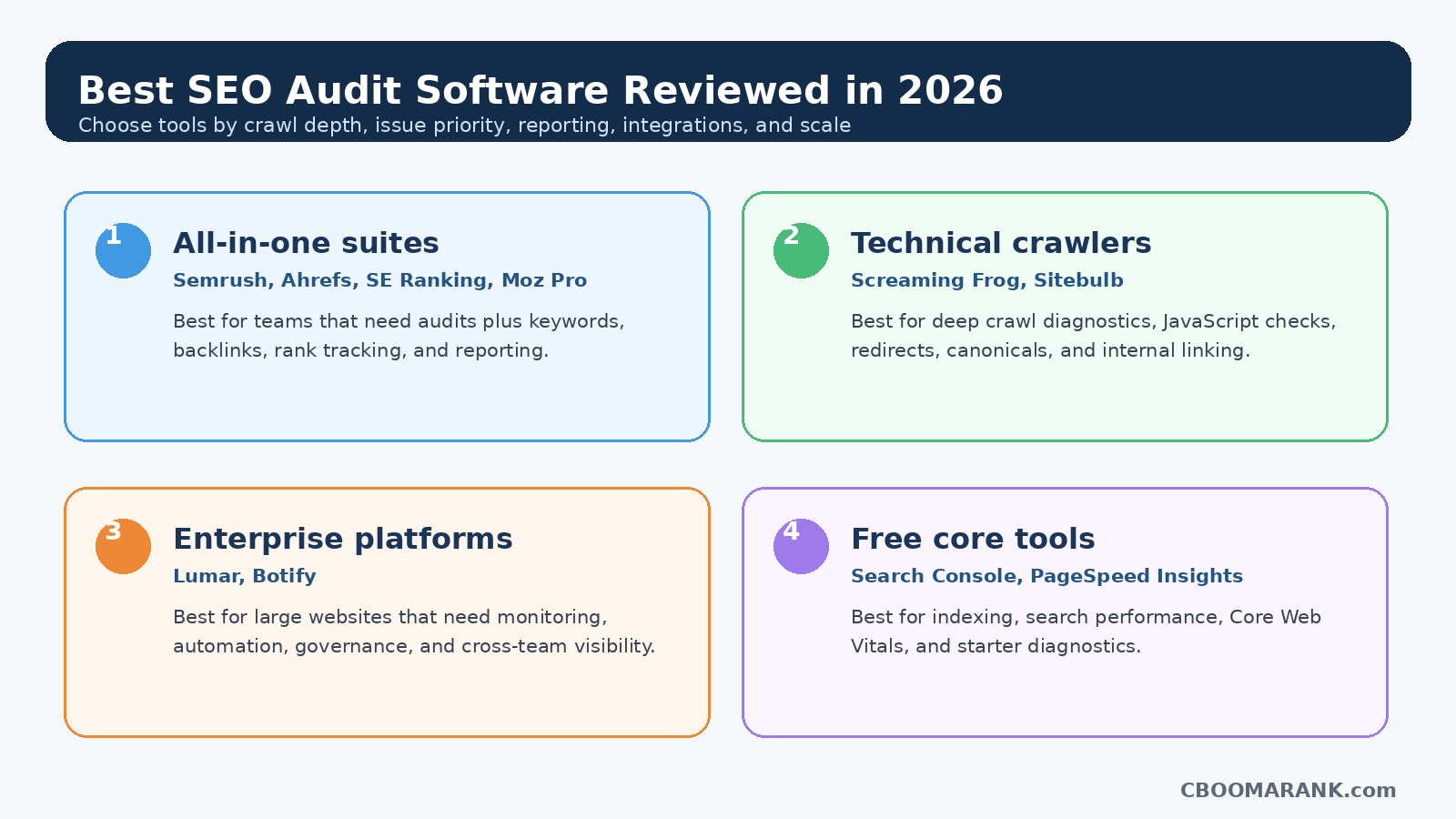
This review compares the most useful SEO audit tools for different business needs: all-in-one SEO suites, desktop crawlers, cloud enterprise platforms, and free Google tools. Instead of naming one universal winner, this guide recommends the best choice for beginners, agencies, ecommerce teams, technical SEOs, enterprise websites, and budget-conscious businesses.
Suggested internal reading: Best Free SEO Tools for Beginners, Semrush vs Ahrefs, and SEO Pricing Guide.
Quick Picks: Best SEO Audit Software by Use Case
| Use Case | Best Choice | Why It Fits |
| Best all-in-one SEO audit suite | Semrush Site Audit | Strong technical checks, marketing suite features, competitor tools, reporting, and AI-readiness checks. |
| Best for backlink-focused SEOs | Ahrefs Site Audit | Combines technical audits with one of the strongest backlink and organic research ecosystems. |
| Best desktop crawler | Screaming Frog SEO Spider | Powerful crawl control, technical diagnostics, custom extraction, and excellent value for advanced SEOs. |
| Best value for small businesses | SE Ranking Website Audit | Easy dashboard, scheduled audits, health score, reports, rank tracking, and agency-friendly features. |
| Best visual technical audit reports | Sitebulb | Clear hints, crawl maps, audit comparison, prioritization, and strong technical explanations. |
| Best enterprise audit platform | Lumar | Enterprise-scale crawling, monitoring, accessibility, performance, governance, and workflow visibility. |
| Best enterprise crawl + AI visibility | Botify | Strong crawl/rendering diagnostics, search automation, bot visibility, and enterprise search intelligence. |
| Best free starter stack | Google Search Console + PageSpeed Insights | Free search performance, indexing, Core Web Vitals, and page-speed diagnostics. |
What Is SEO Audit Software?
SEO audit software is a tool or platform that scans a website and identifies issues that may affect search visibility, user experience, crawling, indexing, page quality, and organic conversions. Some tools are simple browser-based checkers; others are advanced crawlers that can process millions of URLs, render JavaScript, test staging sites, and integrate with analytics, log files, and business dashboards.
A useful SEO audit tool should answer five practical questions: Can search engines find the page? Can they crawl and index it? Is the content complete and useful? Does the page load well for users? Are internal links, canonical tags, redirects, schema, and templates helping or hurting performance?
The best software does not only produce a long export of errors. It helps prioritize the work. A missing meta description on an old low-traffic tag page is not as urgent as a noindex tag on a revenue-driving product category. Good audit software makes that difference visible.
How We Reviewed These SEO Audit Tools
This review focuses on practical buying factors that matter to businesses and marketers: crawl depth, accuracy, issue prioritization, usability, reporting, integrations, scalability, AI and generative-search readiness, cost, and the ability to turn audit findings into action.
We also considered whether each tool fits a specific workflow. A small business owner does not need the same crawler as a global ecommerce SEO team. An agency needs clear reporting and repeatable audit templates, while a technical SEO consultant may need custom extraction, JavaScript rendering, and crawl configuration.
1. Semrush Site Audit
Best for: Best for all-in-one SEO and digital marketing teams
Semrush is one of the strongest options for businesses that want site auditing inside a broader marketing platform. Its Site Audit tool is built for technical SEO checks, crawlability analysis, site health monitoring, and issue prioritization. Semrush also connects audit findings with keyword research, competitor analysis, backlink tools, content optimization, local SEO, PPC research, and reporting.
Strengths
- Strong technical SEO issue detection and prioritization
- Useful for agencies that need branded reports and multi-client workflows
- Pairs well with keyword, content, backlink, local SEO, and PPC research
- Includes modern checks such as AI crawler accessibility in its Site Audit feature
Limitations
- Can feel overwhelming for beginners because it includes many tools
- Costs more than lightweight audit-only tools if you only need crawling
Best choice recommendation: Choose Semrush if you want one platform for SEO audits, competitor research, content planning, PPC research, and client reporting.
2. Ahrefs Site Audit
Best for: Best for SEOs who need audits plus backlinks and organic research
Ahrefs Site Audit is a strong choice for SEO professionals who want technical audits connected to keyword research, backlinks, ranking data, and competitor analysis. Ahrefs says its Site Audit scans websites for 170+ technical and on-page SEO issues, and its free Webmaster Tools option is especially helpful for site owners who want to audit verified properties before upgrading.
Strengths
- Strong technical and on-page SEO issue coverage
- Excellent fit if backlink analysis is a major part of your workflow
- Helpful Health Score and issue reports for prioritizing problems
- Free access is available for verified site owners through Ahrefs Webmaster Tools
Limitations
- Less focused on PPC and broader marketing workflows than Semrush
- Data limits and access depend on the selected plan
Best choice recommendation: Choose Ahrefs if backlinks, organic research, and technical audits are equally important to your SEO workflow.
3. Screaming Frog SEO Spider
Best for: Best desktop crawler for technical SEO professionals
Screaming Frog SEO Spider is a favorite among technical SEOs because it gives detailed control over website crawling. It can audit links, redirects, titles, meta descriptions, headings, canonicals, status codes, directives, images, hreflang, structured data, and many other technical elements. The free version can crawl up to 500 URLs, which is enough for many small websites.
Strengths
- Deep crawl configuration for technical SEO diagnostics
- Excellent for redirect audits, migration checks, internal linking, metadata, and canonicals
- Affordable annual license compared with many cloud platforms
- Works well for consultants who need fast, exportable crawl data
Limitations
- Desktop-based workflow may be less convenient for large teams
- Beginners may need time to learn crawl configuration and exports
Best choice recommendation: Choose Screaming Frog if you want maximum control over technical SEO crawling and do not need a full marketing suite.
4. SE Ranking Website Audit
Best for: Best value audit suite for small businesses and growing agencies
SE Ranking combines website audits with rank tracking, competitor research, backlink monitoring, reporting, and agency-friendly features. Its Website Audit tool covers health score, page-level analysis, Core Web Vitals, technical SEO issues, speed, security, crawlability, HTTP status codes, link attributes, and robots/meta directives. It can also run scheduled audits.
Strengths
- Good balance of usability, features, and price
- Useful dashboards for business owners and agencies
- Scheduled auditing helps monitor new issues over time
- Strong reporting for teams managing multiple websites
Limitations
- Very advanced technical SEOs may still prefer a dedicated crawler for complex projects
- Enterprise-scale crawling needs should be compared carefully against specialized platforms
Best choice recommendation: Choose SE Ranking if you want practical website audits, rank tracking, and reports without paying for the most expensive enterprise tools.
5. Sitebulb
Best for: Best visual technical SEO audit tool
Sitebulb is built specifically for website auditing and technical SEO. It is popular because it explains issues clearly, visualizes crawl data, and helps users understand why a problem matters. It offers desktop and cloud options, audit comparison, JavaScript crawling, issue prioritization, and performance reports.
Strengths
- Clear explanations and visual audit reports
- Strong for technical SEO consultants and agencies
- Audit comparison helps track improvements between crawls
- Useful for presenting complex technical issues to non-technical clients
Limitations
- Not a full all-in-one SEO suite for keyword research, PPC, or content marketing
- Cloud/desktop plan choice depends on team size and crawl scale
Best choice recommendation: Choose Sitebulb if you need a dedicated technical audit tool with excellent visual reporting and explanations.
6. Lumar
Best for: Best enterprise website intelligence and monitoring platform
Lumar is designed for large websites and enterprise teams that need deep audits across technical SEO, site speed, accessibility, custom metrics, and ongoing monitoring. It is useful when SEO issues involve multiple departments such as development, product, content, compliance, and analytics.
Strengths
- Enterprise-scale crawling and monitoring
- Combines technical SEO, site speed, accessibility, and custom analytics
- Good fit for governance, QA testing, and cross-team workflows
- Useful for large ecommerce, publishing, and multi-market websites
Limitations
- May be more than small businesses or freelancers need
- Pricing and setup are typically enterprise-oriented
Best choice recommendation: Choose Lumar if your website is large, complex, and needs continuous monitoring across teams.
7. Botify SiteCrawler
Best for: Best for enterprise crawl diagnostics, rendering, and AI/GEO visibility
Botify is an enterprise search platform with strong crawl, rendering, indexing, and search intelligence capabilities. Its SiteCrawler can crawl and render websites in a way designed to show how search engines and AI agents discover and process content. It is particularly useful for large ecommerce, marketplace, media, and enterprise websites where crawl budget and discoverability affect revenue.
Strengths
- Strong enterprise crawling and JavaScript rendering diagnostics
- Useful for large sites where crawl efficiency and indexation matter
- Connects technical SEO with business and search performance insights
- Expanding focus on AI search, GEO, and bot visibility
Limitations
- Not intended as a low-cost beginner audit tool
- Best value appears when technical SEO is tied to enterprise-scale revenue
Best choice recommendation: Choose Botify if you manage a large site and need enterprise-level crawling, rendering, indexing, and search automation.
8. Moz Pro Site Crawl
Best for: Best beginner-friendly SEO suite with site crawl features
Moz Pro is a well-known SEO platform that includes site crawl, keyword research, rank tracking, page optimization, and link analysis. It is often easier for beginners to understand than highly technical crawlers, making it useful for small teams that need a guided SEO platform rather than deep technical crawl configuration.
Strengths
- User-friendly SEO reports and metrics
- Good choice for learning SEO fundamentals
- Combines audits with keywords, rankings, and link data
- Useful for small businesses and marketers who want guidance
Limitations
- Advanced technical SEOs may prefer Screaming Frog, Sitebulb, Lumar, or Botify for deep crawl control
- Not always the strongest choice for enterprise-scale technical audits
Best choice recommendation: Choose Moz Pro if you want a beginner-friendly SEO suite with audit capabilities, keyword research, and link metrics.
9. Google Search Console + PageSpeed Insights
Best for: Best free audit stack for beginners
Google Search Console and PageSpeed Insights are not full SEO audit suites, but they are essential free tools. Search Console helps website owners monitor Search traffic, performance, indexing, and issues in Google Search. PageSpeed Insights reports mobile and desktop performance and gives suggestions related to page experience and Core Web Vitals.
Strengths
- Free and directly connected to Google Search data
- Excellent for indexing, search performance, and page experience checks
- Useful for beginners and advanced SEOs alike
- Pairs well with any paid audit software
Limitations
- Does not replace a full crawler for site-wide technical audits
- Limited competitor and bulk technical reporting compared with paid tools
Best choice recommendation: Use these tools even if you pay for SEO software. They provide core diagnostic data every website owner should monitor.
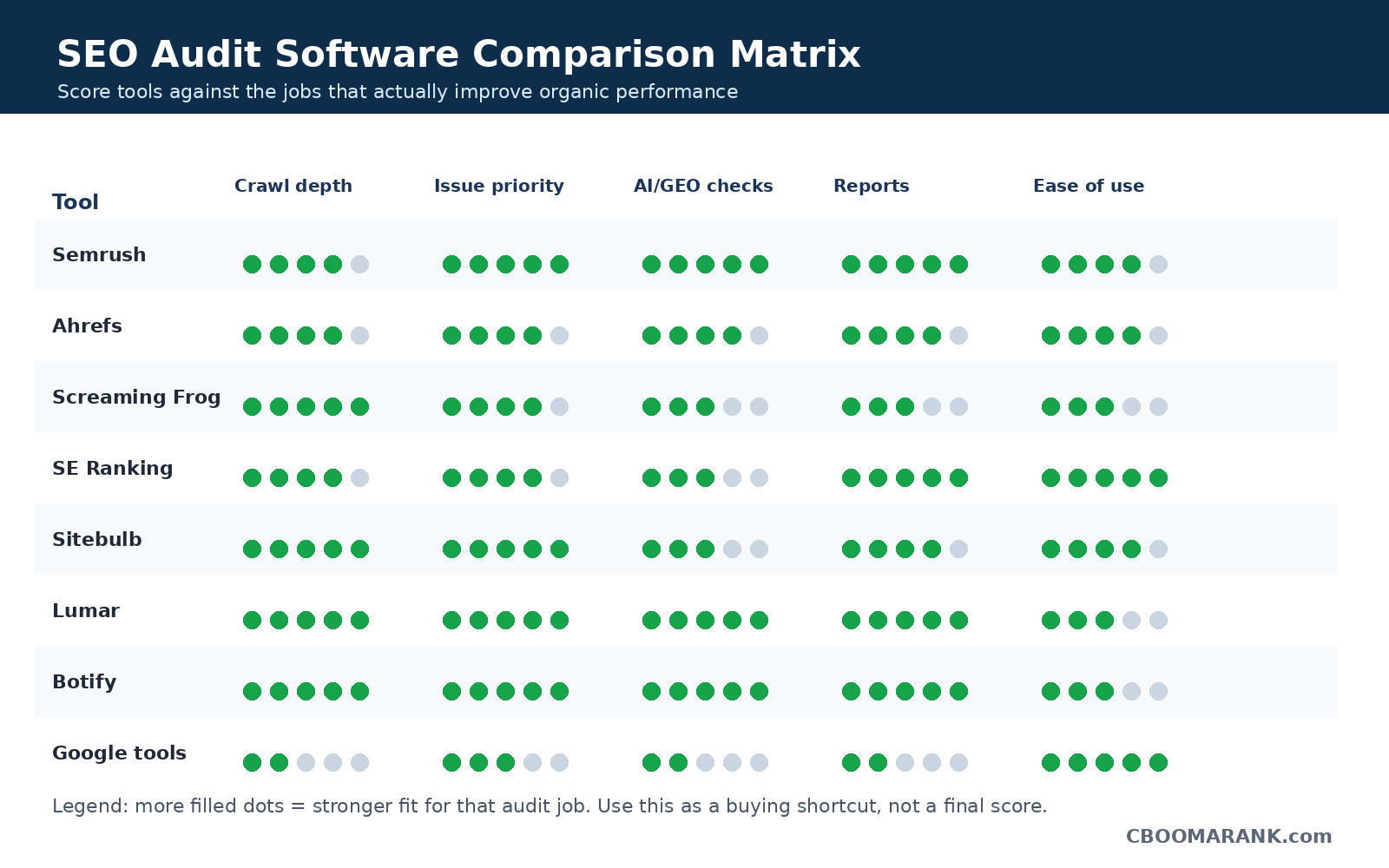
SEO Audit Software Comparison Table
| Tool | Best For | Pricing Style | Biggest Strength | Main Limitation |
| Semrush | All-in-one SEO and marketing | Paid SaaS with limited free tools | Audit + competitor + content + PPC ecosystem | Can be expensive if you only need crawling |
| Ahrefs | SEO, backlinks, and audits | Paid SaaS; free for verified sites via AWT | Backlink data plus technical audits | Less PPC/local marketing breadth than Semrush |
| Screaming Frog | Technical SEO crawling | Free 500 URLs; paid annual license | Deep crawl control and exports | Desktop workflow and learning curve |
| SE Ranking | Small businesses and agencies | Paid SaaS with trial | Value, reporting, scheduled audits | Not as specialized as enterprise crawlers |
| Sitebulb | Visual technical audits | Desktop and cloud plans | Clear hints and crawl visualizations | Not a complete marketing suite |
| Lumar | Enterprise site intelligence | Custom/enterprise | Scale, monitoring, accessibility, speed, governance | Too advanced for small websites |
| Botify | Enterprise crawl and indexing | Custom/enterprise | Rendering, crawl efficiency, AI/GEO visibility | Enterprise complexity and cost |
| Moz Pro | Beginner-friendly SEO suite | Paid SaaS with entry plans | Learning-friendly metrics and audits | Less technical depth than dedicated crawlers |
| Google tools | Free starter diagnostics | Free | Search Console, indexing, Core Web Vitals | Not a full site audit platform |
Must-Have Features in SEO Audit Software
- Crawlability and indexability checks: The tool should identify noindex tags, robots.txt blocks, canonical conflicts, blocked resources, orphan pages, sitemap mismatches, and pages that search engines may struggle to access.
- Technical SEO diagnostics: Look for checks covering status codes, redirects, duplicate titles, missing headings, thin content signals, broken links, hreflang, pagination, structured data, HTTPS, and mobile usability.
- JavaScript rendering support: If your website relies on JavaScript frameworks, the crawler should show whether key content, links, and metadata are visible after rendering.
- Issue prioritization: A useful audit tool ranks issues by severity, affected URLs, template impact, and likely business value rather than treating every warning equally.
- Reporting and collaboration: Agencies and in-house teams need exports, scheduled reports, white-label dashboards, client-ready summaries, and task management workflows.
- Integrations: Strong tools connect with Google Search Console, Google Analytics, PageSpeed data, Looker Studio, project management tools, log files, and content workflows.
- AI and generative search readiness: In 2026, some platforms now include AI crawler accessibility, AI search visibility, GEO checks, and brand visibility features.
Best SEO Audit Software by Business Type
Best for beginners
Start with Google Search Console, PageSpeed Insights, and a simple platform such as Moz Pro or SE Ranking. This gives you enough data to understand search traffic, indexing, site speed, and common technical errors without overwhelming your team.
Best for bloggers and affiliate sites
Ahrefs, Semrush, or SE Ranking are strong because they combine site audits with keyword research, competitor analysis, rank tracking, and backlink monitoring. Bloggers need more than technical checks; they also need content and keyword opportunity data.
Best for agencies
Semrush, SE Ranking, Sitebulb, and Screaming Frog are strong choices. Agencies usually need repeatable audit templates, client reports, exports, and a mix of broad SEO analysis and deep technical diagnostics.
Best for ecommerce
Semrush, Ahrefs, Screaming Frog, Sitebulb, Lumar, and Botify can all work depending on scale. Ecommerce audits should focus on category pages, product templates, faceted navigation, duplicate content, canonicals, internal search URLs, schema, and crawl budget.
Best for enterprise websites
Lumar and Botify are better suited to large websites that need continuous monitoring, workflow governance, QA testing, and crawl intelligence across millions of URLs.
Best value recommendation
For most small businesses, SE Ranking offers strong value. For advanced technical SEOs, Screaming Frog remains one of the best-value tools. For all-in-one SEO teams with larger budgets, Semrush or Ahrefs may deliver more total value because they include research and reporting beyond auditing.
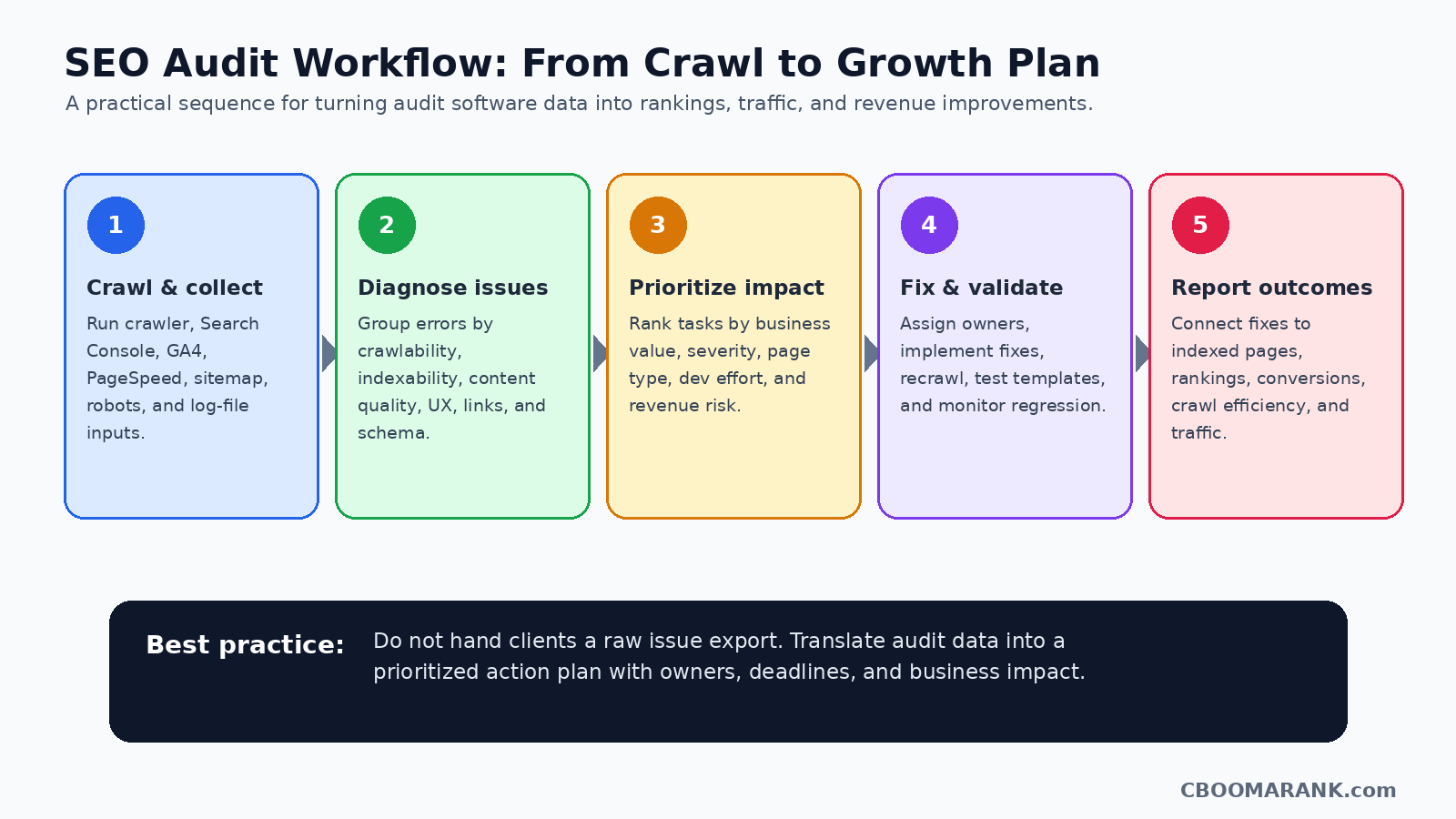
How to Run a Website Audit the Right Way
- Start with business-critical pages: Before crawling everything, identify the pages that generate leads, sales, affiliate revenue, subscriptions, or brand visibility. These pages should receive priority in the audit.
- Crawl the website: Run your chosen crawler. Include XML sitemaps, important subfolders, product/category templates, blog posts, landing pages, and navigation paths. For JavaScript-heavy websites, make sure rendering is enabled.
- Connect performance data: Use Search Console and analytics data to separate high-impact problems from low-impact warnings. An issue on a high-traffic page is usually more urgent than the same issue on a low-value archive page.
- Group issues by template: Many website problems repeat across templates. If 2,000 product pages have the same missing schema issue, fixing the template can solve thousands of URLs at once.
- Prioritize by impact and effort: Assign every issue a priority based on severity, affected URLs, business value, and implementation difficulty. This prevents teams from wasting time on cosmetic warnings while critical crawl or indexability problems remain unresolved.
- Fix, validate, and recrawl: After implementation, recrawl affected sections to confirm the fix worked. Search Console can also confirm whether Google sees improvements over time.
- Report outcomes, not just errors: A good audit report should explain what changed: pages indexed, errors reduced, speed improved, internal links fixed, rankings protected, or revenue pages made crawlable.
Common SEO Audit Issues These Tools Can Find
| Issue | Why It Matters | Priority |
| Blocked pages | Important pages blocked by robots.txt or noindex cannot rank properly | Critical |
| Broken internal links | Wastes crawl paths and creates poor user experience | High |
| Redirect chains | Slow down crawling and reduce clarity for users and bots | Medium to High |
| Duplicate title tags | Makes pages harder to differentiate in search results | Medium |
| Canonical conflicts | May cause the wrong page to be indexed or preferred | High |
| Slow pages | Hurts user experience and can reduce conversion performance | High |
| Missing structured data | Reduces eligibility for enhanced search features | Medium |
| Thin or duplicate content | Can weaken topical authority and page usefulness | High |
| Orphan pages | Important pages may not receive internal link equity | High |
SEO Optimization Notes for Publishing on CBOOMARANK
- Use the focus keyword “best SEO audit software” in the title, introduction, first H2, conclusion, image ALT text, and meta description naturally.
- Add comparison schema or FAQ schema in WordPress where your SEO plugin supports it.
- Internally link from related posts about free SEO tools, Semrush vs Ahrefs, SEO pricing, backlinks, and Google Ads where relevant.
- Add affiliate disclosure if any tool links are monetized.
- Update prices quarterly because SaaS pricing and plan limits change frequently.
- Add a “last updated” date near the top of the article to improve trust.
FAQ: Best SEO Audit Software
What is the best SEO audit software overall?
Semrush is a strong overall choice for businesses that want site audits plus keyword research, content tools, competitor research, PPC insights, and reports. Ahrefs is excellent when backlink research and organic analysis are central to your workflow.
What is the best free SEO audit tool?
Google Search Console and PageSpeed Insights are the best free starter tools. They do not replace a crawler, but they provide essential data about search performance, indexing, Core Web Vitals, and page-speed issues.
Is Screaming Frog better than Semrush?
They serve different needs. Screaming Frog is better for deep desktop crawling and technical SEO control. Semrush is better for teams that want auditing inside a wider SEO and digital marketing platform.
Which SEO audit software is best for agencies?
Agencies should consider Semrush, SE Ranking, Sitebulb, and Screaming Frog. The right choice depends on budget, reporting needs, technical depth, and the number of client websites.
Which audit tool is best for ecommerce websites?
For small ecommerce sites, Semrush, Ahrefs, SE Ranking, Screaming Frog, or Sitebulb may be enough. For large ecommerce websites with thousands or millions of URLs, Lumar or Botify may be more appropriate.
How often should I run an SEO audit?
Small sites can run monthly audits. Agencies and ecommerce websites should run scheduled audits weekly or after major site updates. Enterprise websites often need continuous monitoring.
Can SEO audit software fix issues automatically?
Most tools identify and prioritize issues, but the actual fixes often require content updates, developer work, CMS changes, template edits, or redirects. Some enterprise tools include workflows and automation, but human review is still important.
Do SEO audit tools guarantee higher rankings?
No. Audit tools help find problems and opportunities, but rankings depend on content quality, search intent, technical health, competition, backlinks, user experience, and ongoing optimization.
Suggested Internal Links for CBOOMARANK
- Best Free SEO Tools for Beginners
- Semrush vs Ahrefs
- Ubersuggest vs Semrush
- SEO Pricing Guide
- How to Build High-Quality Backlinks in 2026
- PPC Advertising Ultimate Guide
External Authoritative References
- Semrush Site Audit: https://www.semrush.com/features/site-audit/
- Ahrefs SEO Audit Tool: https://ahrefs.com/seo-audit-tool
- Ahrefs Webmaster Tools: https://ahrefs.com/webmaster-tools
- Screaming Frog SEO Spider: https://www.screamingfrog.co.uk/seo-spider/
- SE Ranking Website Audit: https://seranking.com/website-audit.html
- Sitebulb Features: https://sitebulb.com/features/
- Lumar Platform: https://www.lumar.io/platform/
- Botify SiteCrawler: https://www.botify.com/platform/botify-analytics/sitecrawler-feature
- Google Search Console: https://search.google.com/search-console/about
- Google Search Essentials: https://developers.google.com/search/docs/essentials
