

Website maintenance services keep a website secure, functional, fast, accurate and technically healthy after it goes live. Maintenance can include software updates, backups, security monitoring, uptime checks, performance optimization, broken-link repairs, content updates, technical SEO reviews and ongoing quality assurance.
Additionally, A website is not a one-time project. Plugins become outdated, pages develop broken links, integrations fail, content becomes inaccurate and performance can decline as the site changes. Without regular maintenance, small technical problems can eventually affect users, conversions and organic search performance.
Moreover, This guide explains what professional website maintenance services include, what affects maintenance costs, which tasks should be completed weekly, monthly and quarterly, and how ongoing maintenance supports SEO, security and website performance.
Not sure what is affecting your website? Start with a CBOOMARANK website analysis to identify SEO, technical and performance issues before deciding what maintenance work should be prioritized.
Website Maintenance Services: Quick Answer
In addition, Website maintenance services provide ongoing technical and content support after a website has been launched.
A complete maintenance plan may cover:
- CMS, plugin and theme updates
- Website backups
- Security monitoring
- Malware and vulnerability checks
- Uptime monitoring
- Speed and performance optimization
- Broken-link detection
- Technical SEO checks
- Form and checkout testing
- Content updates
- Database maintenance
- Analytics and tracking checks
- Mobile usability reviews
- Domain and SSL monitoring
- Reporting and maintenance recommendations
Furthermore, The exact scope depends on the website. A small business brochure site may need relatively simple maintenance, while an ecommerce site, publisher, marketplace or SaaS platform may require much more frequent monitoring and testing.
What Are Website Maintenance Services?
Also, Website maintenance services are recurring tasks designed to keep a website working correctly after development is complete.
They typically combine preventive maintenance with corrective maintenance.
Preventive Website Maintenance
Additionally, Preventive maintenance attempts to identify or reduce problems before they affect visitors. Examples include scheduled backups, software updates, security checks, uptime monitoring and recurring SEO audits.
Corrective Website Maintenance
Moreover, Corrective maintenance addresses issues that have already appeared. Examples include repairing broken forms, restoring a failed page, fixing layout problems, removing malware or resolving broken links.
Improvement and Optimization
In addition, Maintenance can also include continuous improvement. A site may remain technically functional while still needing better speed, stronger internal linking, updated content or improved mobile usability.
Why Websites Need Ongoing Maintenance
Furthermore, Websites depend on multiple systems that change independently. Hosting environments are updated. Browsers evolve. Plugins release new versions. Search engines change how they crawl and present information. External websites remove or redirect pages that you link to.
Consequently, a website that worked perfectly when it launched can develop problems months later even if nobody intentionally changes the design.
Security Changes Over Time
Also, Software vulnerabilities may be discovered after a website launches. Keeping supported software updated reduces unnecessary exposure and makes it easier to apply security fixes when they become available.
Content Becomes Outdated
Additionally, Prices, team members, services, statistics, links and product information can become inaccurate. Content maintenance helps ensure that visitors are not making decisions using outdated information.
Website Performance Can Decline
Moreover, Large images, additional scripts, new plugins, database growth and third-party integrations can gradually affect page speed and responsiveness.
Links and Integrations Can Break
In addition, External links disappear, APIs change, forms stop delivering messages and payment or tracking integrations may fail. Periodic testing helps identify these problems earlier.
What Do Website Maintenance Services Include?
1. Software Updates
Furthermore, Content management systems, extensions, plugins, themes and other website components should be reviewed regularly for available updates.
Also, Updates should not be applied blindly on important production websites. A safer workflow includes creating a backup, reviewing compatibility, applying the update and testing important site functions afterward.
2. Website Backups
Additionally, Backups provide a recovery path when software updates fail, files are damaged, databases become corrupted or security incidents occur.
Moreover, A useful backup strategy should consider both website files and databases. The correct backup frequency depends on how often the site changes.
For example, an ecommerce store receiving orders throughout the day may require more frequent backups than a small informational website updated once a month.
3. Security Monitoring
In addition, Website maintenance should include checks for suspicious activity, malware, unauthorized changes and known software vulnerabilities.
Furthermore, Security is not one task completed once. It requires a combination of updates, monitoring, access controls, backups and incident-response planning.
4. Uptime Monitoring
Also, Uptime monitoring checks whether the website remains reachable. When downtime is detected, alerts can help administrators investigate hosting, DNS, application or infrastructure problems more quickly.
5. Performance Monitoring
Maintenance should track whether page performance is improving or declining.
Useful areas to review include:
- Page loading speed
- Server response behavior
- Large images
- JavaScript and CSS
- Caching
- Database performance
- Third-party scripts
- Mobile responsiveness
6. Broken-Link Checks
Additionally, Broken internal and external links create a poor user experience and can make important content harder to navigate.
Moreover, Regular maintenance should identify links returning errors, unnecessary redirect chains and outdated destinations.
7. Form and Conversion Testing
A website may look healthy while its most important conversion path is broken.
In addition, Test important forms, calls to action, account registration, email notifications and checkout workflows regularly.
8. Analytics and Tracking Verification
Furthermore, Tracking scripts can disappear during redesigns or configuration changes. Maintenance should verify that important analytics, conversion and search-measurement systems continue collecting data correctly.
Website Maintenance Costs: What Determines the Price?
Also, Website maintenance costs vary because websites differ dramatically in size, technology, traffic, complexity and business risk.
Additionally, A simple five-page business website is not comparable with a high-traffic publication, membership platform, ecommerce store or SaaS application.
Website Size
Moreover, Larger websites generally require more monitoring because they contain more pages, assets, links, templates and potential failure points.
Technology Stack
In addition, A simple static website may require less recurring technical work than a WordPress installation with many plugins or a custom application with databases, APIs and third-party integrations.
Update Frequency
Furthermore, Websites that change daily usually need more frequent backups, testing and monitoring than websites updated occasionally.
Business Criticality
Also, A website that directly handles revenue, customer accounts or transactions may justify faster response times and more proactive monitoring.
Security Requirements
Additionally, Sites handling sensitive information or important customer workflows may require stronger monitoring, logging, access controls and recovery procedures.
Content Support
Moreover, Some maintenance providers handle only technical tasks. Others also update articles, landing pages, products, images and promotional content.
Response-Time Agreement
In addition, Maintenance plans that promise rapid support or emergency response usually involve more operational capacity than plans handled only during normal business hours.
Website Maintenance Cost Models
Providers commonly structure website maintenance in several ways.
Monthly Maintenance Plan
Furthermore, A recurring monthly plan provides a defined set of maintenance tasks and support allowances. This model is useful for businesses that want predictable ongoing coverage.
Hourly Website Maintenance
Also, Hourly maintenance works well when support needs are occasional or difficult to predict. However, costs may become less predictable when frequent work is required.
Project-Based Maintenance
Additionally, Some tasks are better treated as individual projects, particularly major performance improvements, security remediation, migrations or large content cleanups.
Managed Website Support
Moreover, A managed support agreement can combine maintenance, monitoring, development and strategic improvements. This approach is more suitable for websites that function as important business infrastructure.
Website Maintenance Checklist
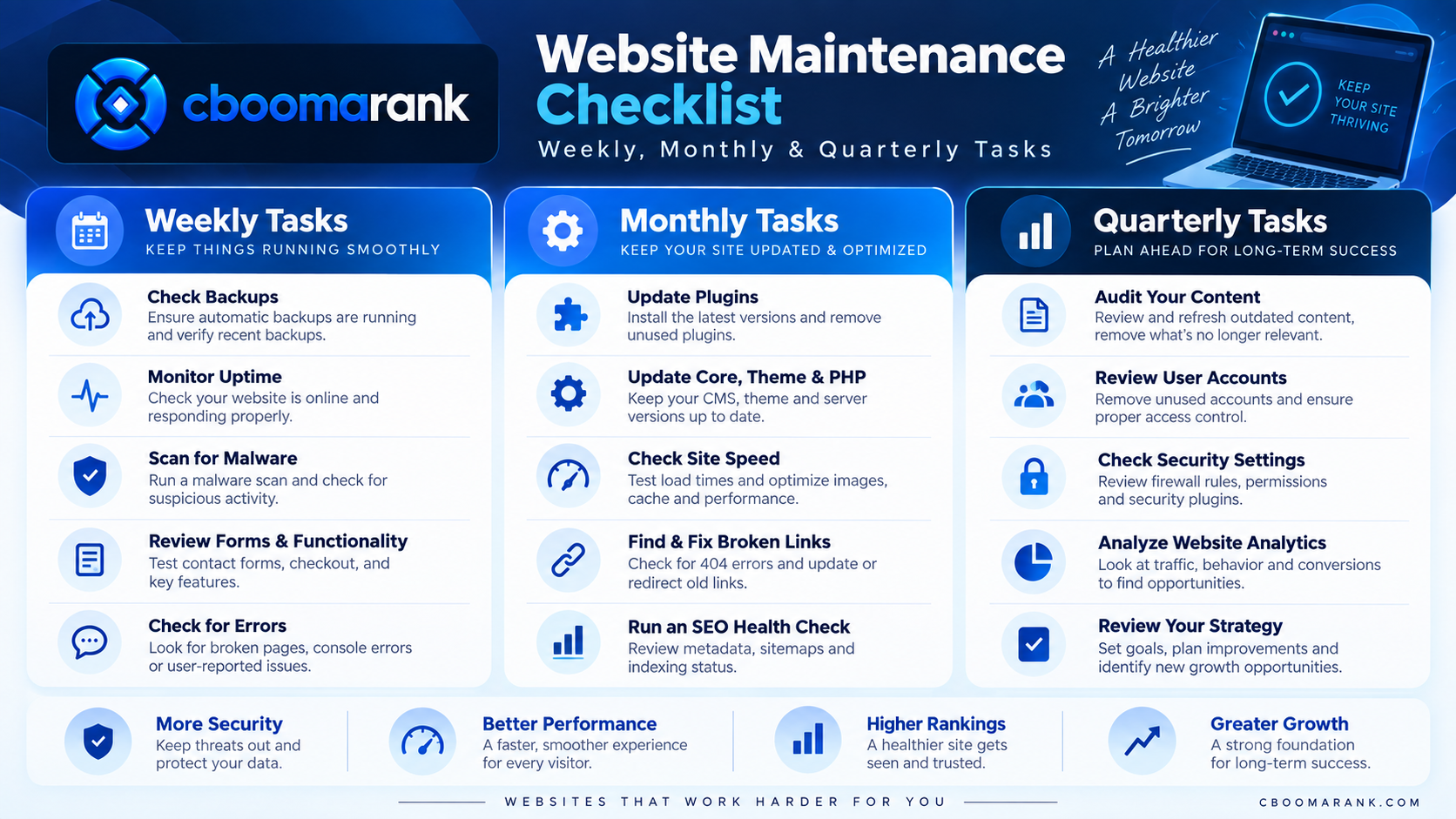
In addition, A useful maintenance schedule separates frequent operational checks from deeper periodic reviews.
Weekly Website Maintenance Checklist
- Confirm the website is reachable
- Review important security alerts
- Verify scheduled backups
- Check important forms and conversion paths
- Review failed transactions or application errors where relevant
- Inspect urgent software updates
- Check for obvious broken pages
Monthly Website Maintenance Checklist
- Review CMS, plugin and theme updates
- Test forms and email delivery
- Review website performance
- Check broken internal and external links
- Review search visibility and indexing issues
- Verify analytics and conversion tracking
- Review high-traffic landing pages
- Check mobile usability
- Review backups and recovery readiness
Quarterly Website Maintenance Checklist
- Run a broader technical SEO audit
- Review outdated content
- Check redirects and deleted pages
- Review navigation and internal linking
- Audit website users and permissions
- Review hosting and resource usage
- Test recovery procedures
- Review third-party integrations
- Evaluate conversion performance
Find maintenance issues before they become larger problems.
Furthermore, Use CBOOMARANK Website Analysis and SEO Audit workflows to identify technical, SEO and performance issues across your site.
How Website Maintenance Affects SEO
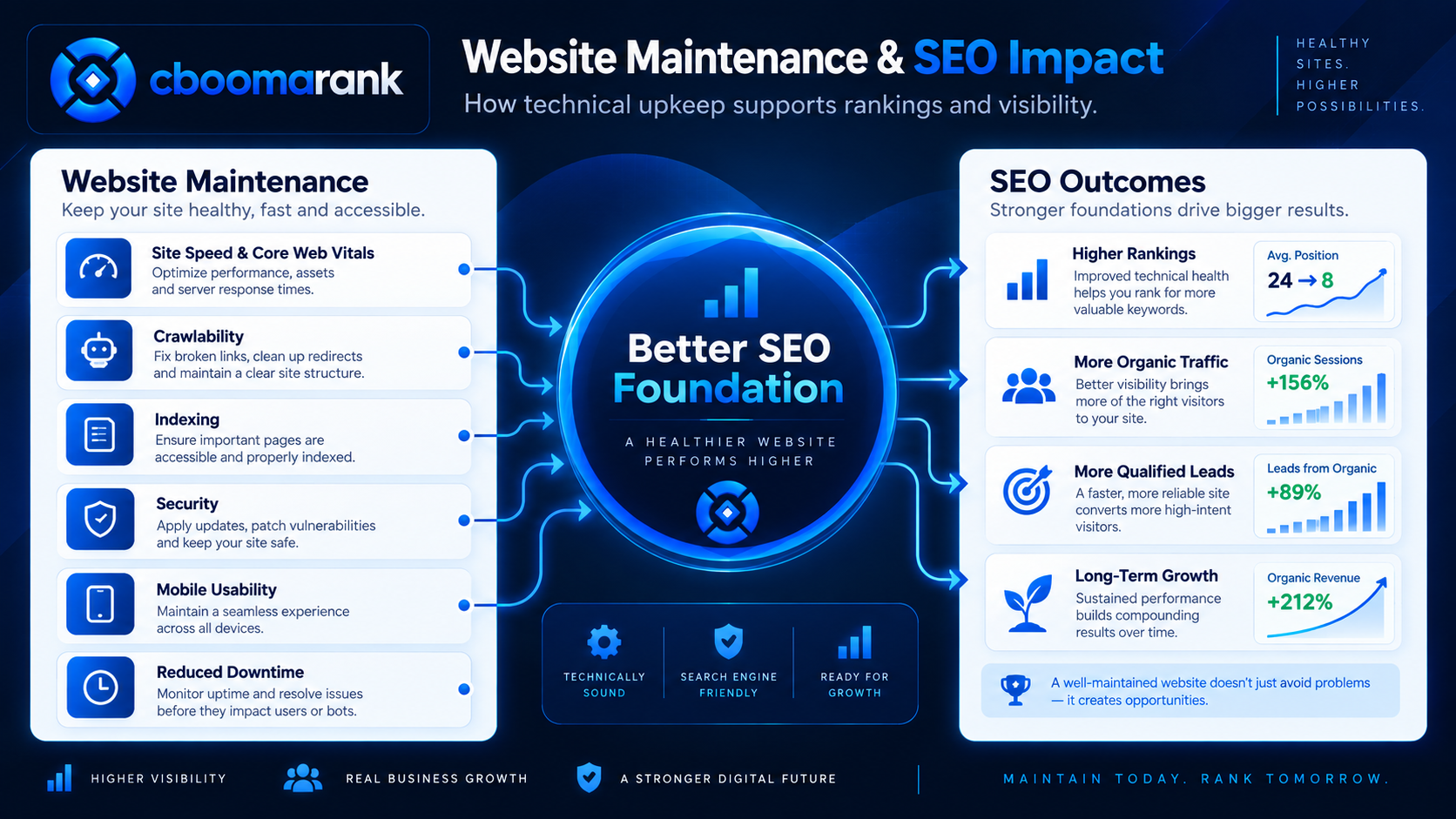
Also, Website maintenance and SEO are closely connected because search performance depends partly on whether search engines and users can access a technically healthy website.
Additionally, Maintenance does not guarantee higher rankings. However, neglected technical problems can make it harder for important pages to be crawled, indexed, understood or used effectively.
Crawlability and Indexing
Moreover, Search engines need reliable access to important pages. Server errors, accidental noindex directives, broken internal links and incorrect redirects can interfere with discovery and indexing.
In addition, Regular technical reviews can identify these problems before they affect larger sections of the website.
Broken Internal Links
Furthermore, Internal links help visitors and search engines move between related pages. When important links break, users may encounter errors and search engines may have fewer paths to discover content.
Also, A maintenance process should periodically crawl internal links and correct broken destinations.
Redirect Problems
Additionally, Redirects are useful when URLs change, but unnecessary chains and incorrect destinations can create friction.
Moreover, Maintenance should review old redirects, deleted pages and URL changes so that important links point as directly as possible to the intended destination.
Outdated Content
In addition, SEO maintenance also includes reviewing content that contains old statistics, outdated screenshots, obsolete pricing, discontinued products or information that no longer matches search intent.
Furthermore, Updating high-value pages can be more useful than continuously publishing new articles while older content declines.
Duplicate and Thin Content
Also, Website growth can create duplicate archives, parameter URLs, outdated landing pages or low-value content. Periodic audits help identify sections that should be improved, consolidated, redirected or removed.
Search Performance Monitoring
Additionally, Maintenance should review changes in impressions, clicks, ranking queries and important landing pages. A sudden decline can indicate technical problems, content changes, stronger competition or shifts in search demand.
Check the technical health of your website.
Moreover, Use CBOOMARANK SEO Audit and Website Analysis to find crawlability, content and optimization issues that may require maintenance.
Website Maintenance and Core Web Vitals
In addition, Performance maintenance should include monitoring user-experience metrics rather than assuming that a site remains fast after launch.
Furthermore, Google’s Core Web Vitals focus on loading performance, interaction responsiveness and visual stability.
Largest Contentful Paint
Also, Largest Contentful Paint, or LCP, measures how quickly the main visible content becomes available to the user.
Additionally, Large hero images, slow servers, render-blocking resources and excessive third-party scripts can contribute to poor loading performance.
Interaction to Next Paint
Moreover, Interaction to Next Paint, or INP, evaluates responsiveness to user interactions. Heavy JavaScript and long-running browser tasks can make pages feel slow even after the initial content has appeared.
Cumulative Layout Shift
In addition, Cumulative Layout Shift, or CLS, measures unexpected movement of visible content while a page loads or changes.
Furthermore, Images without dimensions, dynamically inserted content and poorly reserved advertising or embed space can contribute to layout instability.
Why Performance Needs Continuous Monitoring
Also, A page that performs well today can become slower after new analytics scripts, marketing tags, images, widgets, plugins or advertising technologies are added.
Performance monitoring should therefore be part of ongoing website maintenance rather than a one-time launch task.
Website Security Maintenance
Security maintenance reduces avoidable risk by keeping software, credentials, backups and monitoring practices current.
Keep Supported Software Updated
Apply appropriate security updates to content management systems, plugins, themes, frameworks and server components.
For business-critical sites, test important updates before applying them broadly to production.
Review Administrator Accounts
Remove accounts that are no longer needed and confirm that users have only the permissions required for their role.
Use Strong Authentication
Strong passwords and multi-factor authentication can reduce the risk created by compromised credentials where the platform supports them.
Monitor Unexpected File Changes
Unexpected modifications to website files can indicate configuration mistakes or security problems. Important sites should maintain enough logging and monitoring to investigate unusual changes.
Keep Recovery Options Available
Security planning should assume that prevention can fail. Reliable backups and documented recovery procedures make incidents easier to contain and recover from.
Website Backup Maintenance
A backup is useful only when it can actually be restored.
Professional website maintenance should consider several backup questions:
- How frequently does the website change?
- Are files and databases both backed up?
- Are backup copies stored separately from the production website?
- How long are backups retained?
- Who can access them?
- Has the restoration process been tested?
Backup Frequency
A low-change informational website may need less frequent backups than a store, membership site or SaaS application where customer activity changes data throughout the day.
Retention
Keeping only the newest backup can be risky because a problem may remain unnoticed for days. A retention strategy can preserve multiple recovery points.
Restore Testing
Businesses should periodically verify that backups can be restored. A backup system should not be considered reliable merely because it reports that files were created successfully.
WordPress Website Maintenance Services
WordPress maintenance often includes additional tasks because the platform commonly depends on themes and plugins maintained by different vendors.
A WordPress maintenance plan may include:
- WordPress core updates
- Plugin updates
- Theme updates
- Backup verification
- Security monitoring
- PHP compatibility checks
- Database optimization
- Broken-link checks
- Spam management
- Performance monitoring
- Form testing
- Technical SEO reviews
Do Not Treat Every WordPress Update the Same
Updates can contain security fixes, compatibility improvements or new functionality. However, plugins and themes may interact with each other in unexpected ways.
For important sites, create a recent backup and test critical functionality after significant updates.
Remove Unused Plugins and Themes
Unused software can increase complexity. Review plugins and themes periodically and remove components that are no longer required, while preserving anything necessary for the active site.
Ecommerce Website Maintenance
Ecommerce websites require additional maintenance because technical failures can directly interfere with transactions.
Important checks include:
- Product-page availability
- Shopping-cart functionality
- Checkout workflow
- Payment processing
- Transactional emails
- Inventory synchronization
- Shipping integrations
- Coupons and promotions
- Product structured data
- Mobile checkout usability
- Site search
- Revenue and conversion tracking
Test the Complete Purchase Journey
Do not test only individual buttons. Periodically test the full journey from product discovery through checkout and confirmation.
Monitor High-Value Landing Pages
Product and category pages generating substantial organic or paid traffic deserve additional monitoring because failures on these pages can have immediate commercial consequences.
Website Maintenance for SaaS and Web Applications
SaaS platforms and web applications often require maintenance beyond traditional content websites.
Depending on the application, maintenance may involve:
- Application error monitoring
- Database health checks
- Queue and scheduled-job monitoring
- API monitoring
- Dependency updates
- Authentication testing
- Payment workflow testing
- Email-delivery monitoring
- Storage monitoring
- Performance profiling
- Backup and recovery testing
The more critical the application is to customer workflows, the more important proactive monitoring becomes.
DIY Website Maintenance vs Professional Website Maintenance Services
Some website maintenance tasks can be handled internally, particularly on small and relatively simple websites. Others require deeper technical knowledge or consistent operational availability.
DIY Maintenance Can Work When
- The website is small
- The technical setup is simple
- Updates are infrequent
- An internal team understands the CMS
- The business can tolerate slower problem resolution
- Backups and recovery are already well managed
Professional Maintenance Is More Useful When
- The website generates significant revenue or leads
- Downtime creates meaningful business risk
- The site contains many integrations
- The business lacks internal technical expertise
- Security requirements are higher
- The site changes frequently
- Fast incident response is important
Website Maintenance Services vs Managed Hosting
Managed hosting and website maintenance may overlap, but they are not always the same service.
A hosting provider primarily manages infrastructure required to serve the website. Depending on the plan, managed hosting may also provide backups, security features, caching, updates or monitoring.
Website maintenance typically focuses more broadly on the application and website itself, including content, plugins, forms, SEO, broken links and business functionality.
Before purchasing both services, identify which responsibilities are already covered by the hosting provider and which remain with the website owner or maintenance company.
How to Choose a Website Maintenance Service Provider
Do not select a provider only by comparing monthly prices. First determine what the website actually requires.
Ask What Is Included
Clarify which tasks are included in the recurring fee and which require additional charges.
Ask About Backups
Determine how backups are created, how long they are retained and whether restoration assistance is included.
Ask About Update Procedures
Find out whether updates are tested, whether backups are created first and what happens if an update breaks the website.
Ask About Emergency Support
Understand what qualifies as an emergency, when support is available and whether emergency work has a different price.
Ask About Security Monitoring
Confirm whether the service includes only software updates or broader security monitoring and incident support.
Ask About SEO Maintenance
If organic search is important to your business, ask whether technical SEO checks, broken-link monitoring, redirect reviews and search-performance reporting are included.
Ask for Clear Reporting
A useful maintenance report should explain what was checked, what changed, which problems were found and which tasks should be prioritized next.
Website Maintenance Service Provider Checklist
Before choosing a provider, confirm the following:
- Scope of recurring work
- Backup frequency and retention
- Software update process
- Security responsibilities
- Uptime monitoring
- Performance monitoring
- SEO maintenance
- Content update allowance
- Support response times
- Emergency support terms
- Reporting frequency
- Cancellation and ownership terms
Evaluate your website before choosing a maintenance package.
CBOOMARANK can help identify technical SEO, website-quality and competitor issues so you can prioritize maintenance based on evidence rather than guesswork.
Website Maintenance Services Cost Comparison
Website maintenance pricing varies widely, so businesses should compare scope rather than assuming that two monthly plans provide the same level of service.
The following ranges are general planning examples rather than fixed market prices. Actual costs depend on the website, provider, service level and amount of work required.
| Website Type | Typical Maintenance Needs | Relative Cost Level |
|---|---|---|
| Small business website | Updates, backups, security checks, forms, basic SEO monitoring | Low to moderate |
| Growing content website | Technical SEO, broken links, content updates, performance and analytics | Moderate |
| WordPress business website | Core, plugin and theme maintenance plus backups, security and testing | Moderate |
| Ecommerce website | Checkout, payments, products, integrations, security and uptime monitoring | Moderate to high |
| Publisher or high-traffic website | Performance, uptime, advertising systems, content and technical SEO | High |
| SaaS or web application | Application monitoring, databases, APIs, deployments, authentication and payments | High |
Why the Cheapest Website Maintenance Plan May Cost More Later
A low monthly fee can be attractive, but the price means little if essential work is excluded.
For example, a plan may advertise software updates but exclude restoration when an update breaks the website. Another plan may provide backups without testing whether those backups can actually be restored.
Before comparing prices, create a list of responsibilities and determine exactly which party owns each task.
Website Maintenance Schedule by Frequency
Not every maintenance task should run on the same schedule. High-risk or operational checks may need daily or weekly attention, while broader reviews can be completed monthly or quarterly.
| Frequency | Recommended Maintenance Activities |
|---|---|
| Continuous / Daily | Uptime monitoring, security alerts, application errors and critical transaction monitoring where appropriate |
| Weekly | Backup verification, critical updates, forms, conversions and obvious site errors |
| Monthly | Software updates, broken links, performance, analytics, search visibility and mobile checks |
| Quarterly | Technical SEO audit, content review, redirects, permissions, recovery testing and integration review |
| Annually | Domain, SSL, hosting, architecture, major content, vendor and overall maintenance-plan review |
Signs Your Website Needs Maintenance
Some maintenance problems are obvious. Others appear gradually and are easy to ignore until they affect customers or search performance.
Common warning signs include:
- Pages loading significantly slower than before
- Frequent downtime
- Broken forms
- Checkout or payment problems
- Expired certificates
- Broken internal links
- Large numbers of 404 errors
- Outdated software
- Unexplained layout changes
- Mobile display problems
- Analytics suddenly stopping
- Search impressions declining sharply
- Important pages disappearing from search
- Outdated pricing or service information
- Spam or suspicious website modifications
- Slow WordPress administration
- Database errors
- Plugin conflicts
Website Maintenance Red Flags to Avoid
No Backup Before Major Changes
Important updates, migrations and technical modifications should have an appropriate rollback or recovery plan.
No Documentation
If nobody records what has been changed, future troubleshooting becomes harder. Maintenance records are particularly important when multiple people manage the website.
Unlimited Updates Without Testing
Automatically updating every component without understanding compatibility can introduce failures on complex websites.
No Ownership of Emergencies
A maintenance agreement should make it clear who responds when the site becomes unavailable or a critical workflow stops working.
No Performance Baseline
Without baseline measurements, gradual speed degradation can remain unnoticed for months.
No Search Monitoring
A technically functioning website can still develop crawl, indexing or SEO problems. Businesses that rely on organic traffic should include search visibility in maintenance reporting.
Website Maintenance and Technical SEO Audits
A technical SEO audit is particularly useful as a recurring maintenance checkpoint because it can expose problems that may not be visible when manually browsing the website.
An audit can help identify issues involving:
- Indexability
- Broken links
- Redirects
- Duplicate pages
- Metadata
- Internal linking
- Canonical URLs
- Sitemaps
- HTTPS
- Mobile usability
- Performance
- Structured data
For a deeper explanation, read our Technical SEO guide.
You can also use our Technical SEO Audit Workbook when planning a more detailed maintenance review.
For troubleshooting specific problems, see our guide to checking and resolving technical SEO problems.
Website Maintenance and SEO Performance Monitoring
Maintenance teams should look for changes rather than treating SEO as a static checklist.
Useful search indicators include:
- Organic clicks
- Search impressions
- Click-through rate
- Ranking queries
- Indexed pages
- Top landing pages
- Crawl errors
- Organic conversions
A decline does not automatically prove a technical problem. Search demand, seasonality, competition, content quality and algorithmic changes can also influence performance.
However, maintenance monitoring can help identify when technical changes and search declines occur at similar times.
See our guide to Google SEO performance indicators for additional measurement context.
A Practical CBOOMARANK Website Maintenance Workflow
CBOOMARANK can support the analysis and prioritization stage of ongoing website maintenance.
Step 1: Analyze the Website
Start by examining the website for technical, SEO and page-quality issues.
Run a CBOOMARANK Website Analysis
Step 2: Review SEO Audit Findings
Separate critical technical problems from lower-priority recommendations. Issues affecting accessibility, indexing, broken functionality or important landing pages should normally receive greater attention.
Step 3: Review Keyword Performance
Check whether important pages are maintaining visibility for their target topics. Declining visibility can help identify pages that need content or technical maintenance.
Step 4: Compare Competitors
Competitor research can reveal whether visibility changes are isolated to your website or reflect stronger competitor performance across the market.
Step 5: Prioritize Maintenance Work
Group findings into practical categories such as:
- Critical
- High priority
- Medium priority
- Routine maintenance
- Future improvement
Step 6: Recheck After Changes
After maintenance work is completed, rerun relevant analysis to confirm that the intended issue has actually been resolved.
Turn maintenance into a measurable workflow.
Use CBOOMARANK Website Analysis, SEO Audits, keyword research and competitor research to identify what requires attention and monitor the results of your improvements.
Website Maintenance Services Frequently Asked Questions
What Are Website Maintenance Services?
Website maintenance services are recurring technical, security, performance, content and quality-control tasks used to keep a website functional after launch.
How Often Should a Website Be Maintained?
Some monitoring should be continuous, while backups, software reviews, technical checks and content reviews can follow weekly, monthly or quarterly schedules depending on the website.
How Much Do Website Maintenance Services Cost?
Costs depend on website size, platform, complexity, support expectations, security requirements, content work and the amount of recurring technical maintenance required.
Does Website Maintenance Help SEO?
Maintenance can support SEO by identifying broken links, crawlability problems, performance issues, outdated content, redirect errors and other technical conditions that may affect users or search engines.
Do Small Business Websites Need Maintenance?
Yes. Even small websites require backups, updates, security checks, domain and SSL monitoring, form testing and periodic content reviews.
Does WordPress Need Regular Maintenance?
Yes. WordPress core, themes and plugins change over time. Regular maintenance helps keep components updated while checking compatibility, backups, security and website functionality.
What Is Included in WordPress Website Maintenance Services?
Common services include backups, WordPress core updates, plugin and theme updates, security monitoring, uptime checks, performance reviews, broken-link checks and technical SEO monitoring.
What Is the Difference Between Website Maintenance and Website Hosting?
Hosting primarily provides the infrastructure used to serve the website. Maintenance focuses on keeping the website, software, content and important business functionality healthy. Some managed hosting plans include part of both responsibilities.
Can I Maintain My Website Myself?
Yes, particularly if the site is small and you understand its technical setup. Larger, revenue-generating or business-critical websites may benefit from dedicated professional support.
What Should I Look for in a Website Maintenance Company?
Look for clear responsibilities, reliable backups, safe update procedures, security practices, support terms, technical SEO capability and understandable reporting.
How Can CBOOMARANK Help With Website Maintenance?
CBOOMARANK can help analyze website and SEO issues, review keyword visibility and compare competitors so maintenance decisions can be prioritized using measurable information.
Final Website Maintenance Checklist
Before considering your maintenance process complete, confirm that you have a recurring system for:
- Backups
- Software updates
- Security monitoring
- Uptime monitoring
- Performance monitoring
- Broken-link checks
- Form testing
- Checkout testing where applicable
- Technical SEO audits
- Analytics verification
- Content reviews
- Access reviews
- Recovery testing
- Reporting
Final Takeaway
Professional website maintenance services are not simply about installing updates. Effective maintenance combines prevention, monitoring, testing, recovery and continuous improvement.
The right maintenance plan depends on how important the website is to the business. A basic informational site may require a relatively simple schedule, while ecommerce websites, publishers, marketplaces and SaaS applications need more frequent operational monitoring.
From an SEO perspective, maintenance helps protect the technical foundation that allows search engines and users to access important content. Broken links, slow performance, incorrect redirects, outdated pages and indexing problems can all reduce website quality if they remain unnoticed.
The most effective approach is therefore to measure website health regularly, prioritize issues according to business impact and verify the result after every important change.
Start with evidence before deciding what your website needs.
Analyze Your Website with CBOOMARANK or view CBOOMARANK pricing.
Sources and Further Reading
- Google Search Central — SEO Starter Guide
- Google Search Central — Core Web Vitals
- web.dev — Web Vitals
- WordPress Developer Resources — Hardening WordPress
- WordPress Documentation — Updating WordPress
- Google Search Console Help — Performance Report
Website technologies, search systems, hosting platforms and security recommendations change over time. Verify current documentation and test important changes before applying them to a production website.
Website Maintenance Services Cost Comparison
Website maintenance pricing varies widely, so businesses should compare scope rather than assuming that two monthly plans provide the same level of service.
The following ranges are general planning examples rather than fixed market prices. Actual costs depend on the website, provider, service level and amount of work required.
| Website Type | Typical Maintenance Needs | Relative Cost Level |
|---|---|---|
| Small business website | Updates, backups, security checks, forms, basic SEO monitoring | Low to moderate |
| Growing content website | Technical SEO, broken links, content updates, performance and analytics | Moderate |
| WordPress business website | Core, plugin and theme maintenance plus backups, security and testing | Moderate |
| Ecommerce website | Checkout, payments, products, integrations, security and uptime monitoring | Moderate to high |
| Publisher or high-traffic website | Performance, uptime, advertising systems, content and technical SEO | High |
| SaaS or web application | Application monitoring, databases, APIs, deployments, authentication and payments | High |
Why the Cheapest Website Maintenance Plan May Cost More Later
A low monthly fee can be attractive, but the price means little if essential work is excluded.
For example, a plan may advertise software updates but exclude restoration when an update breaks the website. Another plan may provide backups without testing whether those backups can actually be restored.
Before comparing prices, create a list of responsibilities and determine exactly which party owns each task.
Website Maintenance Schedule by Frequency
Not every maintenance task should run on the same schedule. High-risk or operational checks may need daily or weekly attention, while broader reviews can be completed monthly or quarterly.
| Frequency | Recommended Maintenance Activities |
|---|---|
| Continuous / Daily | Uptime monitoring, security alerts, application errors and critical transaction monitoring where appropriate |
| Weekly | Backup verification, critical updates, forms, conversions and obvious site errors |
| Monthly | Software updates, broken links, performance, analytics, search visibility and mobile checks |
| Quarterly | Technical SEO audit, content review, redirects, permissions, recovery testing and integration review |
| Annually | Domain, SSL, hosting, architecture, major content, vendor and overall maintenance-plan review |
Signs Your Website Needs Maintenance
Some maintenance problems are obvious. Others appear gradually and are easy to ignore until they affect customers or search performance.
Common warning signs include:
- Pages loading significantly slower than before
- Frequent downtime
- Broken forms
- Checkout or payment problems
- Expired certificates
- Broken internal links
- Large numbers of 404 errors
- Outdated software
- Unexplained layout changes
- Mobile display problems
- Analytics suddenly stopping
- Search impressions declining sharply
- Important pages disappearing from search
- Outdated pricing or service information
- Spam or suspicious website modifications
- Slow WordPress administration
- Database errors
- Plugin conflicts
Website Maintenance Red Flags to Avoid
No Backup Before Major Changes
Important updates, migrations and technical modifications should have an appropriate rollback or recovery plan.
No Documentation
If nobody records what has been changed, future troubleshooting becomes harder. Maintenance records are particularly important when multiple people manage the website.
Unlimited Updates Without Testing
Automatically updating every component without understanding compatibility can introduce failures on complex websites.
No Ownership of Emergencies
A maintenance agreement should make it clear who responds when the site becomes unavailable or a critical workflow stops working.
No Performance Baseline
Without baseline measurements, gradual speed degradation can remain unnoticed for months.
No Search Monitoring
A technically functioning website can still develop crawl, indexing or SEO problems. Businesses that rely on organic traffic should include search visibility in maintenance reporting.
Website Maintenance and Technical SEO Audits
A technical SEO audit is particularly useful as a recurring maintenance checkpoint because it can expose problems that may not be visible when manually browsing the website.
An audit can help identify issues involving:
- Indexability
- Broken links
- Redirects
- Duplicate pages
- Metadata
- Internal linking
- Canonical URLs
- Sitemaps
- HTTPS
- Mobile usability
- Performance
- Structured data
For a deeper explanation, read our Technical SEO guide.
You can also use our Technical SEO Audit Workbook when planning a more detailed maintenance review.
For troubleshooting specific problems, see our guide to checking and resolving technical SEO problems.
Website Maintenance and SEO Performance Monitoring
Maintenance teams should look for changes rather than treating SEO as a static checklist.
Useful search indicators include:
- Organic clicks
- Search impressions
- Click-through rate
- Ranking queries
- Indexed pages
- Top landing pages
- Crawl errors
- Organic conversions
A decline does not automatically prove a technical problem. Search demand, seasonality, competition, content quality and algorithmic changes can also influence performance.
However, maintenance monitoring can help identify when technical changes and search declines occur at similar times.
See our guide to Google SEO performance indicators for additional measurement context.
A Practical CBOOMARANK Website Maintenance Workflow
CBOOMARANK can support the analysis and prioritization stage of ongoing website maintenance.
Step 1: Analyze the Website
Start by examining the website for technical, SEO and page-quality issues.
Run a CBOOMARANK Website Analysis
Step 2: Review SEO Audit Findings
Separate critical technical problems from lower-priority recommendations. Issues affecting accessibility, indexing, broken functionality or important landing pages should normally receive greater attention.
Step 3: Review Keyword Performance
Check whether important pages are maintaining visibility for their target topics. Declining visibility can help identify pages that need content or technical maintenance.
Step 4: Compare Competitors
Competitor research can reveal whether visibility changes are isolated to your website or reflect stronger competitor performance across the market.
Step 5: Prioritize Maintenance Work
Group findings into practical categories such as:
- Critical
- High priority
- Medium priority
- Routine maintenance
- Future improvement
Step 6: Recheck After Changes
After maintenance work is completed, rerun relevant analysis to confirm that the intended issue has actually been resolved.
Turn maintenance into a measurable workflow.
Use CBOOMARANK Website Analysis, SEO Audits, keyword research and competitor research to identify what requires attention and monitor the results of your improvements.
Website Maintenance Services Frequently Asked Questions
What Are Website Maintenance Services?
Website maintenance services are recurring technical, security, performance, content and quality-control tasks used to keep a website functional after launch.
How Often Should a Website Be Maintained?
Some monitoring should be continuous, while backups, software reviews, technical checks and content reviews can follow weekly, monthly or quarterly schedules depending on the website.
How Much Do Website Maintenance Services Cost?
Costs depend on website size, platform, complexity, support expectations, security requirements, content work and the amount of recurring technical maintenance required.
Does Website Maintenance Help SEO?
Maintenance can support SEO by identifying broken links, crawlability problems, performance issues, outdated content, redirect errors and other technical conditions that may affect users or search engines.
Do Small Business Websites Need Maintenance?
Yes. Even small websites require backups, updates, security checks, domain and SSL monitoring, form testing and periodic content reviews.
Does WordPress Need Regular Maintenance?
Yes. WordPress core, themes and plugins change over time. Regular maintenance helps keep components updated while checking compatibility, backups, security and website functionality.
What Is Included in WordPress Website Maintenance Services?
Common services include backups, WordPress core updates, plugin and theme updates, security monitoring, uptime checks, performance reviews, broken-link checks and technical SEO monitoring.
What Is the Difference Between Website Maintenance and Website Hosting?
Hosting primarily provides the infrastructure used to serve the website. Maintenance focuses on keeping the website, software, content and important business functionality healthy. Some managed hosting plans include part of both responsibilities.
Can I Maintain My Website Myself?
Yes, particularly if the site is small and you understand its technical setup. Larger, revenue-generating or business-critical websites may benefit from dedicated professional support.
What Should I Look for in a Website Maintenance Company?
Look for clear responsibilities, reliable backups, safe update procedures, security practices, support terms, technical SEO capability and understandable reporting.
How Can CBOOMARANK Help With Website Maintenance?
CBOOMARANK can help analyze website and SEO issues, review keyword visibility and compare competitors so maintenance decisions can be prioritized using measurable information.
Final Website Maintenance Checklist
Before considering your maintenance process complete, confirm that you have a recurring system for:
- Backups
- Software updates
- Security monitoring
- Uptime monitoring
- Performance monitoring
- Broken-link checks
- Form testing
- Checkout testing where applicable
- Technical SEO audits
- Analytics verification
- Content reviews
- Access reviews
- Recovery testing
- Reporting
Final Takeaway
Professional website maintenance services are not simply about installing updates. Effective maintenance combines prevention, monitoring, testing, recovery and continuous improvement.
The right maintenance plan depends on how important the website is to the business. A basic informational site may require a relatively simple schedule, while ecommerce websites, publishers, marketplaces and SaaS applications need more frequent operational monitoring.
From an SEO perspective, maintenance helps protect the technical foundation that allows search engines and users to access important content. Broken links, slow performance, incorrect redirects, outdated pages and indexing problems can all reduce website quality if they remain unnoticed.
The most effective approach is therefore to measure website health regularly, prioritize issues according to business impact and verify the result after every important change.
Start with evidence before deciding what your website needs.
Analyze Your Website with CBOOMARANK or view CBOOMARANK pricing.
Sources and Further Reading
- Google Search Central — SEO Starter Guide
- Google Search Central — Core Web Vitals
- web.dev — Web Vitals
- WordPress Developer Resources — Hardening WordPress
- WordPress Documentation — Updating WordPress
- Google Search Console Help — Performance Report
Website technologies, search systems, hosting platforms and security recommendations change over time. Verify current documentation and test important changes before applying them to a production website.
