

Updated: August 4, 2026 | Reading time: approximately 16 minutes
Choosing between Shopify and WordPress is no longer a simple choice between an easy hosted store and a flexible website builder. In 2026, ecommerce platforms are also competing on AI-assisted operations, conversational shopping, international selling, first-party data, checkout performance, content marketing and the cost of maintaining an increasingly complex technology stack.
The most accurate comparison is Shopify versus self-hosted WordPress with WooCommerce. WordPress is the content management system; WooCommerce adds the store, cart, checkout, order and product functions needed for ecommerce.
The practical verdict is straightforward: Shopify is usually better for merchants who want a managed, commerce-first system with fewer technical responsibilities. WordPress with WooCommerce is usually better for businesses that prioritize ownership, content-led SEO, custom workflows and control over hosting, payments and code.
Neither platform automatically produces traffic or sales. Your product-market fit, merchandising, site architecture, page speed, structured data, content quality, conversion rate and customer acquisition strategy matter more than the platform logo.
Shopify vs WordPress: the 2026 verdict at a glance
| Category | Shopify | WordPress + WooCommerce | Winner |
| Fastest launch | Managed setup and hosting | More setup choices | Shopify |
| Ease of maintenance | Centralized updates and support | Owner manages the stack | Shopify |
| Customization | Strong within platform limits | Full code and infrastructure control | WooCommerce |
| Content-led SEO | Good built-in features | Deeper editorial and technical flexibility | WooCommerce |
| Native AI operations | Sidekick and agentic-commerce tools | Extension-driven and fragmented | Shopify |
| Payments | Integrated; extra fees may apply to third-party providers | Broad gateway choice; no Woo platform fee | WooCommerce |
| Data and hosting control | Platform-managed | Merchant-controlled | WooCommerce |
| Predictable budgeting | More predictable subscription model | Costs vary by stack and support | Shopify |
| Best overall fit | Teams prioritizing simplicity | Teams prioritizing control | Depends |
Choose Shopify when operational simplicity and speed are more valuable than maximum control. Choose WordPress with WooCommerce when your store must adapt to a unique business model, when content is a major acquisition channel, or when platform ownership is strategically important.
What has changed since the old 2023 comparison?
The previous CBOOMARANK article was published in July 2023. Since then, both ecosystems have changed substantially:
- Shopify has made AI a core part of the admin through Sidekick, which can help analyze store information, create content, manage products and complete supported tasks after merchant review.
- Shopify now promotes selling through AI chats and agentic storefronts, making product-feed quality and channel syndication more important.
- Shopify Markets has matured into a stronger international-selling and international-SEO layer, including automated hreflang, canonical and sitemap handling for configured markets.
- WooCommerce remains free and open source, but its true cost is shaped by hosting, extensions, development, security and maintenance—not by the core plugin alone.
- WooCommerce has continued improving product URLs, catalog performance and compatibility with the latest WordPress releases, while its AI capabilities remain more modular and extension-driven.
- Google has expanded ecommerce search documentation around merchant listings, product variants, store policies, product data and crawlable navigation. Platform choice matters, but implementation quality matters more.
What is Shopify?
Shopify is a hosted ecommerce platform. The subscription includes the store software, hosting, SSL, platform updates and a unified admin for products, orders, customers, payments, marketing and analytics. Merchants can extend the system through themes, apps, APIs and Shopify’s developer tools.
This managed model reduces the number of technical decisions a business must make. It also means Shopify controls more of the infrastructure, checkout rules and platform roadmap.
What is WordPress with WooCommerce?
WordPress is an open-source content management system. WooCommerce is the open-source ecommerce plugin that adds products, carts, checkout, orders and store management to WordPress.
The core software is free, and the merchant chooses the host, theme, extensions, payment processors, developers and maintenance process. This creates freedom and portability, but it also makes the site owner responsible for assembling and managing the stack.
1. Ease of use and launch speed
Shopify wins for ease of use. A merchant can create a store, choose a theme, add products, configure payments and begin selling without selecting a host or maintaining server software. Updates, SSL and most infrastructure work are handled by Shopify.
WooCommerce setup involves more decisions: hosting, WordPress installation, theme selection, plugin compatibility, caching, backups, security and payment extensions. A strong managed WooCommerce host reduces this burden, but the stack still has more moving parts.
Verdict: Shopify is better for beginners and small teams that need to launch quickly. WooCommerce is better when customization justifies additional setup and maintenance.
2. Pricing and total cost of ownership
Pricing should be compared as total cost of ownership, not simply as a monthly platform fee. Prices below were checked on August 4, 2026 and can vary by country, billing cycle and promotion.
| Cost area | Shopify | WordPress + WooCommerce |
| Core platform | Basic $29/mo yearly; Grow $79; Advanced $299 (US snapshot) | WooCommerce core is free |
| Hosting | Included | Typically $25-$350/mo for most stores, according to Woo |
| Extensions/apps | Monthly or usage-based apps may apply | Often $29-$299/year per extension |
| Payment processing | Processor rates; extra Shopify fee for third-party gateways on many plans | Processor rates; Woo states no extra platform fee |
| Maintenance | Mostly included at platform level | Owner, host or agency must manage it |
| Enterprise | Shopify Plus from $2,300/mo for qualifying arrangements | Custom hosting and development budget |
Shopify’s US pricing page listed Basic at $29 per month when paid yearly, Grow at $79 per month and Advanced at $299 per month. Monthly billing is higher. Shopify Plus started at $2,300 per month for qualifying setups. App subscriptions, premium themes, POS Pro and payment costs can increase the total.
WooCommerce charges no core-platform subscription and states that it takes no revenue share. However, WooCommerce’s own pricing guide estimates hosting at roughly $25 to $350 per month for most stores and extensions at approximately $29 to $299 per year each. Development, maintenance, security, premium themes and specialist integrations can become the largest expenses.
A simple WooCommerce store may cost less than Shopify. A highly customized WooCommerce store may cost far more. Shopify is usually easier to forecast; WooCommerce gives you more control over where the money is spent.
3. AI, automation and conversational commerce
Shopify has the more unified native AI experience. Sidekick works inside the Shopify admin and can provide guidance, generate content, analyze information, manage supported store tasks and create certain custom apps. Shopify also includes selling in AI chats in its current plan descriptions and offers tools for agentic commerce.
WooCommerce’s AI strategy is more decentralized. The former Woo AI plugin was deprecated, while WooCommerce has introduced experiments and extensions such as AI Product Advisor and third-party shopping assistants. This gives merchants choice, but it also requires more evaluation of data handling, quality, vendor support and compatibility.
AI should assist—not replace—human decisions. Product facts, prices, legal claims, inventory, shipping promises and SEO changes must be verified before publication or activation.
Verdict: Shopify currently offers the smoother built-in AI workflow. WooCommerce offers more freedom to assemble specialized AI tools.
4. SEO and content marketing
Both platforms can rank well. Shopify automatically handles important technical foundations, including canonical tags, sitemaps, robots rules, SSL and structured data in supported themes. Merchants can edit titles, descriptions, URLs and image alt text. Shopify Markets can automate hreflang, canonical and sitemap relationships for configured international stores.
WordPress remains exceptionally strong for content-led SEO because it provides deep control over content types, internal linking, templates, schema, redirects, taxonomies, editorial workflows and server configuration. WooCommerce stores can use SEO plugins and custom development to shape product and category experiences in detail.
That flexibility can become a liability when plugins conflict, faceted URLs create crawl waste, thin archives are indexed or schema is duplicated. Shopify reduces some technical risk, while WooCommerce gives an experienced team more room to optimize.
Google’s ecommerce guidance emphasizes crawlable navigation, useful category and product pages, structured product data, merchant policies and clear site architecture. Those principles apply on both platforms.
| SEO area | Shopify | WordPress + WooCommerce |
| Sitemaps and canonical tags | Generated automatically | Handled by WordPress/SEO plugins and configuration |
| Structured product data | Included in supported themes; can be extended | Highly customizable through plugins or code |
| International hreflang | Automated through configured Shopify Markets | Requires multilingual/SEO configuration |
| Content publishing | Built-in blog | Best-in-class CMS flexibility |
| URL and taxonomy control | Good, with platform conventions | Greater control, but greater risk of misconfiguration |
| Server and performance control | Managed by Shopify | Controlled through host, cache and infrastructure |
| Technical skill required | Lower | Moderate to high for advanced SEO |
Verdict: Shopify is strong for reliable SEO defaults. WooCommerce is stronger for advanced control and content-heavy strategies—provided the site is managed well.
5. Ownership, portability and control
WooCommerce is the clear winner for infrastructure and data control. You choose the host, access the database, modify the code, replace service providers and build custom checkout or product logic without being tied to one hosted platform.
Shopify merchants own their brand and business data, but the store operates inside Shopify’s platform rules and technical boundaries. You can export products, customers and other data, but moving a highly customized store to another platform can require substantial rebuilding.
For many small businesses, Shopify’s constraints are a worthwhile trade for reliability. For publishers, marketplaces, membership businesses or companies with unusual operational requirements, WooCommerce’s openness may be strategic.
6. Payments and transaction fees
Shopify Payments provides an integrated payment experience where available. On the US pricing page checked for this update, Shopify listed online card rates from 2.9% plus 30 cents on Basic, falling on higher plans. Shopify also listed additional platform transaction fees when a merchant uses a third-party payment provider: 2% on Basic, 1% on Grow, 0.6% on Advanced and 0.2% on Plus.
WooCommerce lets merchants choose from many processors and says it charges no additional platform fee for using a third-party payment solution. The merchant still pays the processor’s fees and may pay for the gateway extension or integration.
Availability varies by country. Nigerian merchants should verify support for local gateways, settlement currencies, chargeback handling and recurring payments before choosing a platform.
Verdict: Shopify is more integrated. WooCommerce generally offers greater gateway freedom and avoids an additional platform transaction fee.
7. Design and customization
Shopify themes are designed around commerce and can be configured quickly. Modern theme sections, app blocks and the theme editor allow many changes without code. Deeper checkout customization and enterprise workflows may require higher plans or development work.
WordPress offers a broader design ecosystem and more unrestricted template control. WooCommerce blocks, themes, page builders and custom code can support almost any layout. That freedom can also produce bloated pages, inconsistent templates and plugin dependence if the build is not disciplined.
8. Performance, hosting and security
Shopify manages hosting, CDN, SSL and platform-level updates. This gives merchants a consistent performance and security baseline without server administration. Apps, theme code, media and third-party scripts can still slow a Shopify store.
WooCommerce performance depends heavily on hosting architecture, database health, caching, image optimization, theme quality and plugin choices. A well-engineered WooCommerce store can be extremely fast, but a cheap host and an overloaded plugin stack can create serious performance problems.
With WooCommerce, the owner or provider must manage backups, updates, malware protection, access controls and incident response. Shopify handles more of that platform burden, though merchants remain responsible for accounts, staff permissions, apps, fraud procedures and data practices.
9. International selling, B2B and omnichannel commerce
Shopify has a strong unified approach to international markets, POS, social channels, marketplaces and AI commerce. Advanced plans add more regional tailoring, while Plus includes deeper B2B and checkout capabilities.
WooCommerce can support international currencies, translations, tax systems, marketplaces, POS and B2B through extensions and custom integrations. It can be more adaptable, but the merchant must select and maintain the components.
Shopify is usually easier when a retailer wants one operating system across online and in-person sales. WooCommerce is attractive when regional payment methods, custom pricing rules or specialized integrations are non-negotiable.
10. Support and maintenance
Shopify provides centralized platform support, documentation and a network of partners. Current plan information lists 24/7 live chat support, while Plus includes priority phone support.
WordPress and WooCommerce support is distributed. You may receive help from your host, extension vendors, theme developer, agency and community. This can provide deeper specialist expertise, but it can also lead to vendor finger-pointing when an issue spans several components.
Which platform is best for your business?
| Business type | Recommended platform | Why |
| First online store | Shopify | Fast setup and fewer technical responsibilities |
| Content-heavy brand or publisher | WooCommerce | Stronger content architecture and editorial flexibility |
| Retailer with physical locations | Shopify | Unified POS and inventory ecosystem |
| Highly customized store workflow | WooCommerce | Code, database and checkout flexibility |
| Small team without developers | Shopify | Centralized platform and support |
| Agency-managed brand with custom needs | WooCommerce | Long-term control and extensibility |
| International store needing quick localization | Shopify | Integrated Markets and international SEO workflow |
| Business needing unusual local gateways | WooCommerce | Wider freedom to select and customize processors |
A five-question decision framework
- How much technical responsibility can your team carry? Choose Shopify when you want fewer infrastructure decisions. Choose WooCommerce when you have dependable technical resources.
- Is content a primary growth engine? WooCommerce is compelling for businesses that publish extensively, build complex content hubs or need custom content relationships.
- How unusual is your business model? Standard retail fits Shopify well. Custom marketplaces, configurable products, specialized memberships and unique checkout logic may favor WooCommerce.
- Which payments and countries matter? Verify gateway availability, currencies, tax rules, payout timing, fraud tools and recurring-billing support for every target market.
- What is the three-year cost? Model the platform, hosting, apps, extensions, development, maintenance, payment fees, migration risk and staff time—not just the advertised entry price.
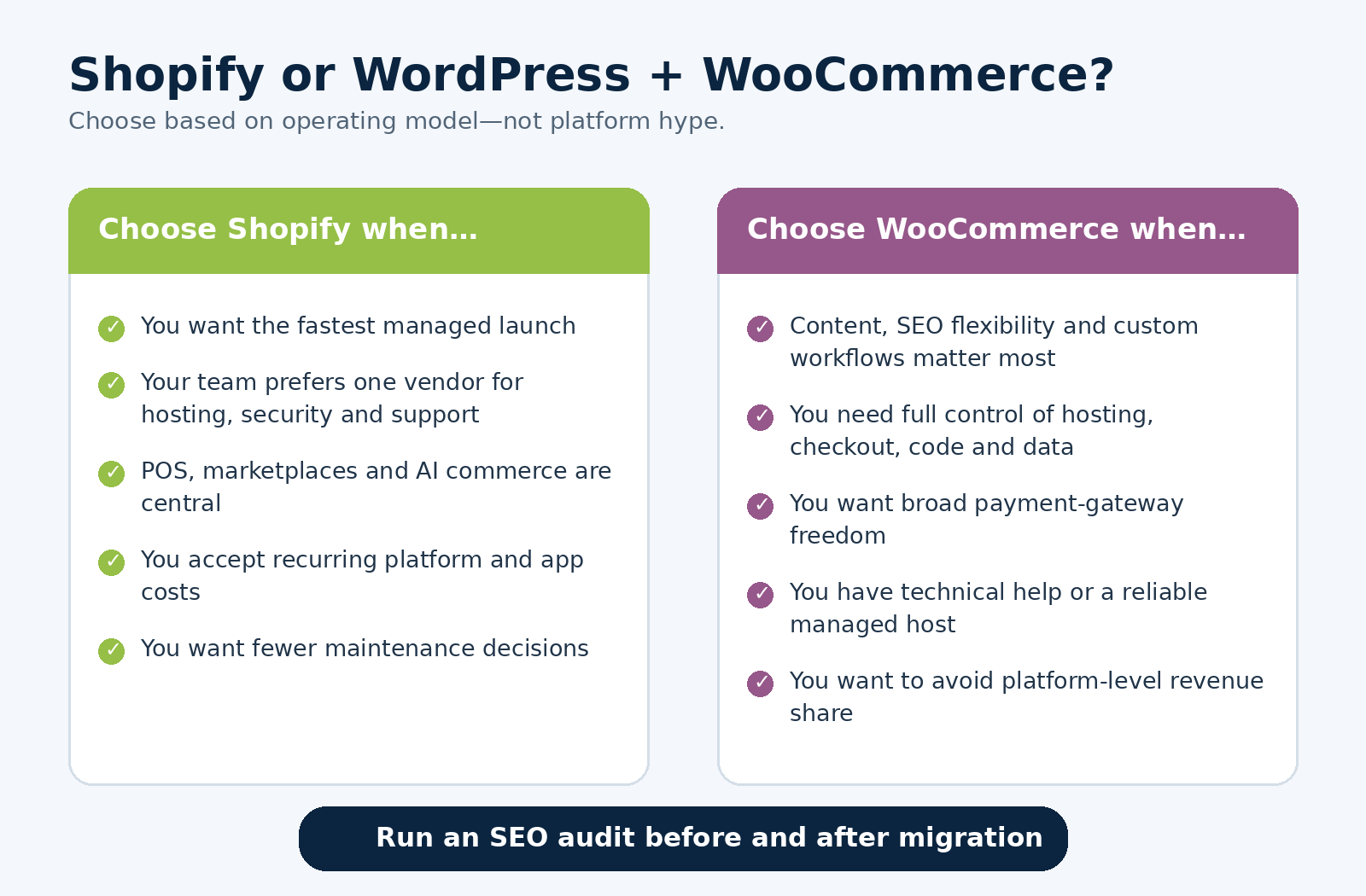
Decision guide: Shopify or WordPress with WooCommerce?
Migrating between Shopify and WooCommerce
Migration is not only a product-data project. It is also an SEO, analytics, payments, operations and customer-experience project. Before switching platforms, inventory every indexable URL, product variation, category, image, redirect, schema field, tracking tag, email automation and integration.
Keep valuable URLs wherever possible. Create server-side 301 redirects for changed URLs, preserve product and category relationships, resubmit the sitemap, verify structured data, reconnect Merchant Center and advertising feeds, and monitor Search Console for indexing or ranking changes.
Run a full crawl and SEO audit before launch, immediately after launch and again after search engines have recrawled the new site.
| Planning an ecommerce launch or migration? Run a free CBOOMARANK SEO audit to identify technical, performance and structured-data issues. Review our SEO services or contact CBOOMARANK for a tailored plan. |
Final verdict: Shopify or WordPress in 2026?
Shopify is the better default for merchants who value a fast launch, centralized support, managed infrastructure, integrated payments, omnichannel operations and built-in AI assistance.
WordPress with WooCommerce is the better choice for businesses that value ownership, content depth, custom development, payment freedom and control over every layer of the store.
For most first-time merchants without technical support, Shopify is the lower-risk decision. For established content-led businesses or companies with complex requirements and reliable development resources, WooCommerce can create a stronger long-term strategic asset.
The platform should support your operating model. It should not force your business to fit the platform.
Frequently asked questions
Is Shopify better than WordPress for beginners?
Usually, yes. Shopify bundles hosting, security, ecommerce functions and support in one system, reducing the number of technical decisions required.
Is WordPress cheaper than Shopify?
It can be, but not always. WooCommerce has no core platform subscription, yet hosting, extensions, development and maintenance can make a professional store more expensive than Shopify.
Which platform is better for SEO?
Shopify offers strong technical defaults. WordPress with WooCommerce offers greater SEO and content control. The better result depends on architecture, speed, content, internal linking and implementation quality.
Can I use Shopify with WordPress?
Yes. Businesses can use WordPress for content and Shopify for commerce through integrations or a headless architecture, but this adds complexity and should be justified by a clear requirement.
Which is better for dropshipping?
Shopify is generally easier because of its managed setup and app ecosystem. WooCommerce can provide more control and lower platform fees, but it requires more technical management.
Which platform gives me more ownership?
Self-hosted WordPress with WooCommerce provides more control over hosting, database access, code, checkout and service providers.
Can both platforms sell internationally?
Yes. Shopify provides a more unified Markets workflow. WooCommerce supports international selling through plugins, gateways and custom integrations.
Should I change platforms only for SEO?
Usually not. A migration introduces ranking and revenue risk. Change platforms when the operational, technical or commercial benefits outweigh the migration cost and risk.
Sources and further reading
- Shopify pricing
- Shopify SEO overview
- Shopify international SEO for Markets
- Shopify Sidekick documentation
- WooCommerce pricing
- WooCommerce on WordPress.org
- WooCommerce platform overview
- WooCommerce 10.8 update
- WooCommerce AI Product Advisor beta
- Google ecommerce SEO best practices
- Google ecommerce site structure
- Google merchant listing structured data
Editorial note: Platform pricing and features can change. Verify current regional pricing, payment availability and plan limits before making a purchase or migration decision.
