

Pay-per-click advertising changed significantly after the original version of this article was published in 2023. The strongest PPC teams in 2026 are not simply collecting more tools. They are building a connected workflow that combines search-demand research, competitive intelligence, AI-assisted campaign creation, first-party conversion data, budget safeguards and clear reporting.
Google Ads now places greater emphasis on AI-powered campaign features such as AI Max for Search and Performance Max. Microsoft Advertising has also expanded Performance Max, automation and inventory across its ecosystem. At the same time, privacy changes make accurate conversion tracking, consent signals and first-party data more important than adding another dashboard.
This updated guide compares 15 of the best PPC tools for research, automation, optimization and reporting. It is designed for small businesses, in-house teams and agencies that want better results without giving up strategic control. For hands-on campaign support, explore CBOOMARANK pay-per-click management.
| Quick recommendation: Start with the native platforms and free research tools. Add a specialist management platform only when campaign volume, account complexity or reporting workload justifies the cost. The best PPC stack is the smallest stack that improves decisions and protects budget. |
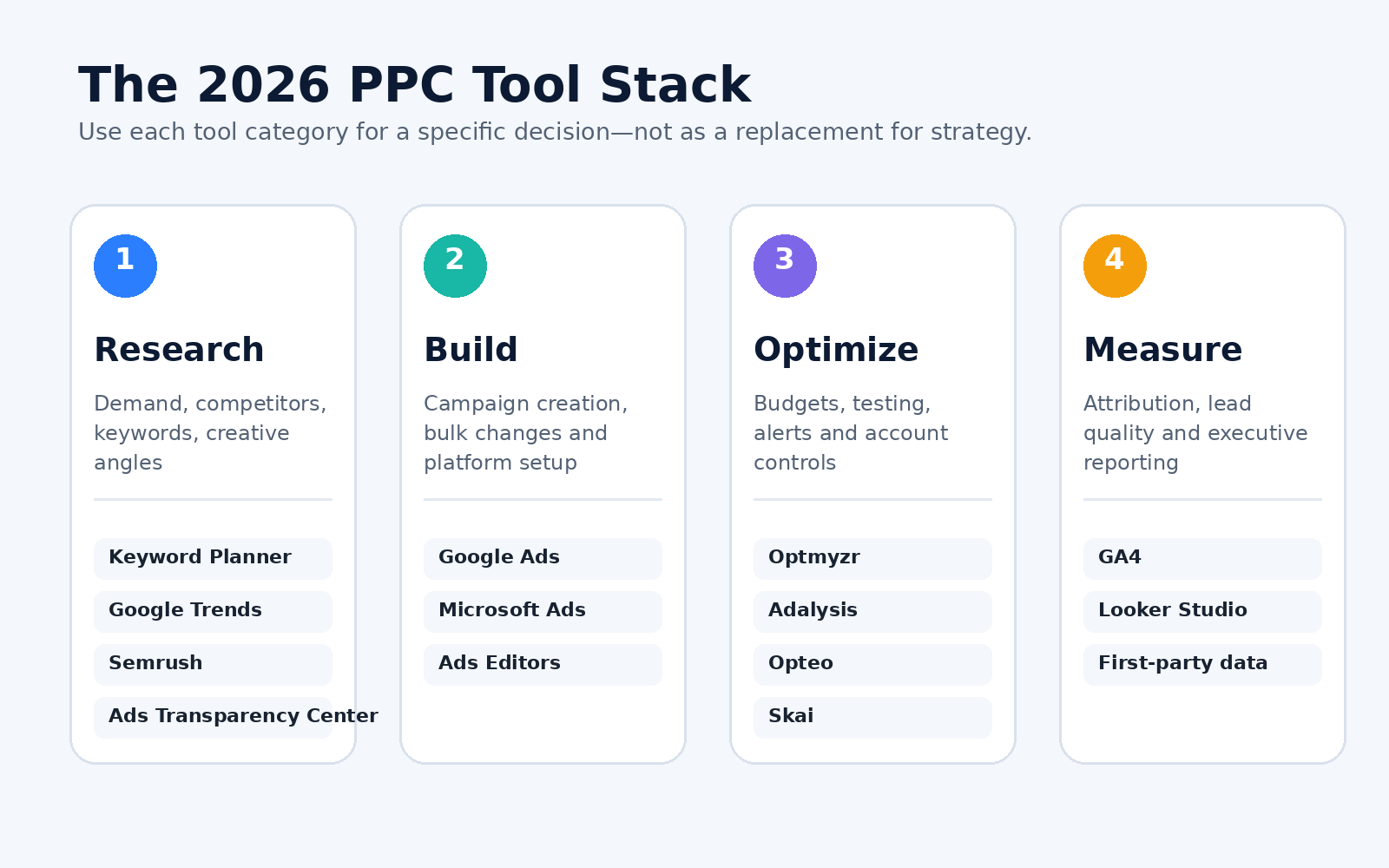
A practical PPC workflow: research demand, build campaigns, optimize performance and measure business outcomes.
Best PPC tools at a glance
| Tool | Best for | Core strength | Access |
| Google Ads | Core campaign platform and AI-powered search | Search, Performance Max, AI Max, bidding, conversion tracking | Platform spend |
| Microsoft Advertising | Incremental reach and Microsoft ecosystem | Search, Performance Max, Copilot inventory, audience ads | Platform spend |
| Google Keyword Planner | Google keyword demand and forecasts | Keyword ideas, CPC ranges, search estimates, forecasts | Free with Google Ads |
| Google Trends | Seasonality and rising demand | Relative interest, regions, related searches, trend comparisons | Free |
| Google Ads Transparency Center | Competitor creative research | Search verified advertisers and ads served on Google platforms | Free |
| Semrush Advertising Research | Competitive paid-search intelligence | Competitor keywords, ads, landing pages and historical patterns | Paid / limited trial |
| Google Ads Editor | Bulk Google Ads management | Offline edits, imports, search-and-replace, multi-account work | Free |
| Microsoft Advertising Editor | Bulk Microsoft Ads management | Offline work, account sync and large-scale edits | Free |
| Optmyzr | Agencies and advanced automation | Audits, alerts, optimization workflows, budgets and reporting | Paid |
| Adalysis | Testing, audits and budget control | RSA analysis, automated audits, alerts and budget pacing | Paid |
| Opteo | Guided Google Ads improvements | Performance suggestions, alerts, spend tracking and reports | Paid |
| Skai | Enterprise cross-channel media | Paid search, retail media and social management from one platform | Enterprise pricing |
| Google Analytics 4 | On-site behavior and attribution | Advertising reports, journeys, audiences and conversion analysis | Free / 360 |
| Looker Studio | Custom dashboards and client reporting | Visual reports, scheduled dashboards and data connectors | Free / Pro |
| CBOOMARANK | Landing-page and website diagnostics | SEO audits, page analysis, competitor and site-performance checks | Free tier + paid |
What changed in PPC tools for 2026?
1. AI automation moved from optional feature to operating layer
Automation is now built into the major advertising platforms. Google describes AI Max as a set of targeting and creative enhancements for Search campaigns, while Performance Max uses AI across bidding, budgets, audiences, creative and attribution. This makes strategic inputs—conversion goals, exclusions, landing pages, creative assets and first-party data—more important than manual bid changes alone.
2. First-party conversion data became a competitive advantage
Automated bidding is only as useful as the signals it receives. Google Ads Data Manager centralizes first-party audience and conversion connections, while enhanced conversions can improve measurement by using securely hashed customer data. Lead-generation businesses should optimize toward qualified leads, appointments, sales or revenue—not only form submissions.
3. Privacy and consent affect measurement quality
Consent mode communicates users’ consent choices to Google tags and changes how those tags behave. It is not a consent banner by itself. Advertisers should work with appropriate legal and technical specialists to configure consent, conversion tracking and data retention correctly for the regions they serve.
4. Cross-channel reporting matters more than platform screenshots
A campaign can look successful inside one ad platform while producing poor-quality leads or weak profit. Modern reporting should connect ad spend to landing-page behavior, CRM outcomes, sales value and customer acquisition cost. This is why GA4, data imports and dashboard tools belong in the PPC stack.
5. Automation still requires human controls
AI can expand reach and produce more asset combinations, but it cannot decide your real profit margin, brand risk tolerance or acceptable lead quality. Effective teams use clear budgets, conversion definitions, exclusions, experiments, change logs and alerts to keep automation aligned with business goals.
The 15 best PPC tools for 2026
1. Google Ads: Best core platform for AI-powered paid search
Google Ads AI Max and Performance Max represent the direction of Google’s advertising platform in 2026. Google Ads remains the essential tool for businesses that want to reach high-intent searchers, shoppers, YouTube viewers and audiences across Google inventory.
- Search campaigns for keyword-led demand capture.
- AI Max for broader query matching, text customization and final URL expansion.
- Performance Max for cross-channel conversion goals.
- Smart Bidding, experiments, audience signals and conversion reporting.
Best choice when: Use Google Ads when Google Search and Google-owned inventory are central to your acquisition strategy. Do not switch on every automated feature without confirming conversion tracking, budget limits and exclusions.
2. Microsoft Advertising: Best for incremental search reach and Copilot inventory
Microsoft Advertising provides paid-search and audience access across the Microsoft ecosystem. Its Performance Max campaigns combine goals, assets, audience signals and automated bidding across eligible Microsoft inventory, including opportunities connected with Copilot.
- Search and shopping campaigns beyond Google.
- Performance Max across Microsoft properties.
- Audience, native and multimedia ad formats.
- Import workflows from Google Ads.
Best choice when: Use Microsoft Advertising when you want additional high-intent reach, especially for B2B, professional, desktop-heavy or older audience segments. Measure incremental conversions rather than assuming imported campaigns will perform identically.
3. Google Keyword Planner: Best free tool for PPC keyword demand
Google Keyword Planner helps advertisers discover keywords, review estimated searches and costs, organize terms and build forecasts. It remains the best free starting point for Google Search campaign planning because its data is directly connected to the advertising ecosystem.
- Keyword ideas from products, services or websites.
- Average monthly search estimates and bid ranges.
- Location and language filters.
- Forecasts based on budgets, bids and historical data.
Best choice when: Use Keyword Planner to build an initial paid-search list, then compare it with actual search-term data after launch. For broader SEO and content research, see CBOOMARANK’s updated keyword research tools guide.
4. Google Trends: Best for seasonality and changing demand
Google Trends shows relative search interest over time. It helps advertisers compare wording, identify seasonal peaks, explore regional demand and find rising related searches before shifting budget.
- Term and topic comparisons.
- Regional demand patterns.
- Related and rising searches.
- Web, Shopping, YouTube and other search surfaces.
Best choice when: Use Trends to decide when to increase budgets, when to refresh creative and whether a demand spike is temporary. Remember that Trends is normalized relative interest, not absolute search volume.
5. Google Ads Transparency Center: Best free competitor creative library
Google Ads Transparency Center lets users search verified advertisers and review ads they have served on Google platforms. It is useful for studying messaging, offers, formats and market positioning without relying only on estimated competitor data.
- Advertiser and domain searches.
- Current and historical creative examples.
- Country and date filtering where available.
- Research across Google ad surfaces.
Best choice when: Use it for inspiration and market analysis—not to copy another advertiser’s creative. Record common claims, benefits, calls to action and landing-page themes, then develop a differentiated message.
6. Semrush Advertising Research: Best for competitive paid-search intelligence
Semrush Advertising Research helps marketers examine competitor paid-search keywords, ad copy, landing pages and historical patterns. It is useful before campaign launch and during quarterly market reviews.
- Competitor keyword and position research.
- Ad-copy examples and historical trends.
- Landing-page discovery.
- Paid-search competitor identification.
Best choice when: Use Semrush to generate hypotheses about competitors, but validate important decisions with your own account data. Third-party spend and traffic estimates are directional rather than exact.
7. Google Ads Editor: Best for bulk Google Ads management
Google Ads Editor is a free desktop application for downloading accounts, making changes offline and uploading edits in bulk. It is especially useful when you manage many campaigns, locations, ad groups or asset variations.
- Bulk creation and editing.
- Import and export for reviews or approvals.
- Search-and-replace across large accounts.
- Multi-account management and offline work.
Best choice when: Use Editor for controlled production work. Download recent changes before editing, check errors and warnings, and review all proposed changes before posting.
8. Microsoft Advertising Editor: Best for bulk Microsoft campaign changes
Microsoft Advertising Editor provides offline campaign management, account synchronization and bulk editing for Microsoft Ads. It becomes valuable when you import or maintain many campaigns across markets.
- Bulk account and campaign changes.
- Offline editing.
- One-click synchronization and uploads.
- Windows and Mac versions.
Best choice when: Use the Editor to adapt campaigns rather than blindly duplicating Google Ads structures. Review Microsoft-specific inventory, match behavior, audiences and performance after import.
9. Optmyzr: Best for agencies and advanced PPC automation
Optmyzr is a specialist PPC management platform for optimization, monitoring, reporting and automation across major advertising channels. It is well suited to agencies and in-house teams managing multiple accounts or significant spend.
- Account audits and optimization workflows.
- Budget pacing, alerts and monitoring.
- Automated rules and repeatable playbooks.
- Multi-account reporting and investigation.
Best choice when: Choose Optmyzr when the time saved across many accounts is worth more than the subscription cost. Define which changes require human approval and which can run automatically.
10. Adalysis: Best for testing, audits and budget management
Adalysis focuses on PPC audits, budget controls, alerts, testing and account-management workflows. It is useful for teams that want a structured review system rather than depending solely on native platform recommendations.
- Automated account audits.
- Responsive search ad analysis and testing workflows.
- Budget pacing and management.
- Alerts for performance or account issues.
Best choice when: Choose Adalysis when testing discipline, budget oversight and repeatable audits are major operational problems.
11. Opteo: Best for guided Google Ads improvements
Opteo scans advertising accounts and recommends improvements based on performance data. It also provides monitoring, spend tracking, alerts and reporting features.
- Prioritized improvement suggestions.
- Performance monitoring and alerts.
- Budget and spend visibility.
- Client-friendly reporting.
Best choice when: Choose Opteo when you want an approachable layer of guided recommendations. Treat every suggestion as a proposal: review the business context before pushing changes live.
12. Skai: Best for enterprise cross-channel paid media
Skai is designed for organizations managing paid search, paid social and retail media at enterprise scale. It centralizes workflow, data and decision-making across large programs and multiple publishers.
- Cross-channel campaign management.
- Enterprise governance and automation.
- Paid search, social and retail media integration.
- Shared reporting and data workflows.
Best choice when: Choose Skai when fragmented teams and channels create significant operational cost. It is generally more platform than a small advertiser needs.
13. Google Analytics 4: Best for user behavior and attribution context
Google Analytics 4 helps advertisers examine what people do after arriving on a website or app. Its advertising reports and product links help connect acquisition activity with user journeys, audiences and conversion outcomes.
- Cross-channel acquisition and advertising reports.
- Events, key events and audience building.
- Landing-page and user-journey analysis.
- Integration with Google Ads and other Google products.
Best choice when: Use GA4 to understand behavior and attribution context, but reconcile it with ad-platform and CRM data. Different systems can use different attribution rules and reporting dates.
14. Looker Studio: Best for customizable PPC dashboards
Looker Studio turns connected data into interactive reports and dashboards. It is useful for combining account performance, website analytics, targets and business metrics in a format clients or executives can understand.
- Custom dashboards and scorecards.
- Built-in and partner data connectors.
- Scheduled and shareable reports.
- Blended data and calculated fields.
Best choice when: Use Looker Studio when stakeholders need a consistent reporting view. Keep dashboards focused on decisions: spend, revenue, qualified leads, CPA, ROAS, budget pacing and major changes.
15. CBOOMARANK: Best supporting tool for landing-page and website diagnostics
CBOOMARANK supports PPC performance by identifying technical, content and on-page issues that can weaken landing-page experience and conversion confidence. It is not a replacement for Google Ads or Microsoft Advertising; it is a supporting analysis layer for the destination users reach after clicking.
- Website and page analysis.
- Technical and on-page diagnostics.
- SEO and competitor research support.
- Reports for prioritizing landing-page improvements.
Best choice when: Use CBOOMARANK before increasing media spend on a weak destination. Run a free site audit, then review page speed, mobile experience, message match, forms, trust signals and conversion tracking.
How to choose the right PPC tool stack
Start with the business outcome
Choose tools based on the decision you need to improve. A lead-generation company may need CRM conversion imports and call tracking before competitor intelligence. An ecommerce advertiser may need feed quality, profit data and shopping diagnostics before another keyword platform.
Calculate the operational return
A paid tool should either save measurable staff time, prevent costly mistakes, reveal profitable opportunities or improve client retention. Compare subscription cost with the value of hours saved, spend protected and incremental revenue—not with the number of features listed on the pricing page.
Check platform and data compatibility
Confirm which ad platforms, account types, campaign formats, currencies, regions and conversion sources the software supports. Also review user permissions, change logs, export options and whether the tool can work with your reporting or CRM stack.
Prefer transparent automation
Good automation explains what it detected, what it plans to change and how to reverse the action. Start with recommendations or alerts, then automate only stable, repeatable processes after testing them.
Protect access and governance
Use individual user accounts, least-privilege permissions, two-factor authentication and documented offboarding. Agencies should separate client ownership from tool access and retain clear records of automated changes.
Recommended PPC tool stacks by business type
| Situation | Recommended stack | Why it works |
| Small business starting with Google Ads | Google Ads + Keyword Planner + Trends + GA4 + CBOOMARANK | Covers research, campaign execution, measurement and landing-page checks with mostly free tools. |
| Lead-generation company | Google Ads + Data Manager/CRM imports + GA4 + Looker Studio + call tracking | Optimizes toward qualified and closed leads instead of form volume alone. |
| PPC freelancer | Google/Microsoft Ads + Editors + Optmyzr, Adalysis or Opteo + Looker Studio | Adds bulk work, alerts and repeatable reporting without enterprise complexity. |
| Growing agency | Google/Microsoft Ads + Optmyzr or Adalysis + Semrush + GA4 + Looker Studio | Combines competitor research, multi-account operations, reporting and measurement. |
| Enterprise or commerce media team | Google/Microsoft Ads + Skai + first-party data warehouse + BI reporting | Supports governance, cross-channel execution and large-scale data workflows. |
A practical PPC workflow using these tools
- Research demand: Use Keyword Planner, Google Trends and Semrush to identify intent, costs, seasonality and competitor patterns.
- Review creative: Study Ads Transparency Center examples and your own historical winners to create differentiated messages.
- Fix the destination: Audit landing pages with CBOOMARANK and verify speed, message match, mobile usability, forms and tracking.
- Build efficiently: Use the native platforms and Editors for controlled campaign creation and bulk changes.
- Configure measurement: Define meaningful conversions, connect first-party data where appropriate and verify consent signals.
- Launch with safeguards: Set budgets, exclusions, location controls, alerts and experiment plans.
- Optimize for business quality: Use automation tools to find issues, but judge performance by profit, revenue or qualified leads.
- Report decisions: Use GA4 and Looker Studio to explain what changed, why it matters and what action comes next.
Common PPC tool mistakes to avoid
- Buying software before fixing tracking: More dashboards cannot repair inaccurate conversion data.
- Optimizing only for cheap clicks: Low CPC does not guarantee profitable customers.
- Applying every recommendation automatically: Platform recommendations may not reflect your margins, stock, lead quality or brand constraints.
- Using estimated competitor spend as fact: Third-party figures are useful for direction, not accounting.
- Ignoring search terms and exclusions: Review query quality and maintain appropriate negatives. See CBOOMARANK’s negative-keyword guide.
- Reporting vanity metrics: Impressions and clicks need context from conversions, revenue, profit and lead quality.
- Adding overlapping tools: Two platforms that solve the same problem can increase cost and confusion without improving decisions.
| Need help improving paid-search performance? CBOOMARANK can help audit your landing pages, identify conversion barriers and support a more disciplined PPC strategy. Explore PPC management services |
Frequently asked questions
What is the best PPC tool overall?
There is no single best tool for every advertiser. Google Ads or Microsoft Advertising is the core execution platform. Keyword Planner and Google Trends support research, GA4 supports measurement, and specialist tools such as Optmyzr, Adalysis or Opteo help when account complexity justifies them.
What are the best free PPC tools?
A strong free stack includes Google Keyword Planner, Google Trends, Google Ads Transparency Center, Google Ads Editor, Microsoft Advertising Editor, Google Analytics 4, Looker Studio and a CBOOMARANK site audit.
Do small businesses need PPC automation software?
Not always. Native platform automation and free Editors may be enough for a small account. Specialist software becomes more valuable when you manage many campaigns, multiple clients, large budgets or demanding reporting workflows.
Can AI manage PPC campaigns without human supervision?
AI can improve matching, bidding, creative combinations and monitoring, but it still needs accurate goals, conversion data, budgets, exclusions and human review. Businesses should not automate decisions they cannot explain or reverse.
How many PPC tools should an agency use?
Most agencies need one research layer, the native ad platforms, one management or automation layer, a measurement system and a reporting layer. Add tools only when they solve a distinct operational problem.
How often should PPC tools and account settings be reviewed?
Review critical tracking and alerts continuously, budgets and search terms at least weekly for active accounts, and the overall tool stack quarterly. Also review the stack when platforms change APIs, campaign types, measurement requirements or pricing.
Should I keep the old PPC-tools article URL when updating it?
Yes. Replace the outdated content at the existing permalink when the page already targets the same topic. Keeping the URL helps preserve any existing backlinks, history and search signals while avoiding a competing duplicate page.
Final recommendation
Build your PPC stack in layers: native platforms first, accurate measurement second, research and automation third. For most small businesses, a simple combination of Google Ads, Keyword Planner, Trends, GA4, Looker Studio and a strong landing-page audit is more useful than an expensive collection of overlapping tools.
Once the account becomes complex, add one specialist platform based on your biggest constraint—budget pacing, audits, testing, cross-channel management or client reporting. Review CBOOMARANK pricing or run a free website audit before sending more paid traffic to underperforming pages.
