

Updated August 4, 2026 | Category: Paid Search / PPC
Negative keywords are one of the most useful controls in paid search, but they are also easy to misuse. A well-built exclusion strategy can reduce irrelevant traffic and protect brand suitability. An overbuilt list can block valuable demand, starve automated bidding of data and make a campaign look efficient while quietly limiting growth.
This updated guide replaces the 2023 version of the article. It reflects the current Google Ads environment, where broad intent matching, AI Max for Search and Performance Max campaign-level negative keywords coexist with account-level exclusions, shared lists and brand controls.
| Quick answer: A negative keyword tells Google Ads not to serve an ad when a search contains the excluded word or phrase according to the selected negative match type. Use negatives for clearly irrelevant or consistently poor-quality traffic, not merely because a query looks unfamiliar. |
What are negative keywords?
Negative keywords are words or phrases that prevent ads from serving on matching searches. They help advertisers separate useful demand from searches that are unrelated, unsuitable or unlikely to produce the intended business result.
For example, a company selling paid accounting software might exclude searches containing “free spreadsheet template” if those visitors repeatedly consume budget without starting trials or becoming qualified leads. A luxury retailer might exclude “replica” for brand-safety reasons. A local service business may exclude locations it does not serve.
Negative keywords do not improve campaigns simply because the list becomes longer. They are controls, not optimization trophies. Every exclusion should have a reason: clear irrelevance, brand safety, geographic mismatch, repeated low-quality outcomes, or deliberate campaign-routing logic.
What changed in Google Ads by 2026?
| Current development | What it means for advertisers |
| Performance Max campaign-level negatives | Advertisers can add negative keywords directly to a Performance Max campaign. They apply to Search and Shopping inventory, not Display or video placements. |
| Performance Max search-terms reporting | The report provides more visibility into the terms, landing pages and ad formats associated with Performance Max traffic, making exclusions more evidence-based. |
| Account-level negative keywords | One account-level list can apply across eligible Search and Shopping inventory in Search, Performance Max, App, Shopping, Smart and Local campaigns. |
| AI Max for Search | AI Max respects negative keywords. Google nevertheless recommends using them sparingly so exclusions do not prevent the system from finding valuable intent. |
| Brand exclusions | Brand exclusions are the preferred control for own-brand or competitor-brand searches because they cover common misspellings, variants and related brands more comprehensively. |
| Intent-based matching | Positive broad, phrase and exact matching increasingly consider meaning and intent. Negative keywords remain more literal and do not automatically cover every synonym, spelling or singular/plural form. |
Negative keywords versus positive keywords
Positive keyword match types decide which searches may be eligible to trigger an ad. Negative match types decide which literal word combinations must be blocked. Google explicitly notes that negative match types behave differently from positive match types.
This distinction matters because a positive exact-match keyword can match searches with the same meaning or intent, while a negative exact-match keyword is much narrower. You cannot assume that one negative term automatically blocks synonyms, misspellings, singulars, plurals or conceptually similar searches.
The three negative keyword match types
| Match type | How it blocks searches | Syntax | Example negative | Blocked example | May still show |
| Negative broad | Blocks a search when every word in the negative keyword appears, in any order. Extra words may be present. | free trial | free trial | best free CRM trial | free CRM demo; free trials |
| Negative phrase | Blocks a search when the complete phrase appears in the same order. Extra words may appear before or after it. | “free trial” | “free trial” | best free trial CRM | trial CRM free |
| Negative exact | Blocks only a search containing the exact negative phrase without additional words. | [free trial] | [free trial] | free trial | best free trial |
| Important: Do not type a minus sign before a negative keyword in Google Ads. Enter a broad negative without punctuation, a phrase negative in quotation marks, or an exact negative in square brackets. Wildcard asterisks and the discontinued broad-match modifier are not negative-keyword match types. |
Negative broad match
Negative broad is the default and usually the most restrictive of the three negative match types. For a multiword negative, all words generally need to appear in the search, but they can appear in a different order. A single-word broad negative blocks any search containing that exact word.
Use it when every appearance of a term is genuinely unwanted. Be cautious with short, ambiguous words. A broad negative such as “course” could block valuable queries if your product is also used by training providers or if customers commonly search for a course-related feature.
Negative phrase match
Negative phrase blocks the chosen wording in the same sequence, including longer searches that contain it. This is useful when the unwanted intent is expressed by a stable phrase but individual words may still be relevant in other combinations.
For example, an agency may use “Google Ads support” as a phrase negative when it wants management leads but not people searching for Google customer support. The words “Google Ads” and “support” may remain useful in other contexts.
Negative exact match
Negative exact blocks only the precise search you enter. It is the safest option when one specific query is poor but nearby variations may still be valuable. It is also useful when you are routing a very specific search to another campaign rather than excluding the broader intent.
Negative keywords do not automatically block close variants
Google states that negative keywords do not match all close variants or expansions. If you exclude “flower,” your ad may still be eligible for “flowers.” The same issue can apply to singulars, plurals, misspellings and reordered phrases. Review the search-terms report and add genuinely necessary variations rather than assuming one entry covers everything.
Do not build endless spelling lists before a campaign has data. Start with obvious risks, collect actual search terms and expand only when a pattern justifies the extra restriction.
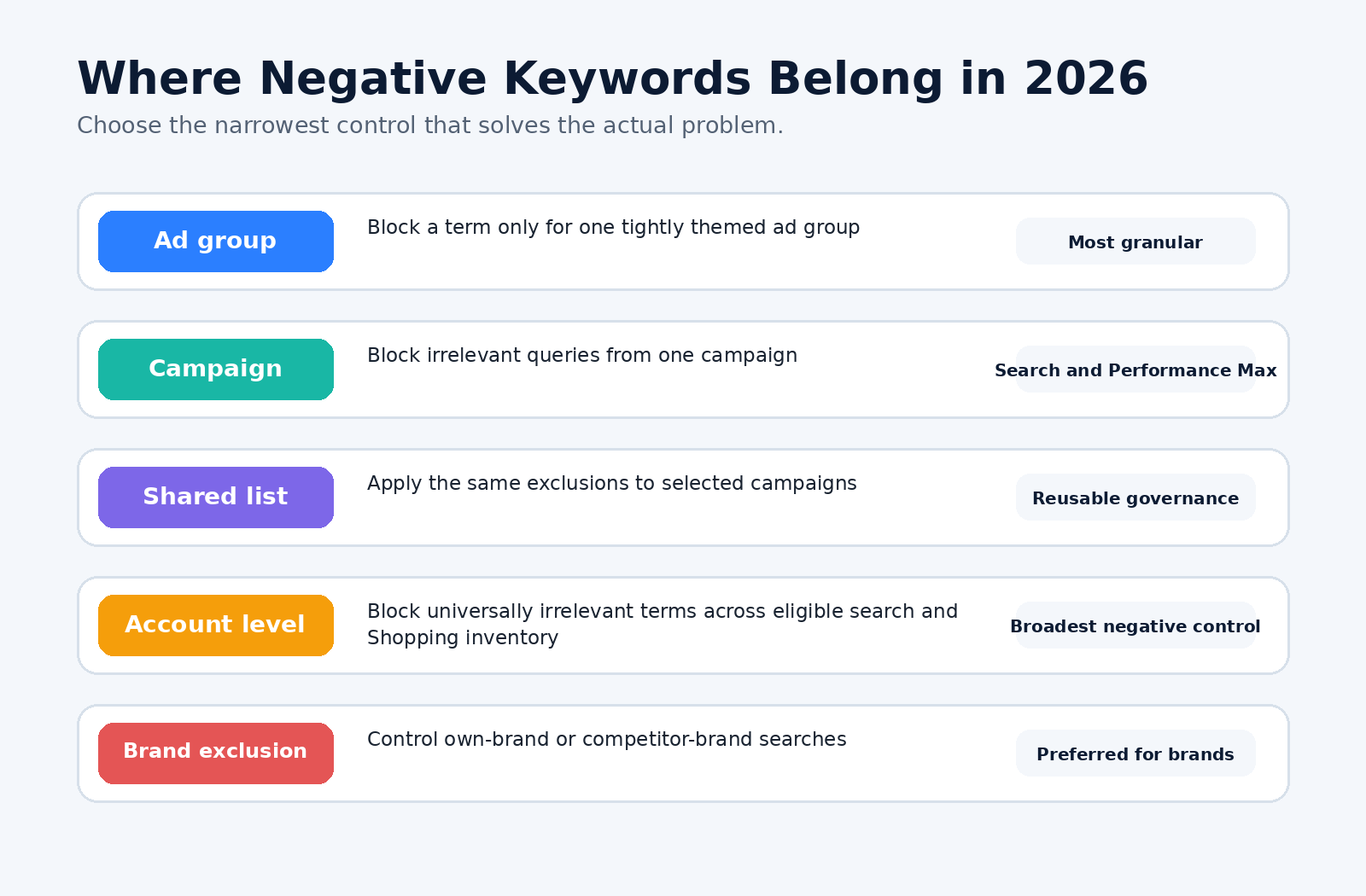
Choose the narrowest Google Ads exclusion control that solves the problem.
Where should you apply negative keywords?
| Level | Best use | Main risk |
| Ad group | Prevent overlap between tightly themed ad groups or block a term only for one offer. | Complex structures become difficult to audit and may accidentally block the intended ad group. |
| Campaign | Exclude terms that are irrelevant to one campaign, location, product line or objective. | Copying the same exclusions across campaigns creates maintenance errors. |
| Shared negative list | Apply a reusable list to selected campaigns, such as employment, support or research terms. | A universal list may be inappropriate for some products or audiences. |
| Account level | Block terms that are universally irrelevant across eligible Search and Shopping inventory. | A mistake can suppress traffic across many campaign types at once. |
| Performance Max campaign level | Block clearly irrelevant or unsafe Search and Shopping queries from one PMax campaign. | Overuse can restrict automated discovery and does not control Display or video context. |
| Brand exclusion | Prevent serving on selected own-brand or competitor-brand searches. | Can remove profitable branded demand if campaign strategy is not planned carefully. |
Account-level negative keywords
Account-level negative keywords create one central list that applies to relevant Search and Shopping inventory. They are useful for terms that should never trigger an ad anywhere in the account, such as prohibited product categories, recruitment searches when the business is not hiring, or locations the business can never serve.
Because the control is broad, keep the account-level list conservative. Review it before launching a new product, entering a new market or changing the business model. A term that was once irrelevant may become valuable later.
Shared negative keyword lists
Shared lists are ideal when several campaigns need the same exclusions but the entire account does not. Common examples include “jobs and careers,” “customer support,” “manual and documentation,” or “free resources.” Apply lists selectively and maintain a clear owner, purpose and review date for each one.
Performance Max negative keywords in 2026
Google now lets advertisers add negatives directly to a Performance Max campaign or at account level. Campaign-level PMax negatives apply to Search and Shopping inventory. They do not prevent ads from appearing beside Display or video content; content-suitability controls are required for those placements.
The updated Performance Max search-terms report provides search terms, landing pages and ad-format context. Use conversion value and lead quality—not clicks alone—to decide whether a term is truly harmful.
- Remove obvious brand-unsafe or completely irrelevant searches.
- Check whether the landing page or product feed caused the mismatch before excluding demand.
- Use campaign-level negatives when the term is wrong only for that PMax campaign.
- Use account-level negatives only when the term is wrong across the business.
- Use brand exclusions instead of long lists of brand-name spelling variations.
AI Max for Search and negative keywords
AI Max for Search expands matching and can use landing-page content to find additional relevant searches. Google confirms that AI Max respects negative keywords. However, its reporting guidance recommends reviewing terms every one to two weeks and using negatives sparingly because excessive blocking can limit intent-based optimization.
A modern workflow therefore evaluates business results, not just literal keyword similarity. A query can look unfamiliar and still produce qualified leads. Conversely, a highly relevant query can be unprofitable because the offer, geography, landing page or lead quality is wrong.
Brand exclusions versus negative keywords
For own-brand or competitor-brand control, use brand exclusions where available. Google describes them as more comprehensive than negative keywords because they can cover common misspellings, variants and related subsidiary brands.
| Use case | Preferred control | Why |
| Keep Performance Max away from your own brand while a dedicated Search campaign handles it | Brand exclusion | More complete brand coverage and cleaner brand/nonbrand separation. |
| Avoid a competitor brand across Search or Performance Max | Brand exclusion | Designed to recognize brand variants more effectively than literal negatives. |
| Block “jobs,” “manual,” “torrent” or another nonbrand intent | Negative keyword | The problem is a word or phrase, not a recognized brand entity. |
| Block one poor-performing exact query while preserving nearby demand | Negative exact keyword | Narrow control without excluding the entire theme. |
How to build a negative keyword list that improves results
1.Define the conversion that matters. Decide whether success means ecommerce revenue, qualified leads, booked appointments, subscriptions or another measurable outcome.
2.Review actual search terms. Start with the Google Ads search-terms report and the Performance Max search-terms-and-landing-pages view.
3.Connect lead quality. Import offline conversions or review CRM outcomes so “conversions” are not mistaken for qualified customers.
4.Group unwanted intent. Organize terms into themes such as jobs, support, free resources, DIY, research, irrelevant locations and incompatible products.
5.Select the narrowest match type. Use exact when only one query is bad, phrase for a stable unwanted phrase and broad only when every use of all included words is unwanted.
6.Choose the correct level. Apply the exclusion to an ad group, campaign, shared list, account or brand list based on scope.
7.Check for conflicts. Make sure the new negative does not block a valuable keyword, product, landing page or campaign route.
8.Measure after the change. Track conversions, conversion value, qualified-lead rate, reach and lost opportunity—not just lower spend.
A starter negative-keyword framework
The following themes can help you begin an audit, but they are not universal exclusions. A training company should not block “course,” a freemium product should not automatically block “free,” and a recruitment platform should not block “jobs.”
| Theme | Possible terms to investigate | When they may be inappropriate |
| Employment | jobs, careers, salary, internship, vacancy, hiring | Recruiters, job boards, training providers and employer-brand campaigns. |
| Education and research | definition, meaning, PDF, thesis, example, tutorial | Publishers, educators, software with educational acquisition funnels. |
| Free or low price | free, cheap, discount, coupon, trial | Freemium products, trials, promotions and price-sensitive markets. |
| Support and navigation | login, support, phone number, complaint, refund | Existing-customer campaigns, support services and reputation management. |
| DIY and self-service | DIY, template, spreadsheet, calculator, how to | Tools, templates, lead magnets and content-led sales funnels. |
| Used or incompatible products | used, second hand, repair, parts, manual | Repair businesses, marketplaces and refurbished-product sellers. |
| Unserved geography | country, state or city names outside service area | International expansion, ecommerce shipping or remote services. |
| Unsafe or prohibited intent | replica, counterfeit, cracked, torrent, illegal | Review carefully for context and policy; do not rely only on keyword blocking. |
Examples by industry
Software-as-a-service company
A paid project-management platform may investigate terms such as “open source,” “free spreadsheet,” “download cracked,” “login,” “customer support” and “jobs.” It should not automatically exclude “free trial” if trials are a core acquisition path.
Local home-services business
A roofing company may exclude “jobs,” “salary,” “DIY,” “training,” “materials only,” distant locations and unrelated repair types. It should apply location exclusions in campaign settings as well; negative place names are not a substitute for correct geographic targeting.
Ecommerce retailer
A premium retailer may exclude “replica,” “wholesale” or “used” if those intents are incompatible. Before excluding “cheap” or “discount,” check whether price-conscious visitors still convert profitably during promotions.
B2B agency
An agency targeting paid-search management leads may exclude “Google Ads support,” “certification,” “jobs,” “login” and “free course.” It may preserve competitor searches if comparison traffic produces qualified opportunities.
How to add negative keywords in Google Ads
Campaign or ad-group negatives
1.Open Google Ads and go to the Campaigns area.
2.Open Keywords, then select the Negative keywords tab.
3.Click the plus button.
4.Choose whether to add the terms to an ad group, campaign or existing negative keyword list.
5.Enter one term per line using no punctuation for broad, quotation marks for phrase or square brackets for exact.
6.Save the changes and review the affected campaigns.
Account-level negatives
1.Open the Admin menu in Google Ads.
2.Choose Account settings.
3.Expand Negative keywords.
4.Add one keyword or phrase per line, choose match types and save.
5.Review the account-level list before product launches or market changes.
Performance Max negatives
1.Go to Keywords in the Campaigns area.
2.Open the Negative keywords tab and click the plus button.
3.Select the Performance Max campaign.
4.Enter terms or select an existing negative keyword list.
5.Choose the intended match types and save.
| Interface note: Google Ads navigation changes frequently. The labels may move, but the official help links in this article are the authoritative reference for the latest interface. |
How often should you review search terms?
For active or rapidly changing accounts, review search terms every one to two weeks. New campaigns, broad match, AI Max, Performance Max and seasonal promotions may need closer attention during the learning period. Mature campaigns can use a risk-based cadence based on spend, query volume and lead quality.
- Review high-spend nonconverting terms first.
- Prioritize terms producing fraudulent, unqualified or out-of-area leads.
- Compare search terms with landing pages and product-feed data.
- Use CRM outcomes and offline conversions where possible.
- Keep an exclusion log with date, reason, scope and reviewer.
- Recheck whether old negatives are still necessary at least quarterly.
Metrics to evaluate after adding negatives
Do not judge success only by a lower number of clicks. An exclusion can reduce spend while also removing profitable demand. Compare performance before and after the change while accounting for seasonality, budgets and other campaign edits.
| Metric | What to look for |
| Conversion value or revenue | Did profitable outcomes improve, remain stable or fall after exclusions? |
| Qualified lead rate | Did sales-accepted or revenue-producing leads improve, not just form submissions? |
| Cost per qualified acquisition | Did the cost of a meaningful customer outcome improve? |
| Search impression and click volume | Did the exclusion remove only waste, or did reach collapse? |
| Search-term mix | Are remaining terms more aligned with the offer and landing page? |
| Campaign learning and bidding stability | Did sudden volume loss disrupt automated bidding? |
| Brand and nonbrand separation | Are brand controls routing traffic as intended? |
Negative keywords do not directly raise Quality Score. They may improve campaign efficiency by preventing irrelevant searches, but Quality Score is a diagnostic based on expected click-through rate, ad relevance and landing-page experience for exact searches of a keyword.
Common negative-keyword mistakes
- Using the minus sign. The old article advised prefixes such as “-free.” Google Ads uses plain text, quotation marks or square brackets for negative match types.
- Using broad-match modifiers. The +keyword modifier is discontinued and should not appear in a current negative-keyword strategy.
- Assuming close variants are blocked. Singulars, plurals, misspellings and synonyms may need separate review.
- Blocking unfamiliar terms too quickly. Evaluate conversion value and lead quality before excluding emerging demand.
- Adding generic global negatives. “Free,” “cheap,” “course” or “template” may be profitable for some campaigns.
- Using negatives instead of brand exclusions. Brand exclusions provide more complete control of branded searches.
- Confusing search controls with content suitability. PMax negatives affect Search and Shopping inventory; Display and video require content-suitability exclusions.
- Ignoring landing-page causes. A poor URL, product feed or message match can create bad traffic that should be fixed rather than excluded.
- Never reviewing old lists. Business models, offers and markets change. An old exclusion can become a hidden growth constraint.
Negative keyword audit checklist
- Confirm the campaign’s primary conversion and business value.
- Export search terms for a meaningful date range.
- Add CRM or offline lead-quality data where available.
- Identify irrelevant, unsafe, unserved and consistently unprofitable themes.
- Choose exact, phrase or broad negative match deliberately.
- Apply each exclusion at the narrowest appropriate level.
- Use brand exclusions for own-brand or competitor-brand traffic.
- Check conflicts against active positive keywords and landing pages.
- Review account-level and shared lists for outdated terms.
- Document the change and measure reach, revenue and qualified conversions afterward.
| Improve the campaign, not just the keyword list Negative keywords work best as part of a complete PPC system that includes accurate conversion tracking, strong landing pages, disciplined search-term reviews and clear business goals. Compare the best PPC tools for 2026 |
Frequently asked questions
What is a negative keyword in Google Ads?
It is a word or phrase that prevents an ad from serving on matching searches according to the chosen negative match type.
What are the three negative keyword match types?
Negative broad, negative phrase and negative exact. Broad blocks searches containing all included words in any order, phrase blocks the phrase in the same order, and exact blocks only the precise search.
Should I put a minus sign before a negative keyword?
No. Enter broad negatives without punctuation, phrase negatives in quotation marks and exact negatives in square brackets.
Do negative keywords block synonyms and misspellings?
Not reliably. Negative keywords are more literal than positive keyword matching, so review singulars, plurals, misspellings and related wording in the search-terms report.
Can I add negative keywords to Performance Max?
Yes. Google Ads supports campaign-level and account-level negatives for Performance Max Search and Shopping inventory.
Does AI Max respect negative keywords?
Yes. Google confirms that AI Max for Search honors negative keywords, although overly restrictive lists may limit useful discovery.
When should I use brand exclusions?
Use them when you want to control searches for your own brand or another specific brand. They provide broader brand coverage than literal negative keyword entries.
How many negative keywords can a campaign have?
Google currently lists up to 10,000 negative keywords per campaign and up to 5,000 keywords per shared negative list, with account and campaign limits documented in its Google Ads account-limits guide. Limits can change, so verify before large uploads.
How often should I update a negative keyword list?
Review high-spend and automated campaigns every one to two weeks, then run a deeper account-level audit at least quarterly or whenever products, markets or conversion goals change.
Final takeaway
The 2026 negative-keyword strategy is not “block everything that looks irrelevant.” It is a measured control system: use actual search terms, conversion value and lead quality; choose the narrowest match and scope; use brand exclusions for brands; and monitor what happens after the change.
For broader campaign research and automation options, read CBOOMARANK’s best PPC tools guide. For organic and paid query discovery, use the keyword research tools comparison. You can also run a free CBOOMARANK website analysis before sending more paid traffic to a landing page.
