

Keyword research has changed. Search volume is still useful, but it is no longer enough to decide what deserves a page. Modern research must also consider search intent, traffic potential, SERP features, topic relationships, commercial value, trend direction and the questions people ask in AI-powered search experiences. Google explains that AI Overviews and AI Mode can use query fan-out to explore several related searches at once, which makes strong topic coverage more important than repeating every exact-match keyword variation. Google’s guidance for AI search confirms that foundational SEO still applies: create original, useful content, keep it crawlable and focus on satisfying visitors. Run a free CBOOMARANK SEO audit
This guide compares 20 of the best keyword research tools available in 2026. It includes free tools, professional SEO platforms, AI-assisted research tools and specialist options for questions, trends, competitor gaps, long-tail keywords and Bing search data.
Quick recommendation
Start with first-party data from Google Search Console and Bing Webmaster Tools. Use CBOOMARANK, Semrush, Ahrefs, SE Ranking or another full platform to expand and qualify opportunities. Add Google Trends, AlsoAsked, AnswerThePublic or Exploding Topics when you need seasonality, questions or emerging demand.
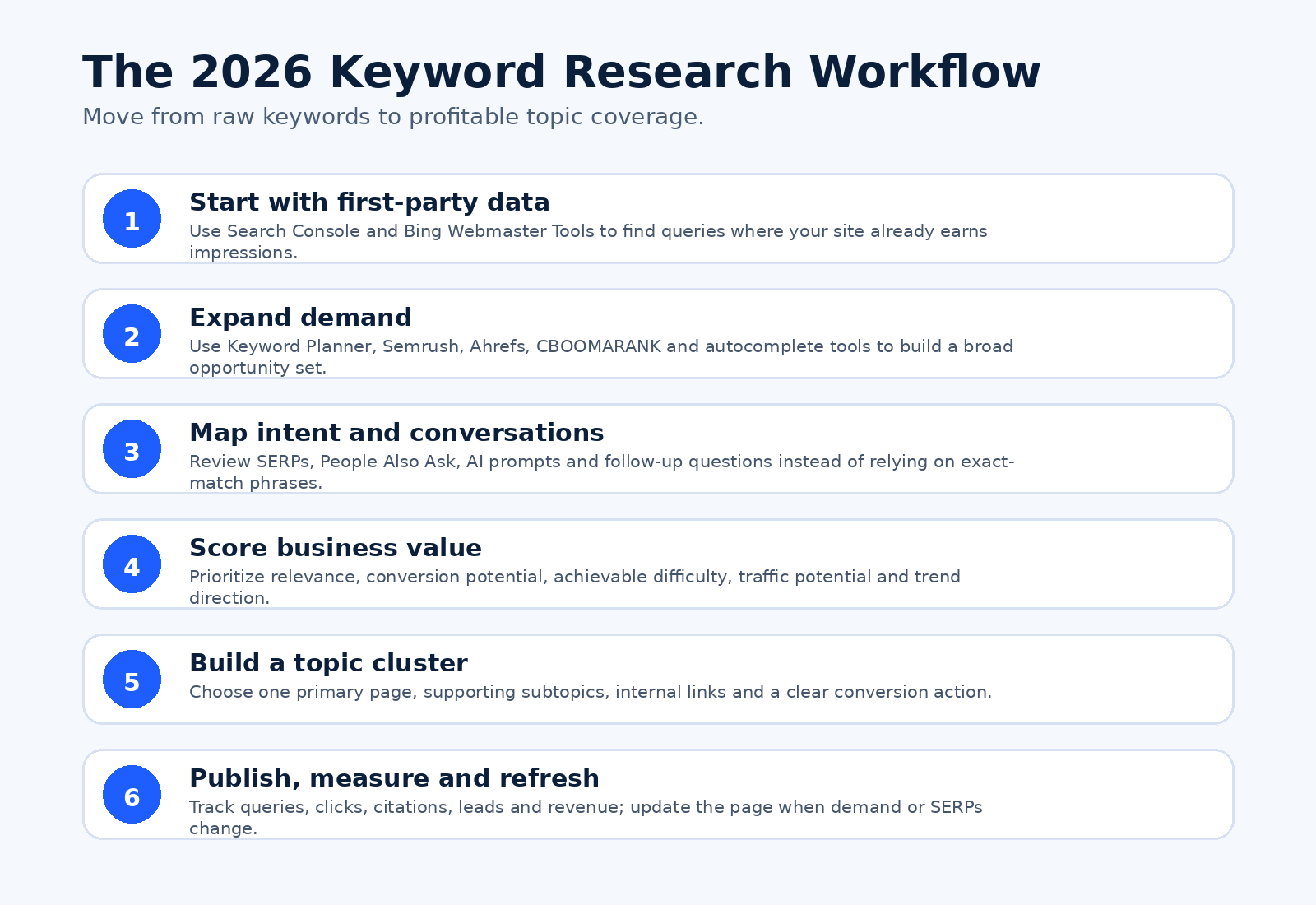
Image: A modern keyword research workflow for moving from search data to publishable topic clusters.
Best keyword research tools at a glance
| Tool | Best for | Access |
| CBOOMARANK | Affordable keyword research plus site reports | Free tier + paid |
| Google Search Console | Queries already generating impressions | Free |
| Google Keyword Planner | PPC demand, CPC and forecasts | Free with Google Ads |
| Google Trends | Seasonality and rising interest | Free |
| Semrush Keyword Magic Tool | Large-scale professional research | Limited free + paid |
| Semrush Prompt Research | AI-search prompts and brand visibility | Paid |
| Ahrefs Keywords Explorer | Traffic potential and deep SERP analysis | Paid |
| Moz Keyword Explorer | Simple keyword prioritization | Limited free + paid |
| SE Ranking | Agency-friendly value and workflow | Trial/paid |
| Mangools KWFinder | Beginner-friendly long-tail and local research | Limited free + paid |
| Ubersuggest | Budget-friendly all-in-one SEO research | Limited free + paid |
| KeywordTool.io | Autocomplete across many platforms | Free ideas + paid data |
| AnswerThePublic | Questions and search-listening ideas | Limited free + paid |
| AlsoAsked | Live People Also Ask topic maps | Limited free + paid |
| LowFruits | Weak SERPs and easier long-tail targets | Paid/credit-based |
| Keywords Everywhere | Inline data while browsing | Free extension + paid metrics |
| Exploding Topics | Early-stage trends and category growth | Free + paid |
| Similarweb Keyword Research | Market and competitor demand analysis | Paid/limited access |
| Seobility Keyword Research | Beginner and multilingual research | Free limits + paid |
| Bing Webmaster Tools | Bing queries, volumes and AI visibility | Free |
How we evaluated the tools
No keyword tool has perfect data. Search volumes, difficulty scores and traffic estimates are modeled differently, so the best choice depends on the job. We prioritized tools that provide several of the following:
- Useful keyword ideas from seeds, competitors, URLs or real search queries.
- Location, language, device or platform-specific research.
- Search volume, trend direction, CPC, difficulty or traffic-potential metrics.
- SERP analysis and clear signals about user intent.
- Topic clustering, question discovery or AI-prompt research.
- Exports, lists, collaboration or integration with content and rank-tracking workflows.
- A practical free tier, trial or differentiated value for the price.
1. CBOOMARANK: Best for affordable all-in-one keyword and website research
Visit CBOOMARANK — CBOOMARANK combines keyword research with SEO reports, SERP checking, indexed-page checking, technical diagnostics and other website utilities. It is a practical starting point for small businesses, bloggers and agencies that want research and site analysis in one environment without immediately committing to a premium enterprise platform.
Standout capabilities:
- Use the keyword research tool to expand seed topics.
- Run a page or domain report before selecting targets.
- Connect research to technical and on-page improvements.
Best choice when: Choose CBOOMARANK when you want keyword discovery and actionable website diagnostics in the same workflow.
2. Google Search Console: Best for keywords your website already shows for
Visit Google Search Console — Search Console is usually the most valuable starting point for an established website because its Performance report shows the real queries that generated impressions and clicks for your pages. Filter by page to find terms where a URL already ranks, then look for high-impression queries with weak click-through rates or average positions just outside the strongest results.
Standout capabilities:
- Real first-party query data.
- Clicks, impressions, CTR and average position.
- Page, country, device and date filters.
Best choice when: Use it to improve existing pages before creating another article targeting the same topic.
3. Google Keyword Planner: Best free tool for PPC keywords and commercial demand
Visit Google Keyword Planner — Keyword Planner is designed for Google Ads, but its keyword ideas, search estimates, competition and bid data are also useful for content planning. It can discover ideas from phrases or a website and help identify terms with advertiser demand. Remember that advertising competition is not the same as organic ranking difficulty.
Standout capabilities:
- Discover ideas from keywords or URLs.
- Review average searches, competition and bid estimates.
- Build forecasts and campaign groups.
Best choice when: Use Keyword Planner when paid-search value and lead-generation intent matter.
4. Google Trends: Best for seasonality, regional demand and rising topics
Visit Google Trends — Google Trends shows relative interest over time rather than absolute search volume. It is excellent for comparing wording, checking seasonality, identifying regional differences and finding rising related searches. Trending Now covers more than 100 countries and regions, and newer Gemini-assisted exploration can help users move from broad themes to related topics.
Standout capabilities:
- Compare terms and topics over time.
- Filter by region, category and search surface.
- Find rising and breakout related searches.
Best choice when: Use Trends before publishing time-sensitive, seasonal or fast-growing content.
5. Semrush Keyword Magic Tool: Best professional all-in-one keyword database
Visit Semrush Keyword Magic Tool — Semrush Keyword Magic Tool is suited to large research projects. It groups suggestions, provides volume, trend, intent, keyword difficulty, CPC and SERP-feature data, and lets teams save or export qualified opportunities. Personalized difficulty can help compare a keyword with the strength of a specific domain rather than relying only on a universal score.
Standout capabilities:
- Large keyword database and advanced filters.
- Intent, SERP features and competitive metrics.
- Keyword lists and integrations across the Semrush suite.
Best choice when: Choose Semrush for comprehensive agency, ecommerce or enterprise research.
6. Semrush Prompt Research: Best for AI-search prompt and conversation research
Visit Semrush Prompt Research — Traditional keyword databases describe search-engine demand. Prompt Research extends the workflow by showing how questions are phrased in AI tools and where brands appear in AI-generated responses. This helps content teams compare classic search demand with conversational discovery and identify prompts that reveal comparison, recommendation or problem-solving intent.
Standout capabilities:
- Research topics and prompts used in AI discovery.
- Identify conversational wording and brand visibility.
- Combine AI-search insights with Keyword Magic Tool data.
Best choice when: Use it as an additional research layer, not a replacement for Search Console, SERP analysis or customer evidence.
7. Ahrefs Keywords Explorer: Best for traffic potential and advanced SERP analysis
Visit Ahrefs Keywords Explorer — Ahrefs goes beyond single-keyword volume with Traffic Potential, Parent Topic, SERP history, intent analysis and competitor data. It can generate and cluster ideas, compare SERPs and reveal whether a broader page could rank for many related searches. Ahrefs states that its keyword difficulty score is based on referring domains to the current top-ranking pages, so you should still review content quality, intent and your own authority.
Standout capabilities:
- Traffic Potential and Parent Topic.
- SERP comparison, intent and ranking history.
- AI suggestions and fast keyword clustering.
Best choice when: Choose Ahrefs when backlinks, SERP competition and total page-level traffic potential are central to your decisions.
8. Moz Keyword Explorer: Best for simple opportunity prioritization
Visit Moz Keyword Explorer — Moz Keyword Explorer presents keyword volume, difficulty, organic click opportunity and a combined Priority-style workflow designed to simplify selection. It is useful for marketers who want a cleaner interface and a straightforward way to compare opportunities without building a complicated scoring spreadsheet.
Standout capabilities:
- Keyword suggestions and SERP analysis.
- Difficulty and organic click potential.
- Lists and prioritization metrics.
Best choice when: Use Moz when ease of interpretation and prioritization matter more than the largest possible database.
9. SE Ranking: Best value for agencies and integrated SEO workflows
Visit SE Ranking — SE Ranking combines keyword ideas with search volume, difficulty, CPC, paid competition, intent filters, SERP features and competitor research. Keywords can flow into grouping, content editing and rank tracking, which makes the platform attractive to small and mid-sized agencies that need an integrated workflow.
Standout capabilities:
- Keyword and competitor research.
- Bulk analysis and intent filters.
- Integration with grouping, content and tracking tools.
Best choice when: Choose SE Ranking when you need broad SEO functionality with team-friendly organization.
10. Mangools KWFinder: Best beginner-friendly long-tail and local keyword tool
Visit Mangools KWFinder — KWFinder is known for a clear interface that makes search volume, keyword difficulty, trend and SERP information easier to interpret. It supports keyword research by term or competitor, local research across many locations, lists and filters for excluding opportunities that do not meet your thresholds.
Standout capabilities:
- Long-tail and competitor keywords.
- Local search research.
- Simple filters, lists and SERP metrics.
Best choice when: Use KWFinder when you want an approachable tool for blogs, local businesses or smaller SEO projects.
11. Ubersuggest: Best budget-friendly all-in-one tool with AI assistance
Visit Ubersuggest — Ubersuggest combines keyword ideas, intent, difficulty, volume, competitor research, content gaps, rank tracking and site auditing. Its current positioning includes AI-generated keyword suggestions and broader visibility research, making it a practical option for independent site owners who want several functions in one lower-cost platform.
Standout capabilities:
- AI-assisted keyword ideas.
- Competitor and content-gap analysis.
- Site audit and rank tracking in the same product.
Best choice when: Choose Ubersuggest when affordability and a guided all-in-one workflow are priorities.
12. KeywordTool.io: Best for autocomplete research across multiple platforms
Visit KeywordTool.io — KeywordTool.io expands autocomplete suggestions across Google, YouTube, Bing, Amazon, TikTok, Instagram, Perplexity, app stores and other platforms. This makes it valuable when customers discover products and information outside traditional Google web results. The free interface is useful for ideas, while search volume and advanced metrics require paid access.
Standout capabilities:
- Research many search and marketplace platforms.
- Generate long-tail autocomplete combinations.
- Use wildcard and question-based expansion.
Best choice when: Use it for YouTube, ecommerce, app, social-search and multi-platform content planning.
13. AnswerThePublic: Best for questions and search-listening ideas
Visit AnswerThePublic — AnswerThePublic turns autocomplete and search-listening data into question, preposition, comparison and related-term ideas. It is useful at the discovery stage, especially when you need the language people use around frustrations, choices, benefits and objections.
Standout capabilities:
- Question and comparison ideas.
- Visual topic exploration.
- Search-listening alerts on paid plans.
Best choice when: Use it to build FAQ sections, support articles, videos and customer-journey content—but validate demand and intent with another data source.
14. AlsoAsked: Best for People Also Ask maps and intent relationships
Visit AlsoAsked — AlsoAsked collects live People Also Ask questions and maps how one question leads to the next. That structure is useful for understanding intent proximity, follow-up questions and the natural research journey behind a topic. In 2026, this is particularly relevant because traditional search and AI assistants both encourage multi-step exploration.
Standout capabilities:
- Live, location-aware People Also Ask data.
- Hierarchical maps of connected questions.
- CSV and image exports for content planning.
Best choice when: Use AlsoAsked to decide which questions belong on one page and which deserve supporting articles.
15. LowFruits: Best for finding weak SERPs and low-competition long tails
Visit LowFruits — LowFruits focuses on opportunities where the current search results contain weaker sites or pages. Instead of relying only on a single difficulty number, it helps users inspect SERP weaknesses and long-tail terms that may be achievable for newer or lower-authority websites.
Standout capabilities:
- Long-tail keyword discovery.
- SERP weakness analysis.
- Filtering for easier opportunities.
Best choice when: Choose LowFruits when you need realistic early wins rather than the largest-volume keywords.
16. Keywords Everywhere: Best browser extension for keyword data while you work
Visit Keywords Everywhere — Keywords Everywhere displays keyword ideas, volume, CPC, competition and trend data inside websites such as Google, YouTube, Amazon, Search Console and Google Trends. The extension reduces tab switching and is useful for quickly qualifying ideas during normal research. It is available for Chrome, Firefox and Edge, with free features and credit-based paid data.
Standout capabilities:
- Inline metrics across supported websites.
- Related, long-tail and competitor ideas.
- Bulk and gap-analysis features on paid access.
Best choice when: Use it when speed and convenience matter more than managing a full standalone SEO platform.
17. Exploding Topics: Best for discovering trends before they peak
Visit Exploding Topics — Exploding Topics is designed to detect emerging categories, products and themes before they become obvious in mainstream keyword databases. Its methodology draws from search engines, social platforms, ecommerce sites, forums, news and other signals, which makes it useful for editorial planning, product research and trend-led content.
Standout capabilities:
- Early trend discovery.
- Growth history and category filters.
- Product, market and channel insights.
Best choice when: Use it to identify emerging demand, then validate search intent and business fit before investing heavily.
18. Similarweb Keyword Research: Best for market demand and competitor search intelligence
Visit Similarweb Keyword Research — Similarweb connects keyword research with market and competitor traffic intelligence. It is useful for understanding which queries drive traffic across a competitive set, comparing organic and paid demand, and assessing share within an industry rather than analyzing keywords in isolation.
Standout capabilities:
- Competitor and industry keyword intelligence.
- Organic and paid search context.
- Market-level traffic and demand analysis.
Best choice when: Choose Similarweb for enterprise market research, category strategy and competitive benchmarking.
19. Seobility Keyword Research Tool: Best free-friendly option for beginners and multilingual work
Visit Seobility Keyword Research Tool — Seobility offers keyword ideas, URL or domain keyword analysis, questions and common SEO metrics. Its broader content-tool suite supports many languages and regional search engines, making it useful for beginners, bloggers and smaller teams that want research connected to on-page optimization.
Standout capabilities:
- Keyword ideas and ranking-keyword discovery.
- Questions, volume and competition metrics.
- Integration with on-page and content tools.
Best choice when: Use Seobility when you want accessible research and site optimization in one platform.
20. Bing Webmaster Tools Keyword Research: Best free source for Bing demand and Microsoft AI visibility
Visit Bing Webmaster Tools Keyword Research — Bing Webmaster Tools provides keyword ideas and search-volume information for Bing. Its broader Search Performance reporting shows the queries driving traffic to your pages, while Microsoft has also introduced AI Performance insights showing citations and grounding query phrases across supported Copilot and Bing AI experiences.
Standout capabilities:
- Bing keyword ideas and volumes.
- Search Performance query data.
- Emerging AI citation and grounding-query insights.
Best choice when: Use it alongside Google Search Console to avoid making decisions from one search ecosystem only.
Which keyword research tool should you choose?
| Situation | Recommended approach |
| For a free starting stack | Use Google Search Console, Google Keyword Planner, Google Trends, Bing Webmaster Tools and CBOOMARANK’s free tools. |
| For bloggers and small businesses | Consider CBOOMARANK, KWFinder, Ubersuggest, Seobility, LowFruits or Keywords Everywhere, depending on whether you need site analysis, simplicity or easier long-tail targets. |
| For agencies | Semrush, Ahrefs and SE Ranking provide stronger bulk workflows, competitor research, lists, exports and integrations. |
| For ecommerce, video and social discovery | Use KeywordTool.io or Keywords Everywhere to research the platforms where customers actually search. |
| For AI-search and conversational research | Combine Semrush Prompt Research, AlsoAsked, AnswerThePublic, Search Console’s generative-AI reporting and Bing AI Performance data with traditional keyword metrics. |
| For emerging trends | Use Google Trends and Exploding Topics, then verify the topic’s relevance, competitive SERP and conversion potential. |
How to do keyword research in 2026
1. Start with revenue and audience goals — Define the product, service, subscription, lead or ad-supported action the content should support. A keyword that attracts the wrong visitor is not valuable simply because it has high volume.
2. Mine first-party queries — Open Search Console and Bing Webmaster Tools. Find high-impression pages, terms ranking in positions where improvement is realistic, and queries that reveal unmet questions or weak snippets.
3. Expand from multiple sources — Use a broad platform such as CBOOMARANK, Semrush, Ahrefs, SE Ranking or Ubersuggest. Add autocomplete, question and trend tools to expose language that a single database may miss.
4. Inspect the current results — Search the target query. Identify the dominant intent, ranking page types, freshness, authority, SERP features, AI Overviews, video or shopping results. A low difficulty score does not help if your proposed page does not match intent.
5. Score the opportunity — Evaluate topical relevance, conversion potential, traffic potential, trend direction, ranking feasibility, content cost and the value of each qualified visitor.
6. Build one strong topic cluster — Choose a primary page and supporting articles. Avoid creating separate thin pages for every keyword variation. Use descriptive internal links so readers and search engines can understand the relationship.
7. Publish original evidence — Add screenshots, tested workflows, examples, data, expert analysis and a clear point of view. Google’s current AI-search guidance emphasizes unique, non-commodity content over recycled summaries.
8. Measure outcomes and refresh — Track impressions, clicks, CTR, rankings, leads, sales, subscriptions and AI citations. Update the page when tools change, search intent shifts or competitors produce materially better resources.
Frequently asked questions
What is the best free keyword research tool?
There is no single best free tool for every job. Google Search Console is strongest for the real queries already showing your site, Keyword Planner is useful for paid-search demand, Google Trends is best for seasonality, and Bing Webmaster Tools provides another source of search and query data. CBOOMARANK adds keyword and website-analysis tools in one platform.
Are keyword research tools accurate?
They are estimates, not exact counts. Different tools use different databases, clickstream sources, models and update schedules. Compare multiple signals and verify the live SERP instead of treating any volume or difficulty score as absolute truth.
Do keywords still matter in AI search?
Yes, but modern optimization focuses more on topics, entities, intent, useful answers and connected questions than repeating exact phrases. Google states that core SEO best practices remain relevant for AI Overviews and AI Mode.
What is the difference between search volume and traffic potential?
Search volume estimates demand for one query. Traffic potential estimates the broader traffic a page may receive from the main query and many related searches. A lower-volume keyword can therefore support a page with substantial total traffic.
Should a new website target high-volume keywords?
Usually not as its only strategy. A newer site should prioritize closely relevant topics where the results show a realistic opening, then build authority through high-quality clusters, internal links, evidence and promotion.
How often should keyword research be updated?
Review priority topics at least quarterly and revisit fast-moving niches more often. Refresh immediately when product features, prices, regulations, SERP intent or trend direction changes.
Can ChatGPT replace a keyword research tool?
AI assistants are useful for brainstorming seed ideas, grouping themes and drafting questions. They should not be treated as a reliable source of current search volume, rankings, CPC or competition unless connected to verified live data.
How many keywords should one page target?
Build each page around one clear intent and topic rather than a fixed number. A strong page can naturally rank for many related queries when it fully addresses the user’s task.
Final verdict
The best keyword research stack is rarely one tool. Use first-party query data to understand where your website already has visibility, a broad SEO platform to expand and qualify opportunities, and specialist tools for questions, trends, long-tail SERPs or AI-search conversations. Most importantly, select keywords based on audience value and search intent—not volume alone.
Turn research into measurable SEO action
Run your website through CBOOMARANK to identify keyword, content, performance and technical opportunities. Then connect each priority topic to a useful page, a clear internal-link path and a conversion goal. Visit https://seo.cboomarank.com/ to get started.
Need a tailored keyword and content plan? Contact CBOOMARANK or explore our SEO services and pricing plans.
Primary sources used for the update
- Google guidance for generative AI search
- Google Search Console Performance report
- Google Ads Keyword Planner
- Google Trends help
- Semrush Keyword Magic Tool
- Ahrefs Keywords Explorer
- SE Ranking Keyword Research
- Mangools KWFinder
- KeywordTool.io
- AlsoAsked
- Keywords Everywhere
- Bing Webmaster Tools Keyword Research
- Bing AI Performance announcement
