

Introduction
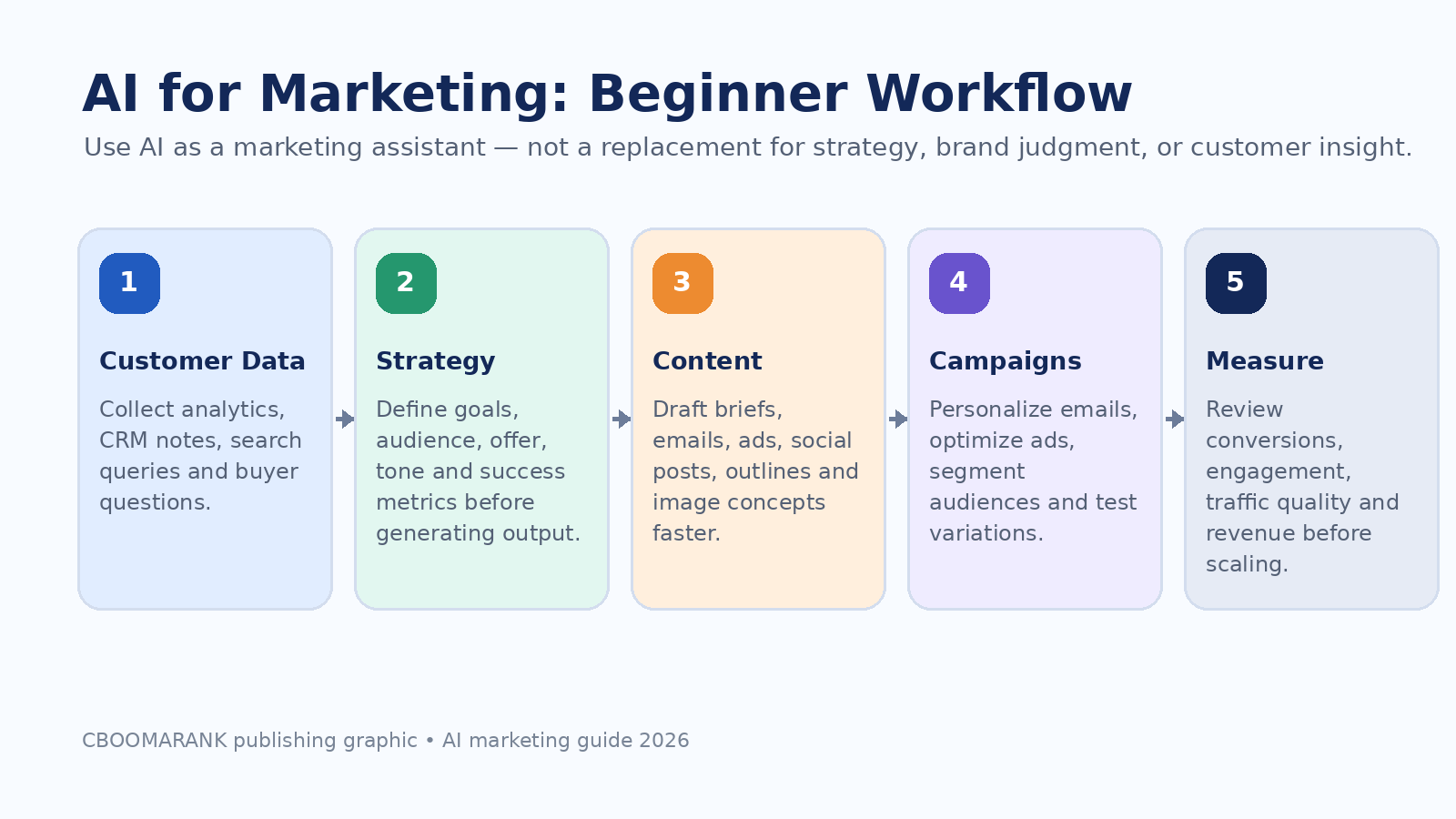
Artificial intelligence is no longer just a futuristic idea for large technology companies. In 2026, AI has become a practical marketing assistant for small businesses, bloggers, ecommerce brands, agencies, and creators who want to work faster and make better decisions.
AI can help marketers research customers, generate content ideas, write better briefs, personalize emails, improve ad creative, summarize analytics, build chatbots, and test landing page improvements. But AI is not a magic button. The best results come when marketers combine AI speed with human strategy, brand judgment, reliable data, and clear performance goals.
This beginner’s guide explains what AI for marketing means, where it fits into a marketing workflow, which use cases are worth starting with, which mistakes to avoid, and how to build a simple AI marketing system that supports growth without sacrificing trust or quality.
For related CBOOMARANK reading, see Best Free SEO Tools for Beginners, Ubersuggest vs Semrush, and Submit URL to Search Engines.
What Is AI for Marketing?
AI for marketing means using artificial intelligence tools to support planning, creation, personalization, campaign management, analysis, and optimization. Instead of replacing the marketer, AI handles repetitive or data-heavy tasks so marketers can focus on strategy, creativity, audience understanding, and decision-making.
Common AI marketing tasks include writing content outlines, generating ad variations, clustering keywords, predicting customer behavior, recommending audience segments, creating email journeys, summarizing campaign data, and producing creative concepts. The key is to use AI where it improves speed, consistency, and insight while keeping humans responsible for accuracy, ethics, brand voice, and final approval.
| Traditional Marketing Task | How AI Helps | Human Role |
| Keyword research | Groups keywords by intent and suggests topic clusters | Confirm demand, search intent, and business relevance |
| Content creation | Drafts outlines, briefs, FAQs, emails, and social captions | Add expertise, examples, editing, and brand voice |
| PPC campaigns | Generates ad variations and supports automated bidding systems | Set goals, budgets, exclusions, landing pages, and measurement |
| Email marketing | Suggests segments, subject lines, and automation flows | Approve messaging, compliance, offers, and customer experience |
| Analytics | Summarizes KPI changes and identifies patterns | Validate data, explain context, and decide next actions |
Why AI Marketing Matters in 2026
Marketing teams are under pressure to produce more content, test more creative ideas, respond faster to customer behavior, and prove return on investment. AI helps by reducing manual work and making it easier to turn large amounts of data into practical next steps.
Recent industry reports show that marketers are already using AI heavily for content creation, research, chatbots, media content, and data analysis. Salesforce’s State of Marketing research also highlights AI and data as major priorities for marketers, especially as personalization becomes harder without clean, trusted data.
For beginners, the opportunity is simple: start with small, measurable workflows. Do not try to automate your entire marketing system immediately. Start with tasks that are repetitive, easy to review, and directly connected to business outcomes.
Best AI Marketing Use Cases for Beginners
1. Customer and Audience Research
AI can summarize survey answers, reviews, support tickets, sales notes, and social comments to reveal common pain points. Beginners can use this to understand what customers actually ask before creating ads or content.
2. Keyword and Topic Research
AI can group keywords by search intent, suggest content clusters, and turn a list of search queries into blog post ideas. This is especially useful when paired with real SEO data from tools like Google Search Console, Semrush, Ahrefs, or Google Keyword Planner.
3. Content Briefs and Outlines
Instead of starting from a blank page, use AI to create a content brief with target audience, search intent, outline, FAQs, internal link ideas, and examples. The marketer should still edit the brief and add original insights.
4. Blog Drafting and Repurposing
AI can help transform a webinar, podcast, report, or video transcript into blog sections, newsletters, social posts, and FAQs. This saves time and keeps the message consistent across channels.
5. Email Marketing Automation
AI can suggest welcome sequences, re-engagement emails, product recommendations, subject lines, and segmentation ideas. Beginners should always review for accuracy, consent, and tone before sending.
6. PPC and Ad Creative Testing
AI can generate many ad headline and description variations for testing. In platforms such as Google Ads Performance Max, AI also supports bidding and placement optimization based on conversion goals and campaign inputs.
7. Social Media Planning
AI can create content calendars, caption ideas, short-form video hooks, hashtags, and post variations. The best social content still needs a human point of view, original examples, and platform-specific style.
8. Analytics and Reporting
AI can summarize traffic changes, conversion trends, campaign performance, and anomalies. This helps beginners understand what changed, but the data should always be checked inside the original analytics platform.
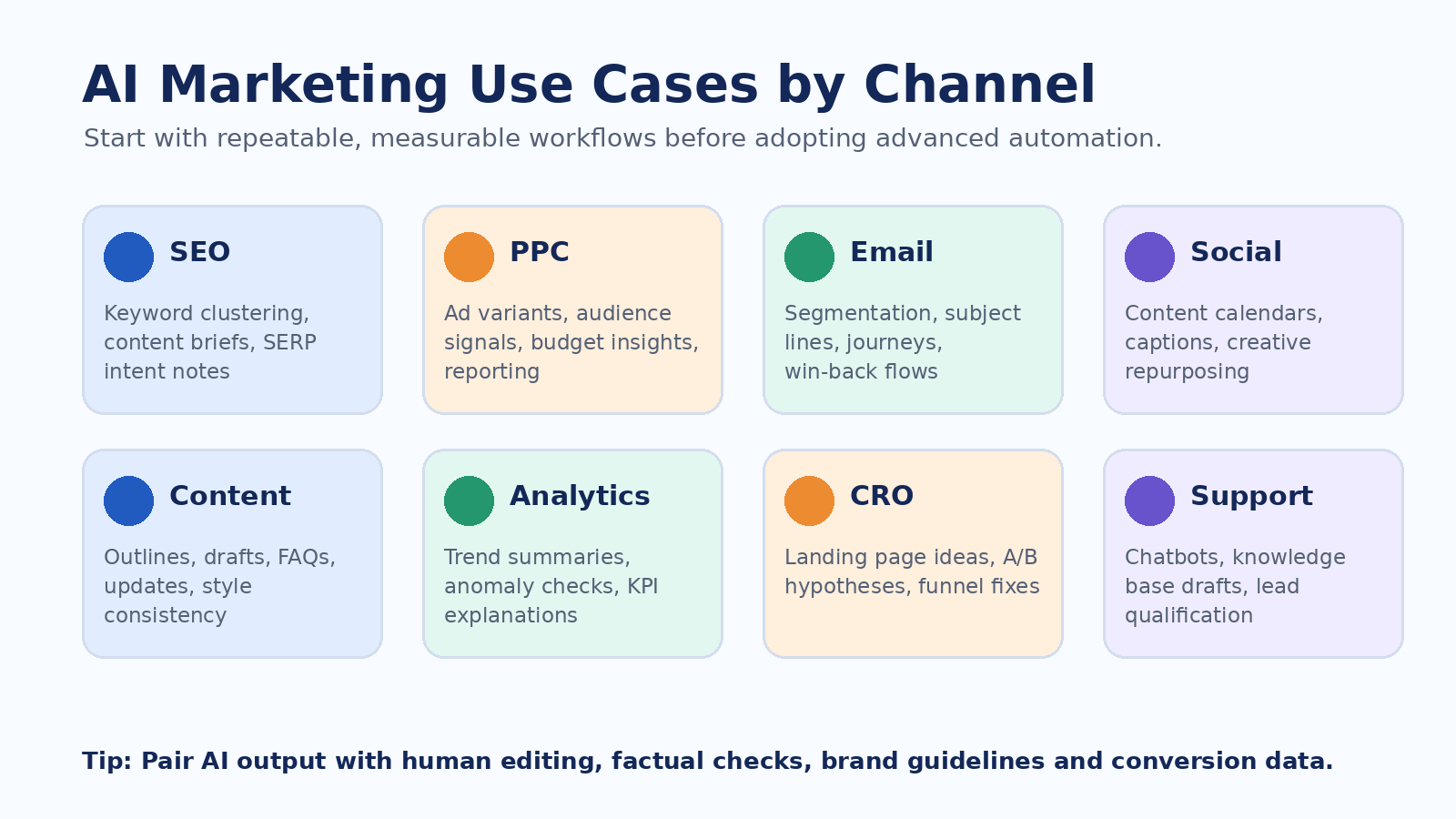
| Channel | Beginner AI Use Case | Metric to Track |
| SEO | Keyword clustering, content briefs, optimization ideas | Organic clicks, impressions, rankings, conversions |
| Content marketing | Outlines, drafts, FAQs, repurposing | Engagement, backlinks, leads, assisted conversions |
| PPC | Ad variants, audience signals, landing page ideas | CPA, ROAS, conversion rate, quality of leads |
| Segments, subject lines, workflows | Open rate, click rate, revenue, unsubscribes | |
| Social media | Calendars, hooks, captions, creative concepts | Reach, saves, shares, profile visits, leads |
| CRO | A/B test ideas, page critiques, offer variations | Conversion rate, revenue per visitor, form completions |
AI for SEO and Content Marketing
AI can speed up SEO work, but it should not be used to publish low-quality mass content. Google Search Central says content should be helpful, reliable, and people-first, and its guidance on generative AI content emphasizes quality rather than simply whether AI was used.
The best beginner workflow is to use AI for research support, outlines, content improvement, summaries, and content refreshes. Then add original examples, screenshots, product experience, expert quotes, data, and practical recommendations. This helps avoid generic content that looks like every other AI-generated article online.
AI is also changing search itself. Google’s official guidance for generative AI features recommends focusing on helpful content, crawlable pages, clear page structure, and user-first experiences. That means marketers should optimize for both traditional search and AI-powered search experiences by creating trustworthy, specific, well-structured content.
Suggested CBOOMARANK internal links for this section: Semrush vs Ahrefs, Best Free SEO Tools for Beginners, and Submit URL to Search Engines.
AI for PPC and Paid Advertising
AI is now built into major ad platforms. Google Ads Performance Max uses Google AI to optimize bids and placements toward conversion goals, while advertisers provide inputs such as audience signals, customer data, and creative assets. Meta Advantage+ also uses AI and automation to support campaign optimization across Facebook and Instagram.
Beginners should not treat automated campaigns as set-and-forget tools. AI can help find patterns, but the advertiser still controls business goals, budget, tracking, exclusions, landing pages, creative quality, and final approval. The most common beginner mistake is launching AI-driven campaigns before conversion tracking and offer clarity are ready.
| PPC Area | AI Can Help With | Beginner Warning |
| Ad copy | Generate headline and description variations | Avoid false claims, fake scarcity, or unsupported results |
| Bidding | Optimize toward conversions or conversion value | Tracking must be accurate before automation scales |
| Audience signals | Find patterns from customer data | Use consented data and respect privacy rules |
| Creative testing | Produce variations quickly | Human review is required for brand safety |
| Reporting | Summarize performance trends | Always verify inside the ad platform |
AI for Email Marketing and Automation
Email marketing is one of the easiest places for beginners to start using AI. You can use AI to draft welcome emails, abandoned cart messages, reactivation campaigns, newsletters, and customer journey ideas.
Mailchimp describes automation flows as dynamic marketing paths for contacts. When AI is combined with clean audience data, automation can make email more relevant without requiring manual messages for every subscriber.
The main rule is to keep permission, relevance, and frequency in mind. AI should not be used to flood subscribers with generic messages. It should help you send more useful messages to the right people at the right time.
Beginner AI Marketing Tool Stack
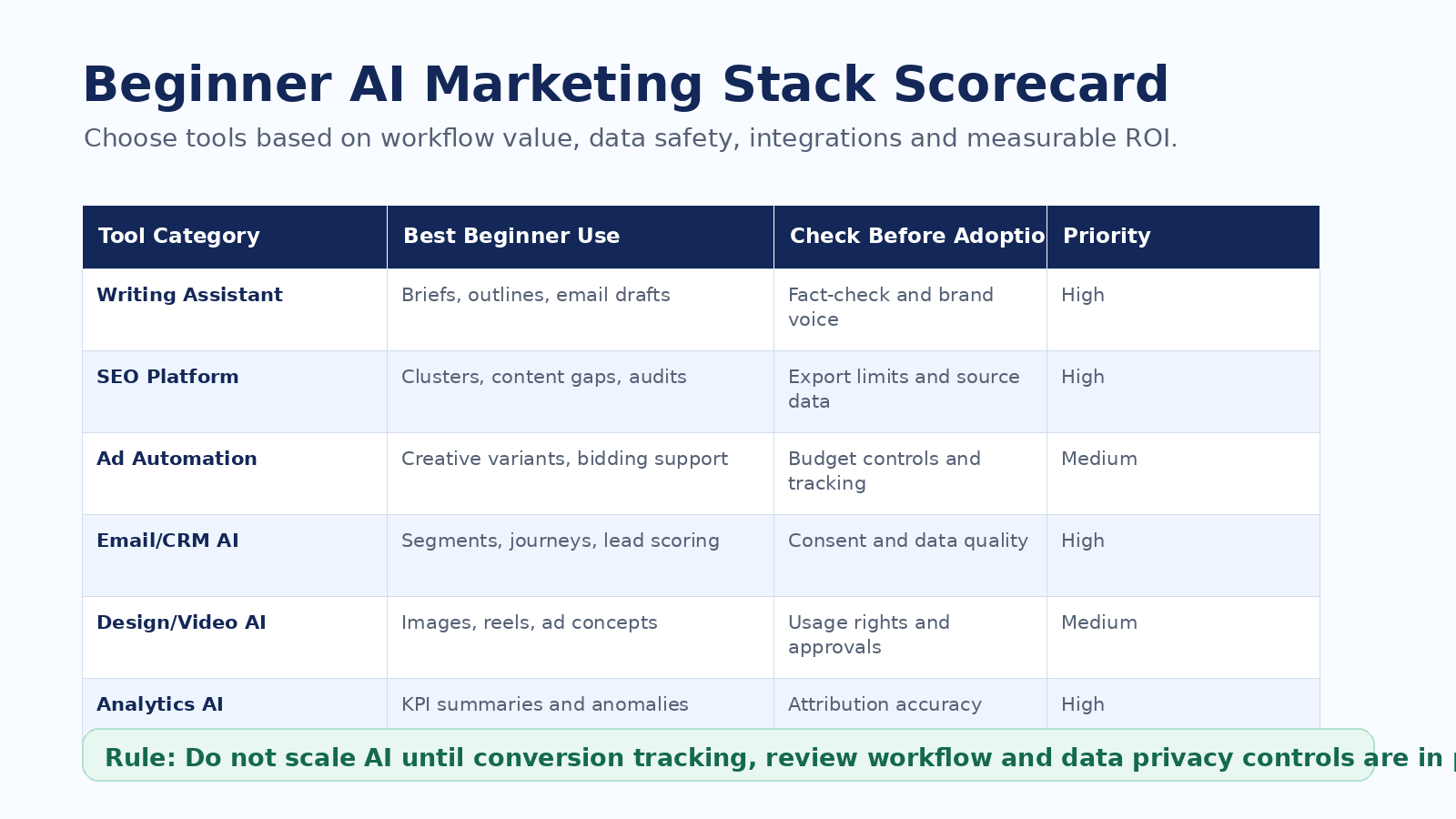
A beginner does not need dozens of AI tools. Start with a small stack that supports your current marketing workflow. The best AI tool is not the one with the most features; it is the one that helps you produce better work, faster, with less confusion and better measurement.
For most small businesses, the simplest starting stack includes one writing assistant, one SEO or keyword tool, one email or CRM automation platform, one design tool, and one analytics dashboard. Add specialized tools only after you know which workflow is slowing you down.
| Tool Category | Examples of Tasks | Best For |
| AI writing assistant | Ideas, briefs, drafts, edits, repurposing | Bloggers, marketers, small teams |
| SEO platform | Keyword research, competitor analysis, content gaps | Content marketers and SEO teams |
| Email/CRM platform | Segmentation, automation, lead nurturing | Small businesses and ecommerce |
| Ad platform AI | Creative variations, bidding, targeting support | PPC teams and ecommerce brands |
| Design/video AI | Ad visuals, social assets, short videos | Social and creative teams |
| Analytics AI | KPI summaries, anomalies, reporting | Managers and agencies |
Step-by-Step AI Marketing Plan for Beginners
Step 1: Choose one business goal
Pick one measurable goal such as more leads, more email subscribers, higher conversion rate, better SEO traffic, or lower cost per acquisition.
Step 2: Collect the right data
Use analytics, search queries, customer questions, sales notes, reviews, and support tickets. AI works better when the input data is specific.
Step 3: Build a prompt template
Create reusable prompts for briefs, emails, ad copy, blog outlines, and reporting summaries. Include audience, offer, goal, tone, format, and constraints.
Step 4: Review every output
Check facts, brand voice, compliance, links, examples, data, and claims. AI should assist your work, not approve itself.
Step 5: Publish in small batches
Test a few pieces of content, ads, or emails before scaling. Measure engagement and conversions before producing more.
Step 6: Improve based on results
Use analytics to decide which prompts, content types, offers, and channels are producing results.
Step 7: Create a repeatable workflow
Document what works. Turn your best prompts, checklists, templates, and review steps into a simple process your team can reuse.
Useful AI Marketing Prompt Templates
Content brief prompt
Create an SEO content brief for [topic] targeting [audience]. Include search intent, outline, FAQs, internal link ideas, external sources to verify, and conversion CTA.
Email campaign prompt
Draft a 5-email welcome sequence for [audience] interested in [offer]. Use a helpful tone, avoid hype, and include one clear CTA per email.
PPC ad prompt
Generate 15 Google Ads headline ideas and 8 descriptions for . Focus on benefits, proof, audience pain points, and compliance-safe wording.

Analytics prompt
Summarize this campaign report. Identify what improved, what declined, possible reasons, and three next actions to test next month.
What Beginners Should Not Automate Too Early
AI can create speed, but unchecked speed can create risk. Beginners should avoid fully automating sensitive customer communication, legal or financial claims, medical advice, refund decisions, ad claims, and public statements without human review.
The FTC’s advertising guidance reminds businesses that consumer protection rules apply online as well. If AI helps create ads, landing pages, testimonials, influencer scripts, or native advertising, the business still remains responsible for clear, truthful, and non-deceptive claims.
| Do Not Automate Blindly | Why It Matters | Safer Approach |
| Product claims | False or unsupported claims can damage trust and create legal risk | Require human approval and evidence |
| Customer support escalation | AI may misunderstand sensitive cases | Use AI drafts with human handoff |
| Paid ad publishing | Bad copy can waste budget quickly | Review before launch and monitor daily |
| Data analysis decisions | AI summaries can miss context | Check source dashboards |
| Brand voice | Generic output weakens differentiation | Use brand guidelines and examples |
How to Measure AI Marketing ROI
AI marketing is only useful if it improves a real business outcome. Beginners should measure time saved, output quality, cost efficiency, and revenue impact. Do not measure AI success only by how much content it produces.
Start by comparing performance before and after a workflow changes. For example, if AI helps you create email subject lines, track open rates, click rates, conversions, unsubscribe rates, and revenue. If AI helps with blog content, track rankings, clicks, engagement, assisted conversions, and backlinks.
| Goal | Useful KPI | AI Marketing Example |
| Save time | Hours saved per week | AI content brief templates reduce planning time |
| Improve SEO | Organic clicks and rankings | AI-assisted content refresh improves weak pages |
| Increase conversions | Conversion rate and revenue | AI-generated landing page tests identify better messages |
| Improve email | Clicks, revenue, unsubscribe rate | AI segments improve relevance |
| Improve ads | CPA, ROAS, lead quality | AI ad variations improve creative testing |
Best AI Marketing Approach by Business Type
| Business Type | Best Starting Use Case | Recommended Focus |
| Small business | Content ideas, email drafts, local SEO, FAQs | Save time and improve consistency |
| Blogger or affiliate site | Keyword clusters, outlines, content refreshes | Publish helpful content with original insight |
| Ecommerce store | Product descriptions, email flows, PPC creative | Improve conversion and retention |
| Agency | Research, reporting, briefs, campaign QA | Scale delivery while maintaining quality |
| SaaS company | Lead nurturing, customer education, paid ads | Improve funnel efficiency |
Final Verdict
AI for marketing is best understood as a powerful assistant. It can help beginners research faster, create better drafts, personalize campaigns, automate routine tasks, and understand performance data. But AI still needs human direction.
The best beginner strategy is to start with one marketing workflow, define a measurable goal, use AI to speed up the work, review every output, publish in small batches, and improve based on real results.
If you run a small business or blog, start with AI for content briefs, SEO topic research, email sequences, ad copy variations, and analytics summaries. If you run an agency or ecommerce store, AI can also support reporting, personalization, creative testing, product content, and campaign optimization.
AI will not replace good marketing fundamentals. Clear positioning, customer understanding, helpful content, strong offers, clean tracking, and trust still matter most. AI simply helps you execute those fundamentals faster.
FAQ
What is AI for marketing?
AI for marketing means using artificial intelligence tools to support tasks such as research, content creation, personalization, automation, ad optimization, analytics, and customer communication.
Is AI marketing good for beginners?
Yes. Beginners can use AI for simple tasks such as writing content outlines, summarizing analytics, generating email ideas, creating ad variations, and organizing keyword research.
Can AI replace marketers?
AI can automate parts of marketing, but it should not replace strategy, customer understanding, brand judgment, ethical review, or final approval.
What is the best AI marketing use case to start with?
The best starting use case is usually content planning, email drafting, or analytics summaries because these tasks are easy to review and directly useful.
Is AI-generated content bad for SEO?
AI-generated content is not automatically bad, but low-quality mass content created only to manipulate rankings is risky. Content should be helpful, accurate, original, and people-first.
How can small businesses use AI for marketing?
Small businesses can use AI to write social posts, create email campaigns, plan blog content, summarize customer feedback, generate ad copy, and analyze campaign results.
What should I check before using an AI marketing tool?
Check data privacy, integrations, export options, pricing, content quality, brand controls, compliance needs, and whether the tool improves a measurable workflow.
Internal Links for CBOOMARANK
CBOOMARANK Blog: https://www.cboomarank.com/blog/
Best Free SEO Tools for Beginners: https://www.cboomarank.com/blog/best-free-seo-tools-for-beginners/
Semrush vs Ahrefs: https://www.cboomarank.com/blog/semrush-vs-ahrefs/
Ubersuggest vs Semrush: https://www.cboomarank.com/blog/ubersuggest-vs-semrush/
Submit URL to Search Engines: https://www.cboomarank.com/blog/submit-url-to-search-engines/
External Authoritative References
Google Search Central – Guidance on using generative AI content: https://developers.google.com/search/docs/fundamentals/using-gen-ai-content
Google Search Central – Creating helpful, reliable, people-first content: https://developers.google.com/search/docs/fundamentals/creating-helpful-content
Google Search Central – Optimizing for generative AI features in Search: https://developers.google.com/search/docs/fundamentals/ai-optimization-guide
Google Ads Help – About Performance Max campaigns: https://support.google.com/google-ads/answer/10724817
Meta for Business – Advantage+ AI and automation: https://www.facebook.com/business/ads/meta-advantage-plus
Microsoft Advertising – Performance Max: https://about.ads.microsoft.com/en/solutions/ad-products-formats/performance-max
FTC – Advertising and Marketing guidance: https://www.ftc.gov/business-guidance/advertising-marketing
FTC – Native Advertising: A Guide for Businesses: https://www.ftc.gov/business-guidance/resources/native-advertising-guide-businesses
HubSpot – AI Trends for Marketers: https://offers.hubspot.com/ai-marketing
Salesforce – State of Marketing Report: https://www.salesforce.com/ap/resources/research-reports/state-of-marketing/
Mailchimp – About Marketing Automation Flows: https://mailchimp.com/help/about-customer-journeys/
