


| Editorial disclosure: CBOOMARANK did not operate identical matched Mochahost and Bluehost lab servers for this comparison. Performance sections compare current published platform features and provider commitments, not a claim that one host is universally faster. Pricing and plans can change; verify checkout before purchase. |
Quick Verdict: Mochahost vs Bluehost
Mochahost and Bluehost are both credible hosting choices in 2026, but they are strongest for different kinds of customers. Bluehost is the easier recommendation for a first WordPress website because its platform is built around guided onboarding, WordPress management and beginner-friendly site creation. Mochahost is more compelling when migration flexibility, cPanel, Windows hosting or a managed WordPress performance stack are the priority.
If you are still comparing several providers, see CBOOMARANK’s Best Web Hosting Providers in 2026 guide for a broader shortlist before you commit to a multi-year plan.
The key difference is positioning. Bluehost concentrates on reducing setup friction for WordPress users. Mochahost offers a wider range of traditional and specialist hosting environments, including cPanel hosting, managed WordPress and Windows hosting. Neither approach is automatically better; the right choice depends on how much control you want, what stack your site requires, whether you are migrating existing sites and how much you value a tightly guided WordPress workflow.
Our 2026 Recommendation
- Choose Bluehost if you are launching your first WordPress site, want a guided dashboard, value WordPress.org’s current recommendation, or want an integrated path from domain registration to site setup.
- Choose Mochahost if you are migrating established sites, prefer cPanel, need Windows/ASP.NET hosting, or want managed WordPress features such as Cloudflare Enterprise CDN, Redis and WP Rocket bundled into the platform.
- For uptime commitments on paper, Bluehost has the stronger shared-hosting figure: 99.99% versus Mochahost’s general 99.9% service-uptime objective in its terms.
- For migrations, Mochahost is unusually aggressive: its managed WordPress and cPanel pages advertise unlimited free expert-led migrations, while its terms appropriately describe migration as a best-effort service.
Mochahost vs Bluehost at a Glance
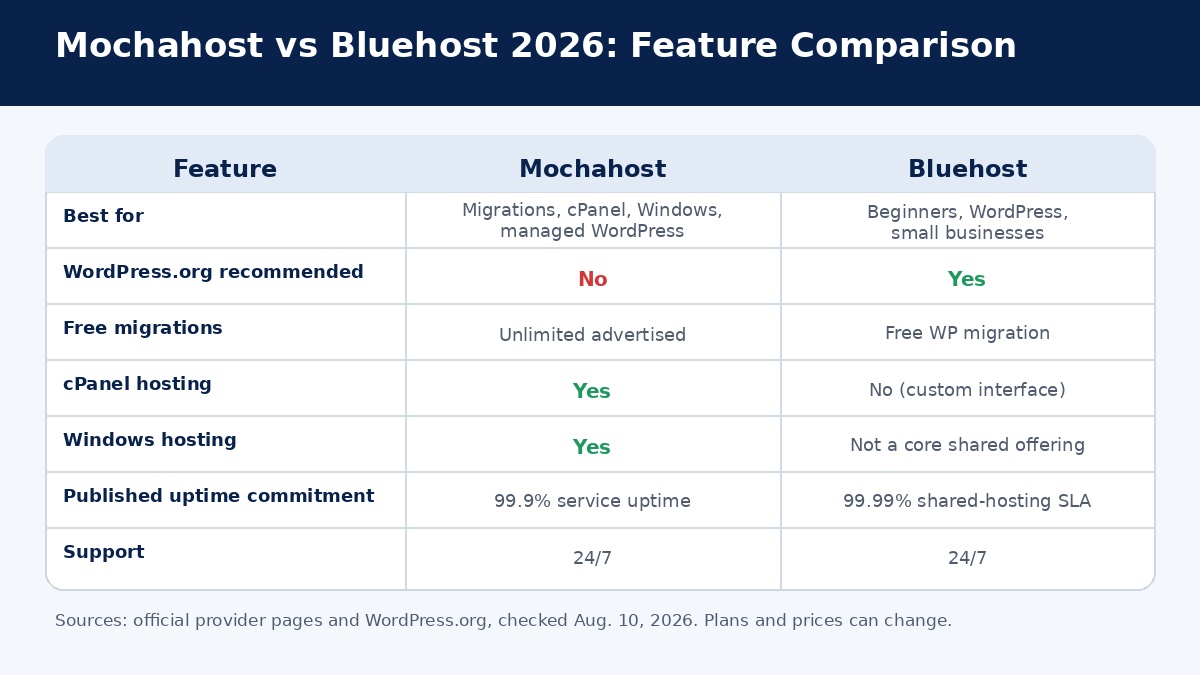
| Category | Mochahost | Bluehost |
| Best for | Migrations, cPanel, Windows, managed WordPress | Beginners, WordPress, blogs, small businesses |
| WordPress.org recommended | No current listing | Yes — longest-running recommended host |
| Managed WordPress | Yes | Yes |
| Free SSL | Yes | Yes |
| Free domain | On qualifying plans | First year on qualifying plans |
| Migration positioning | Unlimited free migrations advertised | Free WordPress migration |
| cPanel | Available | Custom Bluehost interface |
| Windows hosting | Available | Not a core shared-hosting offering |
| Published uptime commitment | 99.9% service uptime objective | 99.99% shared-hosting SLA |
| 24/7 support | Yes | Yes |
| Best beginner experience | Very good | Excellent |
What Is Mochahost?
Mochahost is a hosting provider with a broader infrastructure menu than many beginner-only shared hosts. Its current catalog includes managed WordPress, cPanel hosting, Windows hosting and other server products, which makes it relevant to both ordinary WordPress users and customers with more specific technical requirements.
For WordPress, Mochahost currently promotes a managed platform that bundles Cloudflare Enterprise CDN, Redis caching and WP Rocket. It also advertises a managed web application firewall, real-time malware protection, image optimization, one-click staging, SSH/SFTP access, multi-user features and 24/7 expert support. Those are meaningful inclusions for users who would otherwise assemble caching, CDN and security features from separate plugins or services.
Mochahost also has a traditional cPanel product. Its cPanel page advertises CloudLinux, NVMe servers, unlimited free SSL certificates, JetBackup, Softaculous for WordPress and hundreds of applications, free domains on qualifying annual plans and free expert-led migrations. Experienced site owners who already understand cPanel may prefer this familiar workflow over a highly abstracted hosting dashboard.
A second differentiator is Windows hosting. Mochahost explicitly supports Windows-based technologies such as ASP.NET, .NET, MSSQL and Plesk. That matters because WordPress-focused hosting comparisons often ignore customers whose applications require Microsoft server technologies.
What Is Bluehost?
Bluehost is one of the best-known hosting brands in the WordPress ecosystem. Its mainstream hosting experience is designed to simplify common website tasks such as connecting a domain, installing WordPress, activating SSL, creating a site, managing updates and getting support.
Bluehost also has a distinctive credibility signal: WordPress.org currently lists Bluehost as its longest-running recommended host. That endorsement does not mean Bluehost will outperform every alternative, but it confirms that Bluehost remains closely integrated with the WordPress ecosystem.
Bluehost’s current shared-hosting plans include a 99.99% uptime SLA, weekly website backups, AI site creation, multi-site management, plugin management, malware scanning and removal, free WordPress migration, free SSL and managed update features. The platform also uses NVMe storage on current shared plans and provides staging and developer tools on qualifying products.
The reason Bluehost remains attractive is not that every individual specification beats the market. Its advantage is the complete workflow. A first-time site owner can move from account creation to a functioning WordPress site without learning cPanel, server administration or command-line management first.
Pricing in 2026: Compare the Total Cost, Not Only the Headline Rate
Hosting pricing is one of the easiest places to make a bad comparison. Providers regularly use introductory discounts, term-based pricing, regional offers and renewal rates that are much higher than the signup rate. The correct comparison is the total cost across the period you expect to keep the site online.
When checked on August 10, 2026, the live Bluehost pricing page displayed entry shared-hosting pricing from $3.99 per month for Starter on a 36-month term and $6.99 per month for Business in its main pricing section. The same page also contains promotional comparison blocks that can display different offer values, which is a good reminder to verify the exact checkout total before buying.
Bluehost Starter is positioned for a simple website or blog and currently includes 10 websites, 10 GB NVMe storage, an indicated traffic allowance around 40,000 monthly visits, a free domain for the first year, 24/7 chat support and staging. Business increases website and storage limits and adds stronger support/security features. Renewal costs are materially higher than introductory rates, so long-term budgeting matters.
Mochahost’s managed WordPress page currently advertises a $1 first month offer. Because Mochahost sells several hosting families — managed WordPress, cPanel, Windows and others — it is more useful to compare the exact product you need than to force every plan into a single headline-price table.
Pricing winner: no universal winner. Bluehost is easier to compare for mainstream WordPress/shared hosting. Mochahost can offer better value when you specifically need its bundled managed WordPress stack, cPanel migrations or Windows support. In both cases, check renewal pricing, resource limits, backup policies, support channels and included add-ons before purchasing.
WordPress Hosting: Which Provider Is Better?
Bluehost for WordPress Beginners
Bluehost is especially strong when the customer does not want to think about hosting infrastructure. The dashboard and onboarding process are designed to move a new user through the steps that usually create confusion: domain setup, WordPress installation, SSL, plugins, site creation and ongoing management. Its current WordPress positioning also includes AI-assisted site creation, built-in CDN functionality and developer access such as SSH or WP-CLI on supported plans.
That combination matters because the first challenge for many WordPress users is not raw server performance. It is successfully launching a secure, working website without making configuration mistakes. Bluehost’s guided interface lowers that barrier.
Mochahost for Managed WordPress Features
Mochahost’s managed WordPress product takes a more infrastructure-heavy approach. The current product page includes Cloudflare Enterprise CDN, Redis, WP Rocket, full-page and device-specific caching, image optimization, edge infrastructure with NVMe storage, unlimited PHP workers, a managed WAF and real-time malware protection through Imunify360. For a site owner who would otherwise pay for or configure several of those layers separately, the bundle is compelling.
Mochahost also emphasizes migration as part of the managed experience. The provider advertises unlimited free migrations and expert assistance for existing WordPress sites. That is particularly useful for agencies, publishers and site owners moving multiple installations.
WordPress winner: Bluehost for the easiest beginner path; Mochahost for a more aggressively bundled performance/security stack and migration convenience.
Performance and Speed Features
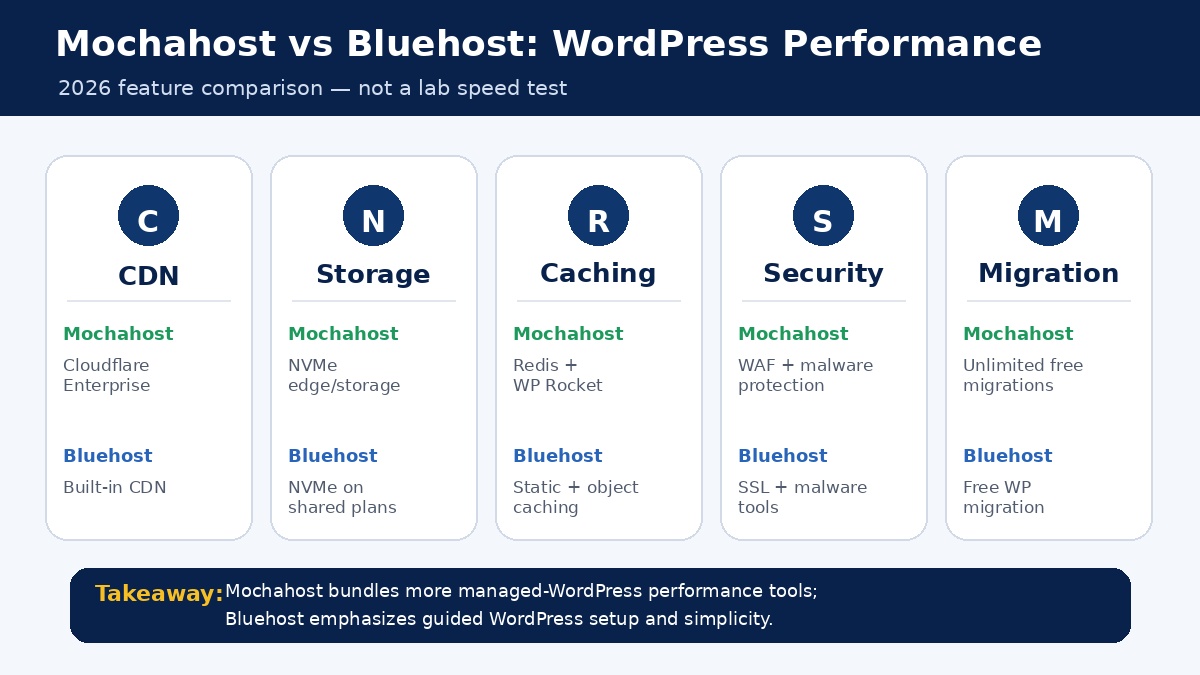
A responsible hosting comparison should distinguish between published features and controlled benchmark results. CBOOMARANK has not run identical matched WordPress installations on Mochahost and Bluehost for this article, so we are not claiming that one provider is universally faster. Theme quality, plugins, PHP workload, database size, images, caching, audience location and traffic patterns can change real-world performance dramatically.
On the feature sheet, Mochahost’s managed WordPress service is strong. Cloudflare Enterprise CDN, Redis, WP Rocket, full-page caching, image optimization, NVMe edge infrastructure and unlimited PHP workers are all designed to reduce latency or improve WordPress request handling. The provider also says its enterprise CDN and WAF operate across more than 275 global edge locations.
Bluehost’s current shared and WordPress platform also includes modern performance features, including NVMe storage on shared plans, CDN, caching, staging and a global-delivery strategy. Its main advantage is that these features are packaged into a beginner-friendly hosting environment rather than presented as a collection of infrastructure components users must manage independently.
Uptime and Reliability
Bluehost currently publishes a 99.99% uptime SLA for shared hosting. Its pricing page says customers can claim a single 5% monthly credit, subject to the policy, if qualifying shared-hosting uptime falls below that level. As with all SLAs, exclusions and the claim process matter.
Mochahost’s Terms of Service state that it endeavors to provide 99.9% service uptime, excluding planned or emergency maintenance and conditions outside reasonable control. The same terms also explain that upstream network or hardware issues may be excluded from the calculation.
Based strictly on the published figures, Bluehost has the stronger general uptime commitment for shared hosting. That does not prove every Bluehost site will have less downtime than every Mochahost site. A site can fail at the application, DNS, plugin or database layer even when the physical host server is online.
Website Migration
Migration is one of Mochahost’s clearest advantages. Its managed WordPress page advertises unlimited free migrations, while its cPanel page says expert-led migrations — including email transfers — have no limit. For a user moving several established websites, this can remove a meaningful amount of setup work.
There is an important terms-level nuance. Mochahost’s Terms of Service describe migration as a best-effort service and say the company aims to migrate websites within 72 hours without guaranteeing a specific timeframe. That is a reasonable contractual limitation and is worth understanding before scheduling a time-sensitive move.
Bluehost also provides free WordPress migration as part of current plans. For a single beginner WordPress site, that can be sufficient. For a larger migration project involving many sites, Mochahost’s unlimited migration positioning is more attractive.
After any hosting migration, run a technical crawl and check indexability, canonicals, redirects, HTTPS and page speed. You can use the CBOOMARANK Free SEO Audit to identify obvious technical issues before and after DNS changes.
Ease of Use and Control Panels
Bluehost wins for users who want the least technical onboarding. Its hosting interface is designed around sites, domains, security, email, billing and WordPress management rather than exposing a traditional server control panel as the primary experience. This is useful for first-time site owners who simply want to publish.
Mochahost offers more interface choice. Its cPanel hosting product is ideal for people who already understand cPanel or want a standard environment that makes domains, email accounts, files, databases and application installation familiar. Its Windows hosting product uses Plesk, which is a natural fit for many Microsoft-hosting customers.
Ease-of-use winner: Bluehost for complete beginners. Control-panel flexibility winner: Mochahost.
Security
Both providers include the basic protections a modern hosting plan should have, including SSL and malware-related tools. The differences are more visible in how security is packaged at higher or managed tiers.
Mochahost’s managed WordPress platform advertises a Cloudflare Enterprise WAF, real-time malware detection, automatic patching and Imunify360 reporting, in addition to SSL. Its cPanel offering includes SSL and backup tooling. These are attractive inclusions for users who want host-level security features without adding many WordPress plugins.
Bluehost’s current shared plans advertise malware scanning and removal, free SSL, weekly website backups and managed updates, with stronger WAF/DDoS and privacy features available on higher plans. The exact bundle varies by plan, so a buyer should compare the plan table rather than assume every security feature is included in the entry tier.
Security winner: broadly a tie at the provider level. Mochahost’s managed WordPress stack is stronger on bundled enterprise-style security features, while Bluehost keeps security controls closely integrated with its beginner hosting workflow.
Customer Support
Both companies advertise 24/7 support. Mochahost’s WordPress, cPanel and Windows pages all emphasize round-the-clock assistance, while Bluehost advertises 24/7 support and varies support channels by plan.
Support quality is difficult to score from marketing pages alone because the real experience depends on the issue, the agent and the plan. A simple domain or SSL question is very different from a complex application-level performance problem. Buyers should therefore evaluate both availability and scope: does the plan include phone support, migration assistance, WordPress expertise or only general hosting troubleshooting?
Support winner: tie on availability. Choose based on the exact support channels and technical scope included in the plan you intend to buy.
Windows Hosting: A Clear Mochahost Advantage
Mochahost offers dedicated Windows web hosting for applications that require technologies such as ASP.NET, .NET, MSSQL, IIS and Plesk. Its current Windows product also advertises 24/7 technical support, automated backups on qualifying plans, SSD infrastructure and a 99.9% uptime statement.
Bluehost’s mainstream shared-hosting and WordPress products are not positioned as Windows hosting. Therefore, if your project specifically depends on Microsoft hosting technologies, Mochahost is the straightforward choice between these two providers.
cPanel Hosting: Mochahost Wins for Traditional Hosting Management
Mochahost has a dedicated cPanel hosting product with CloudLinux, NVMe servers, SSL, JetBackup, Softaculous and migration assistance. This is useful for agencies and experienced administrators who want a familiar control panel and a straightforward way to move cPanel accounts.
Bluehost is designed around its own integrated account experience instead of making cPanel the center of the product. That is simpler for some beginners, but users who specifically want cPanel should favor Mochahost.
Mochahost Pros and Cons
Pros
- Unlimited free migrations are prominently advertised on managed WordPress and cPanel products.
- Strong managed WordPress stack with Cloudflare Enterprise CDN, Redis, WP Rocket, caching and image optimization.
- Dedicated cPanel hosting is available for users who prefer a standard hosting control panel.
- Windows hosting supports Microsoft technologies such as ASP.NET, .NET, MSSQL and IIS.
- 24/7 support is advertised across major hosting products.
- Flexible product range is useful for agencies or businesses whose hosting needs may evolve.
Cons
- Mochahost is not currently one of the hosts listed on WordPress.org’s recommended-hosting page.
- The wider range of products can make plan selection less straightforward for a complete beginner.
- Its general Terms of Service state a 99.9% service-uptime objective, below Bluehost’s published 99.99% shared-hosting SLA.
- Migration marketing is generous, but the Terms of Service appropriately describe migration as a best-effort service.
Bluehost Pros and Cons
Pros
- WordPress.org currently describes Bluehost as its longest-running recommended host.
- Beginner-friendly WordPress onboarding and integrated website management.
- Free domain for the first year on qualifying plans, free SSL and free WordPress migration.
- 99.99% shared-hosting uptime SLA is stronger on paper than many entry hosting commitments.
- NVMe storage, CDN, backups, malware tools, staging and AI-assisted site creation are integrated into current offerings.
- Clear upgrade path into broader Bluehost hosting products as a site grows.
Cons
- Promotional rates can rise substantially at renewal, so buyers should calculate total multi-year cost.
- Traditional cPanel users may prefer a provider that makes cPanel the primary control environment.
- Windows hosting is not a core option in Bluehost’s mainstream shared/WordPress lineup.
- Some support and security features vary by plan, so the entry tier may not include every channel or advanced protection a buyer expects.
Who Should Choose Mochahost?
Mochahost is the stronger fit for users who already operate websites and know which infrastructure features matter to them. A multi-site owner who wants migration help, an agency that prefers cPanel, a WordPress publisher that values Redis and WP Rocket at the hosting layer, or a business with Windows/ASP.NET requirements all have concrete reasons to favor Mochahost.
It is also a sensible option for users who want more flexibility than a tightly guided WordPress-only workflow. The trade-off is that beginners may need to spend more time understanding which Mochahost product family is appropriate for their site.
Who Should Choose Bluehost?
Bluehost is the easier choice for a new blogger, small business, portfolio site or first-time WooCommerce user who wants a familiar WordPress path and does not need a specific server stack. Its combination of domain, SSL, WordPress onboarding, migration, security tools and site management is designed to minimize early setup decisions.
Bluehost is particularly attractive when ease of use and WordPress ecosystem recognition matter more than choosing a traditional control panel. Users who expect to keep a site online for several years should pay close attention to renewal cost before selecting a long introductory term.
Which Host Wins Each Category?
| Category | Winner | Why |
| Beginners | Bluehost | More guided WordPress onboarding |
| WordPress.org endorsement | Bluehost | Currently listed as longest-running recommended host |
| Managed WordPress feature stack | Mochahost | Cloudflare Enterprise, Redis, WP Rocket and security bundle |
| Migrations | Mochahost | Unlimited free migrations advertised |
| Published uptime commitment | Bluehost | 99.99% shared-hosting SLA |
| cPanel | Mochahost | Dedicated cPanel hosting |
| Windows hosting | Mochahost | ASP.NET/.NET/MSSQL/Plesk support |
| Beginner dashboard | Bluehost | Integrated site-management experience |
| 24/7 support | Tie | Both advertise 24/7 availability |
| Overall flexibility | Mochahost | Broader hosting environments |
Final Verdict: Mochahost vs Bluehost 2026
There is no universal winner because Mochahost and Bluehost solve different hosting problems well. Bluehost is the stronger default for a beginner who wants to launch WordPress with minimal technical friction. Mochahost is the stronger specialist option for migrations, cPanel, Windows hosting and a more feature-rich managed WordPress performance stack.
If this is your first site, Bluehost’s guided workflow, WordPress.org recommendation, integrated tools and published 99.99% shared-hosting uptime SLA make it easy to shortlist. If you already manage sites and know that you want cPanel, unlimited migration assistance, Redis/WP Rocket integration or Windows technologies, Mochahost deserves serious consideration.
Before buying either host, compare the exact checkout total, renewal price, website limits, storage, backup frequency, support channels and any add-ons you actually need. Hosting is a recurring operating cost; the cheapest introductory offer is not automatically the best long-term value.
For more alternatives, visit the CBOOMARANK Web Hosting Reviews category or compare another budget-focused option in our Hostinger Review 2026.
Frequently Asked Questions
Is Mochahost better than Bluehost?
Mochahost can be better for users who need cPanel, Windows hosting, unlimited migration assistance or a managed WordPress stack with Cloudflare Enterprise CDN, Redis and WP Rocket. Bluehost is generally easier for first-time WordPress users and has the stronger published shared-hosting uptime commitment.
Is Bluehost still good in 2026?
Yes. Bluehost remains a strong beginner-oriented WordPress option in 2026, with current plans offering free SSL, migration, NVMe storage, site-management tools and a 99.99% shared-hosting uptime SLA. Long-term buyers should compare renewal pricing carefully.
Is Mochahost good for WordPress?
Yes. Mochahost’s managed WordPress service currently advertises Cloudflare Enterprise CDN, Redis, WP Rocket, caching, WAF protection, malware tools, staging and expert-led migrations.
Does Mochahost use cPanel?
Mochahost offers a dedicated cPanel hosting product with CloudLinux, NVMe servers, SSL, JetBackup, Softaculous and migration assistance.
Which is better for beginners: Bluehost or Mochahost?
Bluehost is the easier recommendation for complete beginners because its platform emphasizes guided WordPress setup and integrated site management. Users who already understand cPanel or specific server technologies may prefer Mochahost.
Which is better for multiple website migrations?
Mochahost has the stronger migration proposition because it advertises unlimited free expert-led migrations on managed WordPress and cPanel hosting. Bluehost also offers free WordPress migration, which can be adequate for simpler moves.
Which has the better uptime commitment?
Based on currently published commitments, Bluehost advertises 99.99% uptime for shared hosting. Mochahost’s Terms of Service state that it endeavors to provide 99.9% service uptime, subject to exclusions.
Which host is better for Windows or ASP.NET?
Mochahost. It has dedicated Windows hosting supporting technologies such as ASP.NET, .NET, MSSQL, IIS and Plesk. Bluehost’s mainstream shared and WordPress plans are not positioned around Windows hosting.
Should I change the old Bluehost-review URL when publishing this comparison?
If the existing Bluehost review already has search visibility or backlinks, keeping the old URL can preserve continuity even if the title and content change. If you move to the cleaner /blog/mochahost-vs-bluehost/ slug, create a 301 redirect from the old URL and update internal links and the sitemap.
Recommended Internal Links for CBOOMARANK
- Best Web Hosting Providers in 2026 — Use near the introduction or final verdict.
- Web Hosting Reviews category — Use in the conclusion for readers comparing alternatives.
- Hostinger Review 2026 — Use as an alternative budget-host comparison.
- CBOOMARANK Free SEO Audit — Use in the migration section for post-migration technical checks.
- CBOOMARANK Blog — Use as a broad related-content link if needed.
