

Quick Verdict: Is Hostinger Worth the Money in 2026?
Yes, Hostinger is worth the money for most beginners, bloggers, freelancers, small businesses, and WordPress users in 2026 – especially if you are comfortable paying for a long term upfront to secure the lowest advertised rate. Hostinger has moved beyond being simply a cheap shared host. Its current plans combine hosting, a free first-year domain on eligible tiers, SSL, website migration, CDN, backups, email allowances, WordPress tools, website-building features, AI tools, and 24/7 support in one relatively easy-to-use platform.
The strongest value is the Premium plan, currently advertised in the United States at $2.99 per month when purchased for 48 months. It supports three websites and includes 20 GB SSD storage, weekly backups, CDN, WordPress, a drag-and-drop website builder, two mailboxes per website for the first year, AI tools, and a free domain for the first year. The catch is that the plan renews at $10.99 per month, so the long-term price is much higher than the promotional headline.
For users who need more storage and stronger backup coverage, Hostinger’s Unlimited plan is more compelling than Premium. It is currently advertised at $3.79 per month on a 48-month term and renews at $16.99 per month. It raises storage to 50 GB NVMe, allows unlimited websites under Hostinger’s fair-use terms, and includes daily backups. Cloud Startup starts at $7.99 per month on a 48-month term and renews at $25.99 per month, adding more dedicated resources, 100 GB NVMe storage, daily and on-demand backups, and a dedicated IP.
Hostinger is not perfect. The biggest drawbacks are the long prepayment needed for the lowest monthly equivalent, the substantial renewal jump, and a support experience centered heavily on online help and chat rather than a premium concierge relationship. But judged on what you receive for the initial cost, Hostinger remains one of the strongest value choices in mainstream web hosting.
Hostinger at a Glance
| Category | Assessment |
| Best for | Beginners, bloggers, WordPress sites, freelancers, small businesses |
| Starting price | $2.99/mo for Premium on a 48-month term |
| Premium renewal | $10.99/mo |
| Uptime guarantee | 99.9% |
| Backups | Weekly on Premium; daily on Unlimited; daily + on-demand on Cloud Startup |
| Free domain | First year on eligible plans |
| SSL | Unlimited free SSL |
| Migration | Free automatic website migration |
| Support | 24/7 support |
| Money-back guarantee | 30 days for eligible hosting purchases |
| CBOOMARANK rating | 4.6/5 for value |
What Is Hostinger?
Hostinger is a global web hosting company that offers shared web hosting, managed WordPress hosting, cloud hosting, VPS products, domains, email, website-building tools, and related online services. It has built much of its reputation around low introductory pricing and a custom management interface called hPanel.
The company is particularly popular among new website owners because it tries to simplify tasks that can feel technical with older hosting platforms. From one dashboard, users can create or migrate a site, connect a domain, install WordPress, manage files and databases, create mailboxes, review resource usage, manage SSL, restore backups, and access support.
In 2026, Hostinger is also leaning heavily into AI-assisted website creation and what it calls vibe coding. Those additions do not replace traditional WordPress or developer workflows, but they make the product more flexible for users who want to build landing pages, simple business sites, or web experiences without starting from a blank screen.
Hostinger Pricing in 2026
Hostinger’s pricing is one of its biggest advantages and one of the areas where buyers need to pay the most attention. The company displays a low monthly equivalent, but the deepest discounts usually require paying for 48 months in advance. That can be excellent value if you know you will keep the site for several years, but it is a bigger upfront commitment than a month-to-month plan.
The current U.S. web-hosting page lists Premium at $2.99 per month for 48 months, with a total promotional term cost of $143.52 and renewal at $10.99 per month. Unlimited is listed at $3.79 per month for 48 months, renewing at $16.99 per month. Cloud Startup is listed at $7.99 per month for 48 months and renews at $25.99 per month.
These are promotional prices and can change with sales. The important comparison is not just the first term but the renewal. Hostinger is extremely competitive while the promotional term is active; after renewal, the gap between Hostinger and other mainstream hosts becomes much smaller.
If you are launching a first website, Premium is usually enough. If you know you want daily backups, NVMe storage, and more website capacity, Unlimited makes more sense. Cloud Startup is better for agencies, ecommerce sites, and higher-traffic projects that need more predictable resources without moving to a self-managed VPS.
| Plan | Intro price | Renewal | Websites | Storage | Backups | Best for |
| Premium | $2.99/mo | $10.99/mo | 3 | 20 GB SSD | Weekly | Creators, blogs, small sites |
| Unlimited | $3.79/mo | $16.99/mo | Unlimited* | 50 GB NVMe | Daily | Multiple sites, growing projects |
| Cloud Startup | $7.99/mo | $25.99/mo | Unlimited* | 100 GB NVMe | Daily + on-demand | Ecommerce, agencies, higher traffic |
*Unlimited features are subject to Hostinger’s Fair Usage Policy. Promotional prices shown are current U.S. 48-month offers and can change.
What You Get With Hostinger Premium
Premium is the most useful benchmark for judging whether Hostinger is worth the money because it targets the typical blogger, creator, freelancer, or small business. At the current promotional rate, it supports three websites with 20 GB SSD storage and includes a free domain for the first year, weekly backups, CDN, WordPress support, a drag-and-drop builder, AI tools, free automatic migration, unlimited SSL certificates, and two mailboxes per website free for the first year.
Hostinger also advertises a 99.9% uptime guarantee across its web-hosting plans. That is an industry-standard commitment for shared hosting. The guarantee should not be confused with a promise that a site will never experience downtime, but it creates a contractual benchmark for service availability.
The Premium plan includes enough functionality to replace several separate beginner services. A new user does not need to buy SSL separately, source a migration plugin immediately, purchase a basic page builder just to launch a simple site, or set up a separate CDN from day one. That bundling is a major part of Hostinger’s value proposition.
hPanel: One of Hostinger’s Biggest Advantages
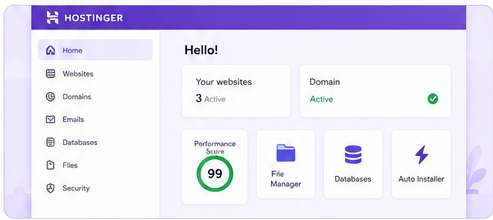
Hostinger’s hPanel is one of the strongest reasons to recommend the service to beginners. Traditional hosting control panels can feel like administrative software first and website tools second. hPanel is designed more like a modern SaaS dashboard, with clearer navigation and a workflow that prioritizes common jobs.
The practical advantage is speed of learning. New users can find websites, domains, email, files, databases, security, backups, billing, and account tools without knowing hosting terminology in advance. WordPress installation and website migration are also surfaced directly in the workflow.
Experienced developers may still prefer cPanel, Plesk, or direct server access in some situations, but hPanel is not trying to be a universal systems administration interface. It is designed to help normal website owners get things done. For its intended audience, it succeeds.
Performance and Uptime: What Should You Expect?
Hostinger’s current platform combines SSD or NVMe storage depending on plan, CDN access, managed WordPress tooling, global data centers, caching features, and resource limits that increase as you move up the product line. The company publishes a 99.9% uptime guarantee and says it aims for higher real-world availability.
It is important to be cautious with hosting speed claims. No hosting provider has one universal load-time number because performance depends on the data center, website theme, plugins, database, caching configuration, image weight, visitor location, and third-party scripts. A lightweight WordPress site can feel extremely fast on Hostinger, while an unoptimized ecommerce store can feel slow even on a stronger plan.
What matters for this review is that Hostinger provides the infrastructure and performance features expected from a competitive 2026 shared host. Its entry plans are appropriate for blogs, portfolios, local-business sites, affiliate sites, landing pages, and smaller WooCommerce projects. High-traffic stores or application-heavy sites should look at Cloud Startup or a VPS rather than expecting the cheapest shared plan to behave like dedicated infrastructure.
The 99.9% uptime guarantee is solid but not uniquely generous. DreamHost, for example, currently publishes a 100% uptime guarantee backed by service credits, while SiteGround advertises 99.9% uptime. Hostinger’s reliability commitment is therefore competitive, not exceptional.

WordPress Hosting: Is Hostinger Good for WordPress?
Yes. Hostinger is a particularly strong value for WordPress users because WordPress is integrated into the onboarding rather than treated as a separate technical task. Users can install WordPress quickly, migrate an existing WordPress site, manage SSL and backups, and use Hostinger’s performance and security tools from hPanel.
For a beginner blog or small business site, that integrated experience can be more valuable than having access to dozens of advanced server settings. Hostinger gives users enough control to manage real websites while hiding many infrastructure details that would otherwise create friction.
The Unlimited and Cloud Startup tiers are more appropriate for serious WordPress projects because they include daily backups and stronger storage. Cloud Startup also adds more compute resources and a dedicated IP, which can matter for ecommerce, membership sites, agencies, and high-traffic content projects.
Hostinger is not the only good WordPress host. Bluehost currently offers a WordPress-oriented Starter plan from $3.99 per month on a 36-month term and publishes a 99.99% uptime SLA. SiteGround offers StartUp from $2.99 per month for the first year with daily backups and managed WordPress features, although it renews at $17.99 per month. DreamHost’s current Web Hosting Launch plan starts at $2.89 per month for the first year and renews at $10.99, with daily backups and a 100% uptime guarantee.
Against those alternatives, Hostinger’s advantage is the combination of its long promotional term, beginner-friendly hPanel, included AI/building tools, and straightforward upgrade path. Its disadvantage is that securing the lowest rate usually requires a longer initial commitment than SiteGround or DreamHost.
Security and Backups
Hostinger includes unlimited free SSL certificates and malware scanning across its web-hosting lineup. SSL is essential for protecting data in transit and is now a basic requirement for any serious website. Malware scanning provides another layer of protection, although website owners should still keep WordPress, themes, plugins, and passwords secure.
Backup frequency depends on plan. Premium includes weekly backups. Unlimited moves to daily backups with easier restoration, while Cloud Startup includes daily and on-demand backups. That difference is significant. If your website changes every day, sells products, collects leads, or publishes frequently, daily backups are much safer than relying on a weekly recovery point.
Even when a host includes backups, important websites should keep an independent backup. A backup stored only inside the same hosting account is better than no backup, but a separate copy gives you more control if the account itself becomes inaccessible.
Customer Support
Hostinger advertises 24/7 support, and the current plans emphasize priority expert support. For most beginners, this means help is available for common hosting, migration, WordPress, billing, and account issues without waiting for normal business hours.
The support model is best for users who are comfortable working through online help, documentation, and chat-based assistance. It is less suitable for someone who expects a traditional premium managed-hosting relationship with a dedicated account engineer or extensive phone consulting.
That is a reasonable trade-off at Hostinger’s price point. Keeping support digital helps the company maintain low pricing, but buyers should choose a host whose communication style matches their expectations. If phone support is essential, Bluehost currently lists phone support on some plans, while SiteGround emphasizes 24/7 human support.
Hostinger’s 30-Day Money-Back Guarantee
Hostinger provides a 30-day money-back guarantee for eligible web, cloud, agency, KVM VPS, and other covered hosting services. Its refund policy was revised in 2026 and includes important exceptions.
Domains are a common source of confusion. If a hosting plan included a free domain, Hostinger may deduct the value of that domain from the refund while allowing you to keep ownership for the remainder of the registration term. Some country-code domains are not refundable, and purchases made using cryptocurrencies or other digital assets are generally not refundable.
The guarantee is useful, but it should be viewed as a testing window rather than permission to ignore the checkout terms. Before paying for a four-year plan, read the refund rules for the exact product and payment method you intend to use.
Hostinger Pros and Cons
| Pros | Cons |
| ✓ Very low promotional pricing on long terms | • Lowest rate generally requires a 48-month prepayment |
| ✓ Modern, beginner-friendly hPanel | • Renewal prices rise substantially after the promotional term |
| ✓ Free domain for the first year on eligible plans | • Premium includes weekly rather than daily backups |
| ✓ Unlimited free SSL certificates | • Support is primarily digital/chat-oriented rather than a premium concierge service |
| ✓ Free automatic website migration | • Entry shared plans are not designed for heavy enterprise workloads |
| ✓ WordPress and website-builder support | |
| ✓ CDN and AI tools included | |
| ✓ Daily backups on Unlimited and Cloud Startup | |
| ✓ 99.9% uptime guarantee | |
| ✓ 30-day money-back guarantee on eligible hosting services |
Hostinger vs Bluehost vs SiteGround vs DreamHost
Hostinger vs Bluehost: Hostinger is cheaper on the current headline rate and offers a modern hPanel experience, while Bluehost is very approachable for WordPress beginners and publishes a 99.99% uptime SLA. Bluehost Starter currently begins at $3.99 per month on a 36-month term and renews at $9.99 per month on a 36-month renewal. Hostinger Premium begins at $2.99 per month on a 48-month term and renews at $10.99 per month.
Hostinger vs SiteGround: Both currently advertise entry pricing around $2.99 per month, but the terms differ. SiteGround StartUp is prepaid for 12 months and renews at $17.99 per month. Hostinger Premium is prepaid for 48 months at the lowest advertised rate and renews at $10.99 per month. SiteGround offers daily backups even on StartUp and positions itself as a more managed WordPress/support experience; Hostinger wins on long promotional value and dashboard simplicity.
Hostinger vs DreamHost: DreamHost Web Hosting Launch currently starts at $2.89 per month for the first year and renews at $10.99. DreamHost includes daily backups and publishes a 100% uptime guarantee, while Hostinger offers a longer low-cost promotional runway if you prepay 48 months. DreamHost is attractive if you want a shorter commitment or very visible renewal pricing; Hostinger is attractive if you want to lock in a low rate for several years.
Overall, Hostinger does not dominate every single specification. Its strength is that it is consistently near the top across price, usability, features, migration, WordPress support, and scalability. That balanced profile is why it remains one of the easiest budget-hosting recommendations.
Who Should Choose Hostinger?
Choose Hostinger if you are launching your first website and want a low learning curve. Premium provides enough resources for a blog, portfolio, service business, landing page, or small company site without requiring a separate toolkit for SSL, migration, basic email, or page building.
Choose Hostinger if you run several small websites. Unlimited becomes attractive when you want more storage, daily backups, and broader website capacity without moving into agency-level hosting.
Choose Hostinger if you are building a WordPress site and prefer a modern dashboard over a traditional cPanel workflow. hPanel is one of the service’s best features for non-technical users.
Choose Cloud Startup if you expect more traffic, run WooCommerce, host client projects, or need more consistent resources. It costs more, but it is the more sensible tier for websites whose revenue depends on uptime and responsiveness.
Who Should Skip Hostinger?
Skip Hostinger if you are unwilling to prepay a long term but still expect the headline promotional price. The advertised $2.99 rate is not a normal monthly price; it is the monthly equivalent of a multi-year purchase.
Skip Hostinger Premium if daily backups are non-negotiable. Move to Unlimited or Cloud Startup instead, or choose a competitor that includes daily backups on its entry tier.
Skip entry-level Hostinger hosting if you are building a very high-traffic ecommerce site, large membership platform, resource-heavy application, or infrastructure that requires dedicated enterprise controls. Cloud hosting or a VPS will be more appropriate.
Finally, consider another host if premium phone support or highly consultative managed service is central to your buying decision. Hostinger’s strengths are self-service usability, automation, documentation, and online support rather than white-glove account management.
Is Hostinger Good for SEO?
A web host cannot make a weak website rank, but hosting affects several technical conditions that matter to SEO: availability, response speed, security, and user experience. Hostinger provides SSL, CDN access, performance tooling, migration support, and a 99.9% uptime guarantee, which gives a properly optimized site a solid technical foundation.
The more important SEO question is whether your hosting plan has enough resources for the site you are running. If the account is constantly near CPU, RAM, or PHP-worker limits, the site can become slow regardless of how well your pages are optimized. Growing sites should monitor resource usage and upgrade before performance becomes a bottleneck.
For WordPress SEO, lightweight themes, image optimization, caching, a controlled plugin stack, and a well-structured site will usually matter more than switching between two competent mainstream hosts. Hostinger is good enough technically that hosting should not be the limiting factor for most small and medium websites.
Final Verdict: Is Hostinger Worth It in 2026?
Hostinger is worth the money in 2026 for the audience it targets. Premium is particularly difficult to beat for a beginner who wants several years of low-cost hosting and values a clean dashboard. Unlimited is the better all-round plan for users who want daily backups and more storage. Cloud Startup is the sensible step up for growing businesses, ecommerce, and agencies.
The recommendation becomes weaker if you evaluate Hostinger only after renewal. Premium’s jump from $2.99 to $10.99 per month is significant, Unlimited rises from $3.79 to $16.99, and Cloud Startup from $7.99 to $25.99. Those rates are not unusual in web hosting, but they reinforce an important buying rule: calculate the full term and renewal cost before checkout.
Even after accounting for that limitation, Hostinger earns a strong value rating because the initial price is backed by genuinely useful features instead of a stripped-down account. Free migration, SSL, CDN, WordPress tools, AI-assisted building, backups, a first-year domain on eligible plans, and 24/7 support make the package practical from day one.
CBOOMARANK verdict: Hostinger is one of the best-value mainstream web hosts in 2026, especially for beginners and cost-conscious WordPress users. It is not the universal best host, but it is absolutely worth considering if you understand the contract length and renewal price before buying.
Frequently Asked Questions
Is Hostinger worth it in 2026?
Yes for most beginners, bloggers, small businesses, and budget-conscious WordPress users. The promotional prices are excellent relative to the included features, but buyers should account for renewal pricing.
How much is Hostinger in 2026?
Hostinger’s U.S. web-hosting page currently lists Premium at $2.99 per month, Unlimited at $3.79 per month, and Cloud Startup at $7.99 per month on 48-month terms. Renewal prices are $10.99, $16.99, and $25.99 per month respectively.
Does Hostinger offer a free domain?
Eligible Premium, Unlimited, and Cloud Startup plans include a domain free for the first year. Domain eligibility and refund rules depend on the TLD and offer terms.
Does Hostinger offer daily backups?
Unlimited and Cloud Startup include daily backups; Cloud Startup also includes on-demand backups. Premium currently includes weekly backups.
Is Hostinger good for WordPress?
Yes. Hostinger includes managed WordPress support, migration, SSL, CDN, and easy installation through hPanel. Unlimited or Cloud Startup is better for important sites that need daily backups.
What is Hostinger’s uptime guarantee?
Hostinger publishes a 99.9% uptime guarantee for its web-hosting plans.
Does Hostinger have a money-back guarantee?
Yes. Eligible hosting products are generally covered by a 30-day money-back guarantee, subject to exclusions for certain domains, payment methods, and services.
Is Hostinger better than Bluehost?
Hostinger currently has a lower promotional entry price and a very simple hPanel interface. Bluehost is also beginner-friendly and publishes a 99.99% uptime SLA. The better choice depends on pricing term, support preferences, and WordPress workflow.
Is Hostinger better than SiteGround?
Hostinger is usually better for budget value, while SiteGround is stronger for users willing to pay more at renewal for daily backups, managed WordPress features, and a support-focused experience.
Which Hostinger plan should I choose?
Premium is enough for a few small sites. Unlimited is the best balance for most growing users because it adds NVMe storage and daily backups. Cloud Startup is better for ecommerce, agencies, and higher-traffic projects.
Official Sources Checked
- Hostinger U.S. web hosting pricing and features
- Hostinger Nigeria pricing page
- Hostinger 30-day refund policy
- Hostinger uptime guarantee
- Hostinger managed cloud hosting
- Bluehost current hosting plan
- Bluehost 2026 renewal pricing
- SiteGround WordPress hosting
- DreamHost web hosting
Editorial note: Hosting promotions and plan limits change frequently. Prices in this article were checked on August 7, 2026. Confirm the final checkout price, renewal rate, taxes, and plan terms before purchasing or republishing future updates.
