
Topic hub
WEB HOSTING articles
Web Hosting Reviews, Comparisons & Guides

Finding the right web hosting provider can make a major difference to your website’s speed, reliability, security, user experience and ability to grow. At CBOOMARANK, our Web Hosting section helps bloggers, businesses, WordPress users, developers, agencies and website owners compare hosting providers and choose a hosting solution that matches their real requirements.
We review hosting companies, examine their features and pricing, compare competing providers and explain the technical details that matter before you commit to a plan. Whether you are launching your first website, moving an established WordPress site, building an online store or upgrading to VPS or dedicated infrastructure, these guides are designed to help you make a more informed decision.
Find the Best Web Hosting for Your Website
There is no single web host that is best for every website. A small personal blog may need affordable shared or managed WordPress hosting, while a growing ecommerce business may require stronger performance, security, backups, scalability and technical support. The right choice depends on your workload, audience, budget and the level of server control you need.
Our web hosting guides focus on the factors that matter most when evaluating a provider:
- Website performance and server technology
- Hosting reliability and uptime commitments
- WordPress hosting features
- Storage, bandwidth and resource limits
- Free SSL certificates and security tools
- Website migration services
- Backups and disaster recovery
- CDN and caching technology
- Customer support and technical expertise
- Control panels such as cPanel or Plesk
- VPS and dedicated server upgrade options
- Introductory pricing and renewal pricing
- Money-back guarantees and contract terms
- Ease of use and overall value for money
Instead of choosing a provider based only on the lowest advertised monthly price, consider the complete hosting package and whether it matches the long-term requirements of your website.
Featured Web Hosting Reviews
Mochahost Review 2026
Looking for flexible hosting with managed WordPress, cPanel, Windows hosting, VPS, dedicated servers and migration options? Our Mochahost review examines the provider’s hosting portfolio, performance-oriented technology, security, support, migrations and plan-selection considerations.
Read: Mochahost Review 2026: Features, Performance, Pricing & Is It Worth It?
Hostinger Review 2026
Hostinger remains a popular option for beginners, bloggers, freelancers, small businesses and WordPress users. Our review looks at its plans, usability, WordPress functionality, performance features and value proposition for different website types.
Read: Hostinger Review 2026: Is It Worth the Money?
Compare the Best Web Hosting Providers
Not sure which hosting company to choose? Our complete hosting comparison brings leading providers together so you can evaluate their strengths, weaknesses, pricing structures, WordPress support, performance technologies and ideal use cases before committing to a long-term plan.
Read: Best Web Hosting Providers in 2026: Complete Review & Comparison
Web Hosting Comparisons
Choosing between two similar hosting companies can be difficult because introductory pricing tells only part of the story. CBOOMARANK comparisons focus on the differences that can affect your website after signup, including resources, migrations, security, backups, performance technology, support, scalability and renewal costs.
Read: Mochahost vs Bluehost 2026: Which Web Hosting Provider Is Better?
Our goal is not to name one provider the universal winner. A useful comparison should explain which host is better suited to a specific type of customer, workload and budget.
WordPress Hosting
WordPress hosting is one of the most important areas we cover because the quality of the hosting environment can affect site management, security and performance. A good WordPress host should provide more than disk space. Depending on the plan, valuable features may include automatic WordPress installation, managed updates, server-level caching, CDN integration, staging, SSL, automated backups, malware protection, migration assistance, SSH or SFTP access and WordPress-specific technical support.
If WordPress powers your website, compare these operational features alongside price. WordPress also publishes hosting information and server-environment guidance that can help site owners understand what a suitable hosting environment should provide.
External resource: WordPress.org Hosting
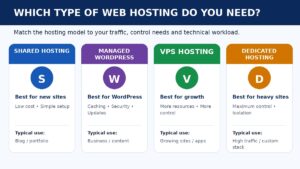
Shared Hosting, Managed WordPress, VPS or Dedicated?
Shared Hosting
Shared hosting is generally suited to new blogs, portfolios, small business sites and projects with modest resource requirements. It is usually one of the easiest and most affordable ways to launch a website, but resource limits and account isolation vary by provider.
Managed WordPress Hosting
Managed WordPress hosting is designed specifically for WordPress and may include performance optimization, security management, automated updates, backups, staging and specialized support. It can be useful for businesses and website owners who want to spend less time managing server configuration.
VPS Hosting
A Virtual Private Server provides greater control and allocated resources than typical shared hosting. VPS hosting can be suitable for growing sites, agencies, ecommerce workloads and applications that need more predictable resources or server flexibility.
Dedicated Hosting
Dedicated hosting provides an entire server environment for one customer. It is generally intended for demanding applications, high-traffic sites, larger businesses and organizations that require greater control over server resources and software configuration.
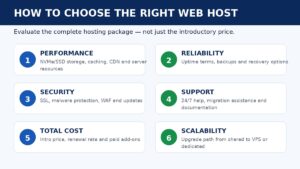
How CBOOMARANK Evaluates Web Hosting
Performance: What infrastructure, caching, CDN, storage and server technologies are available?
Reliability: What does the provider publish about uptime, maintenance and service availability?
Pricing: What is the introductory cost, what happens at renewal and what is actually included?
WordPress: How well does the service support installation, updates, staging, caching and migrations?
Security: Are SSL, malware protection, firewalls, backups and other security features included?
Migration: How easy is it to move an existing website, database and email to the provider?
Support: What technical-support channels are available and when can customers reach them?
Usability: Can beginners manage the platform without unnecessary complexity?
Scalability: Can customers upgrade to stronger hosting products as traffic and requirements grow?
Value: Do the included features justify the total cost rather than only the promotional headline price?
How to Choose a Web Host
Before purchasing a hosting plan, identify what your website actually requires. Answering the following questions can narrow your options quickly and prevent you from paying for features you do not need.
- What type of website are you building?
- How many websites will you host?
- Will you use WordPress or another CMS?
- Where is your target audience located?
- Do you need email hosting?
- Do you need free professional migration?
- How frequently are backups created and where are they stored?
- What security features are included by default?
- Does the plan support your expected traffic and storage?
- What will the hosting cost after the introductory period?
- Can you upgrade easily as your website grows?
Web Hosting, Performance and SEO
Hosting alone will not make a website rank highly in search engines, but poor hosting can create technical problems that affect user experience and crawlability. Your hosting environment should support a website that is fast, secure, accessible and consistently available.
Google describes Core Web Vitals as metrics for real-world loading performance, interactivity and visual stability, and recommends good Core Web Vitals as part of creating a strong page experience. A CDN can also reduce latency by caching content closer to users, although the impact depends on the website and configuration.
External resource: Google Search Central — Core Web Vitals
External resource: Cloudflare — CDN Reference Architecture
After choosing your hosting provider, continue working on technical SEO, useful content, internal linking, mobile usability, site architecture, search engine indexing and conversion optimization.
Explore Our Latest Web Hosting Guides
Use this category as your starting point for individual hosting reviews, head-to-head comparisons, WordPress hosting analysis, buying guides, migration advice and hosting performance content. The archive will continue to expand as CBOOMARANK publishes new provider reviews and updates existing articles for current pricing and product changes.
Frequently Asked Questions
What is the best web hosting provider?
The best provider depends on your website, budget, technical requirements, expected traffic, preferred control panel and required features. Comparing several hosts is usually more useful than choosing solely by promotional price.
Which hosting is best for WordPress?
Look for a WordPress environment with SSL, backups, caching, CDN support, staging, security features, straightforward migration and reliable technical support. The best plan is the one that fits your actual site rather than the plan with the longest feature list.
Is cheap web hosting good enough?
Affordable hosting can work well for smaller websites. Before buying, evaluate resource limits, renewal pricing, backups, security, performance features, migration help and support. A low first-term price can become poor value if essential features require paid add-ons.
Should I use shared hosting or VPS hosting?
Shared hosting is usually sufficient for new and smaller websites. VPS hosting becomes more attractive when you need greater resources, control, account isolation or scalability.
Does web hosting affect SEO?
Hosting is one part of a website’s technical foundation. Reliable availability, strong performance and security can help create a better environment for visitors and search-engine crawling, but ranking still depends on content quality, relevance, links, technical SEO and many other signals.
Can I move my website to another host?
Yes. Many hosting companies provide migration tools or professional migration services. Create a complete backup before moving, and verify the website, database, SSL, DNS and email after the transfer.
Internal Linking Plan
Mochahost Review 2026 — Open article
Use in the Featured Web Hosting Reviews section and whenever discussing flexible hosting, managed WordPress, cPanel or migrations.
Hostinger Review 2026 — Open article
Use for beginner-friendly and budget hosting context.
Best Web Hosting Providers 2026 — Open article
Make this the primary commercial comparison link near the top of the category copy.
Mochahost vs Bluehost 2026 — Open article
Use in the comparisons section as a head-to-head example.
CBOOMARANK Blog — Open article
Use near the end as a route to broader SEO and digital marketing content.
External Linking Plan
WordPress.org Hosting — Open article
Authoritative WordPress hosting resource.
Google Search Central: Core Web Vitals — Open article
Supports the discussion of page experience and performance metrics.
Cloudflare CDN Reference Architecture — Open article
Supports the explanation of CDN latency and caching benefits.
Latest from this topic
Explore the archive
Ideas, practical frameworks, and research from the CBOOMARANK knowledge hub.


Put insight into action
Turn WEB HOSTING insight into practical next steps
Use CBOOMARANK to turn the research you are reading into a clearer SEO and website-growth plan.